




A 30 day countdown sits on every certificate your organization runs. Most security teams treat it as an operations problem: a calendar reminder, an automation pipeline, a ticket assigned to whichever engineer is on call when the renewal job fails. The visible cost of missing that date is a browser warning. “Your connection is not private.” A red padlock. A bounce rate spike.
That framing is incomplete. The browser warning is the least dangerous outcome of an expired certificate. The more dangerous outcomes do not produce a warning at all. A certificate authority that validates domain ownership through an expired WHOIS record. A man in the middle session that downgrades silently to plaintext. A cloned login page that looks more trustworthy than the real one because the real one is the one showing the warning.
In 2024, a team of researchers spent 20 dollars on an expired domain and ended up in a position to issue valid TLS certificates for an entire top level domain. In 2025, the same researchers spent another 20 dollars per domain and took control of more than 4,000 active malware backdoors. Neither case involved a sophisticated exploit. Both involved something expiring, quietly, while nobody was watching.
| 398 max certificate lifetime (days), enforced since 2020 | 20 USD cost to register the expired .mobi WHOIS domain | 135,000+ systems still querying the abandoned WHOIS server | 4,000+ malware backdoors hijacked via 20 USD expired domains |
What Actually Breaks When a Certificate Expires
A TLS certificate makes three promises at once. It encrypts the connection between client and server. It verifies that the server is who it claims to be. And it signals, through the browser chrome, that both of those things are currently true. When the certificate expires, all three promises lapse simultaneously, but they do not lapse the same way.
The encryption promise often degrades rather than disappearing outright. Some server configurations respond to a failed handshake by falling back to older TLS versions, weaker cipher suites, or in misconfigured cases, plaintext HTTP. The verification promise fails completely: the certificate no longer functions as proof of identity, even if the underlying keypair is still cryptographically sound. The signaling promise is the only one most teams notice, because it is the only one with a visible UI.
| The Gap Between Warning and Risk A browser warning tells the user the connection might not be safe. It does not tell an attacker anything they did not already know. Attackers do not wait for a human to click through a warning. They scan for expired, soon-to-expire, and broken certificate chains at internet scale, because a lapsed certificate is a reliable signal that the surrounding infrastructure is unmonitored. |
Attack Vector 1: Man in the Middle on a Degraded Connection
The textbook MITM scenario does not require breaking encryption. It requires the victim’s client to accept a connection that is weaker than the one it was designed to use, and an expired certificate is one of the most common reasons a client accepts a downgrade.
When a certificate expires, some clients and servers attempt fallback negotiation: renegotiating with an older TLS version, accepting a self signed or unverified certificate after a warning is dismissed, or in API to API communication, failing open rather than failing closed. Each of these fallback paths is an opening. An attacker positioned on the network path, through ARP poisoning, DNS spoofing, a rogue access point, or a compromised router, can intercept traffic during exactly this window and present their own certificate in place of the expired one.
Why This Is Worse Than It Sounds
In a healthy TLS deployment, a MITM attempt produces a certificate mismatch error that the browser surfaces loudly. In a deployment with an expired certificate, the user has already been trained to see a certificate warning as the baseline state of that site. A second, attacker controlled certificate produces a warning that looks identical to the one the user has been ignoring for days or weeks. The expired certificate does not just create a vulnerability. It creates user fatigue that masks the exploitation of that vulnerability.
This is especially severe for internal services: VPN portals, internal admin panels, API gateways between microservices, and partner facing endpoints that employees and partners have been trained to “click through” because the internal cert rotation process is slow or manual.
| Where This Hits Hardest Internal admin panels and VPN portals where users routinely bypass certificate warnings out of habitService to service API calls where TLS verification is disabled in code as a workaround for a known expired cert, and never re-enabledLegacy IoT and OT devices with hardcoded certificates that cannot be rotated without a firmware updateHealthcare and financial portals, where research shows certificate related weaknesses are widespread and downgrade behaviors (falling back to TLS 1.0/1.1 or plaintext) remain common |
Attack Vector 2: Impersonation and the Cloned Site Advantage
Brand impersonation does not need a stolen certificate. It needs the victim’s perception of trust to be miscalibrated, and an expired certificate on the real site does exactly that.
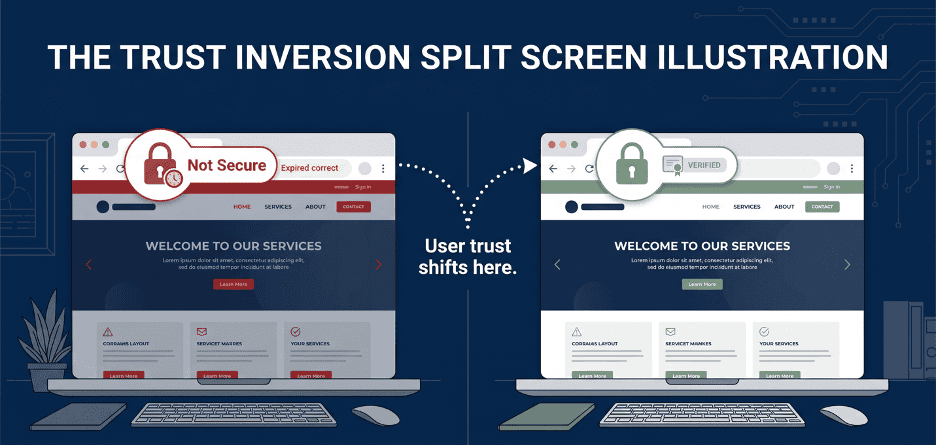
Consider the typical sequence. A company’s certificate lapses on a Friday. The renewal ticket sits in a queue over the weekend. For 48 to 72 hours, every visitor to the legitimate domain sees a browser warning. During that same window, a phishing domain, registered weeks earlier and sitting dormant, is activated. It carries a valid, properly issued certificate, because the attacker registered it well in advance and has no renewal backlog.
From the user’s perspective, the fake site is now the one that looks correct. The padlock is green. The domain is close enough (a homoglyph, a hyphen, a different TLD) to pass a casual glance. The real site is the one throwing red flags. This is impersonation that does not require the attacker to compromise anything belonging to the target. It only requires the target’s own certificate hygiene to fail at the same moment the attacker’s lookalike infrastructure is ready.
The Pixel Perfect Clone Problem
Modern phishing kits do not need to fake your branding from scratch. They load your logo, your CSS, and your static assets directly from your own CDN, while serving the surrounding page from attacker controlled infrastructure with a valid certificate of its own. The result is a login page that is visually identical to yours, fully encrypted, and fully “secure” according to the browser, while your actual login page sits behind an expired certificate warning that trains users to distrust the one domain that is actually yours.
Attack Vector 3: Expired Infrastructure as a Certificate Authority Bypass
The most consequential expired certificate attacks in the last two years did not target a certificate directly. They targeted the infrastructure that certificate authorities rely on to decide whether to issue one.
| Case Study: The 20 Dollar WHOIS Takeover In 2024, researchers at watchTowr Labs were investigating the WHOIS protocol when they discovered that the authoritative WHOIS server for the .mobi top level domain had migrated to a new hostname years earlier. The old hostname, dotmobiregistry.net, had expired and was available for registration. They registered it for 20 dollars and stood up their own WHOIS server. Within days, more than 135,000 unique systems, including government and military domains, cybersecurity vendors, and multiple certificate authorities, were still querying the abandoned address. The critical finding: several certificate authorities were using responses from this server as part of their domain validation process for issuing TLS certificates. Had the researchers been malicious, they could have used the hijacked WHOIS responses to obtain valid, properly signed certificates for any .mobi domain, certificates that would pass every browser check, because the issuing authority itself had been deceived at the validation step. This single expired domain registration created a path to a CA level trust bypass affecting an entire top level domain. The CA/Browser Forum subsequently moved to sunset WHOIS based domain validation entirely. |
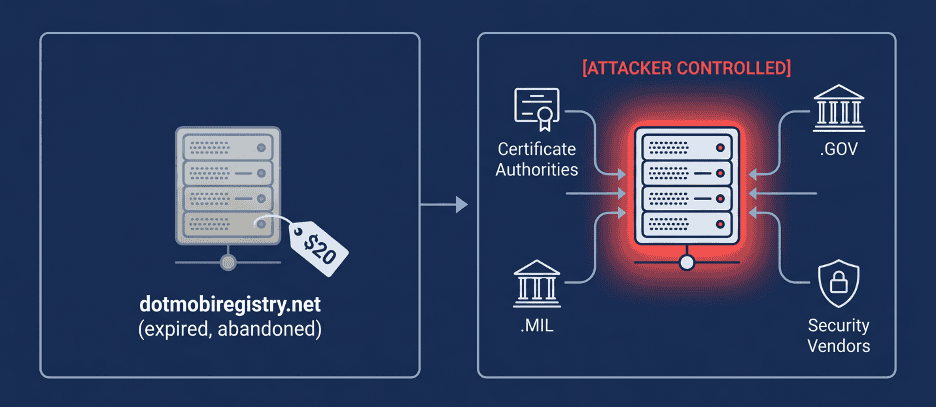
A second case from the same research group, published in early 2025, applied the identical logic to malware infrastructure. The team identified more than 4,000 web shell backdoors, planted by various threat actors across thousands of compromised systems, that were configured to call back to command and control domains that had since expired.
By registering those expired domains for roughly 20 dollars each, the researchers found themselves receiving check in requests from thousands of already compromised hosts, effectively gaining the ability to command malware infrastructure they had never deployed. The pattern is identical: an organization (or in this case, a previous attacker) allowed a piece of infrastructure tied to a trust relationship to expire, and whoever claims that expired infrastructure inherits the trust that was built on top of it.
Why This Matters for Your Organization, Not Just Registries and Malware Authors
The same logic applies to any domain your organization has ever used for a service that issues, validates, or relies on certificates: a decommissioned subdomain that was once used for ACME challenge validation, an old marketing domain that a CA’s automated system still has on file as an authorized contact, a forgotten staging environment whose certificate authority account is still active. None of these need to be “hacked.” They need to expire, and someone else needs to notice before you do.
How Attackers Find Expired and Expiring Certificates at Scale
None of the attack paths above depend on an attacker targeting your organization specifically, at least not at first. Certificate transparency logs, which exist to make certificate issuance auditable, are also a complete public inventory of every certificate your organization has ever had issued, including expiration dates.
| Reconnaissance Method | What It Reveals | Why It Is Effective |
| Certificate Transparency (CT) log monitoring | Every certificate issued for your domains and subdomains, including expiry dates and issuing CA | Public by design, automatable, and covers Subject Alternative Names that may expose internal hostnames |
| Internet wide TLS scanning | Servers presenting expired, self signed, or chain broken certificates | Expired certs are flagged automatically as low effort, high probability targets during mass scans |
| WHOIS and domain expiration monitoring | Domains tied to your brand, partners, or infrastructure that are approaching expiry | A lapsed domain can be re-registered by anyone, inheriting any residual trust or inbound traffic |
| Passive DNS history | Decommissioned subdomains and infrastructure that may still hold CA authorization records | Old subdomains are frequently forgotten by IT but remain valid targets for cert issuance |
Detection: What Continuous Monitoring Actually Needs to Catch
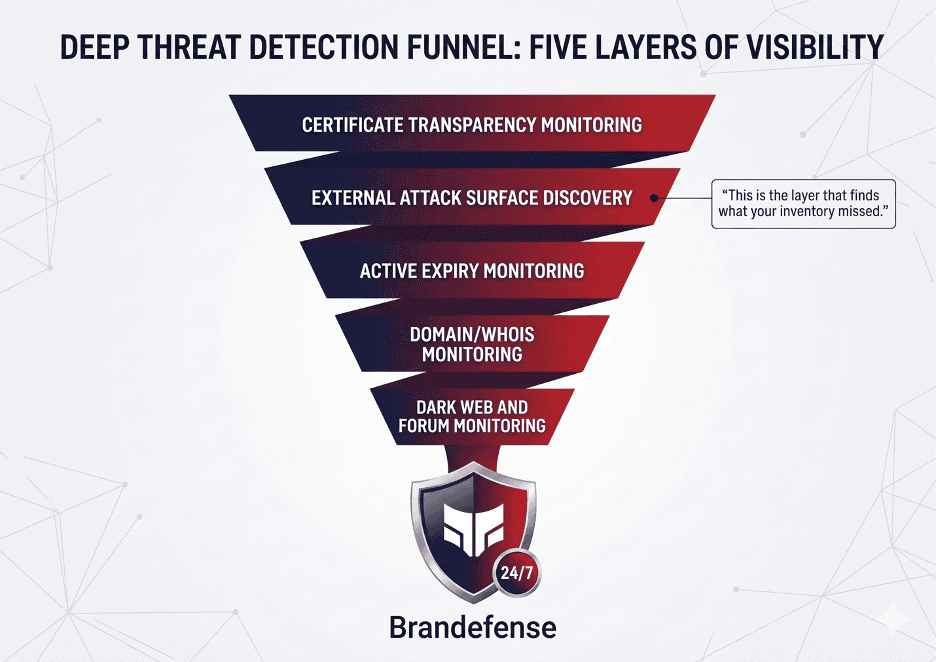
Certificate expiration monitoring is often implemented as a single check: does this certificate, on this known endpoint, expire within N days. That check is necessary but covers a small fraction of the actual exposure. The harder problem is the certificates and domains your monitoring does not know to check, because nobody on the current team knows they exist.
| Detection Layer | What It Catches | Typical Blind Spot Without It |
| Active certificate expiry monitoring on known assets | Certificates approaching expiry on inventoried, documented endpoints | Assumes the inventory is complete and current |
| External attack surface discovery | Subdomains, staging environments, and forgotten endpoints not in the official asset inventory | Shadow IT and abandoned infrastructure with live certificates or expired domains |
| Certificate transparency monitoring | New certificates issued for your domains, including unauthorized or unexpected issuance | Rogue or attacker obtained certificates issued through a compromised validation path |
| Domain expiration and WHOIS monitoring | Brand and infrastructure domains approaching expiration or ownership change | Lookalike or decommissioned domains being re-registered by third parties |
| Dark web and forum monitoring | Discussion of your organization’s infrastructure, leaked internal hostnames, or sale of access tied to misconfigured certificate based trust | Targeting activity that precedes exploitation of a known weak point |
Closing the Gap: A Practical Defense Checklist
Layer 1: Inventory and Visibility
- Maintain a continuously updated inventory of certificates across all domains, subdomains, and SANs, not just production endpoints listed in change management
- Run external attack surface discovery on a recurring basis to surface forgotten subdomains, staging environments, and decommissioned services that may still hold live certificates or CA authorizations
- Monitor certificate transparency logs for new issuance against your domains, including issuance you did not request
Layer 2: Expiration and Renewal Controls
- Automate renewal with short lived certificates where possible (90 days or less), reducing the blast radius of any single missed renewal
- Set expiration alerts at multiple thresholds (30, 14, 7, and 1 days), routed to a team, not an individual, with an owned escalation path
- Audit fallback behavior: confirm that servers and clients fail closed, not open, when certificate validation fails
Layer 3: Domain and Infrastructure Hygiene
- Track domain expiration dates with the same rigor as certificate expiration, including domains used only for ACME validation or CA account verification
- Before decommissioning any subdomain or service, remove its CA authorization records and revoke associated certificates rather than letting them lapse passively
- Monitor for re-registration of expired domains that were ever associated with your infrastructure, including old marketing campaigns, acquired companies, and deprecated products
Layer 4: Detection of Downstream Exploitation
- Monitor for lookalike domains acquiring valid certificates around the time one of your own certificates is known to be expiring
- Track dark web and forum sources for mentions of your infrastructure, especially in the context of access for sale tied to weak perimeter controls
- Review authentication logs for anomalies during any window when a public facing certificate was expired, since this is the window attackers are most likely to have attempted interception
How Brandefense Covers This
| Capability | What It Does |
| External Attack Surface Management (EASM) | Continuously discovers domains, subdomains, and certificates tied to your organization, including assets not in your official inventory |
| Certificate and Domain Expiration Tracking | Monitors certificate and domain expiration across discovered assets, surfacing risk before it becomes a browser warning or worse |
| Certificate Transparency Monitoring | Flags new or unexpected certificate issuance for your domains as it happens |
| Lookalike Domain Detection | Identifies newly registered domains impersonating your brand, including those acquiring valid certificates |
| Dark Web and Forum Monitoring | Surfaces discussion or sale of access tied to your infrastructure’s exposed or misconfigured trust points |
| Continuous Risk Scoring | Prioritizes expired and expiring certificate findings by exposure and business impact, not just by date |
| RELATED READING Lookalike Domains: /blog/lookalike-domains-brand-impact – how attackers exploit the trust gap created when your real domain looks less secure than theirs Third-Party Risk: /blog/third-party-risk-supplier-vulnerability – how a vendor’s expired or misconfigured infrastructure becomes your exposure |