


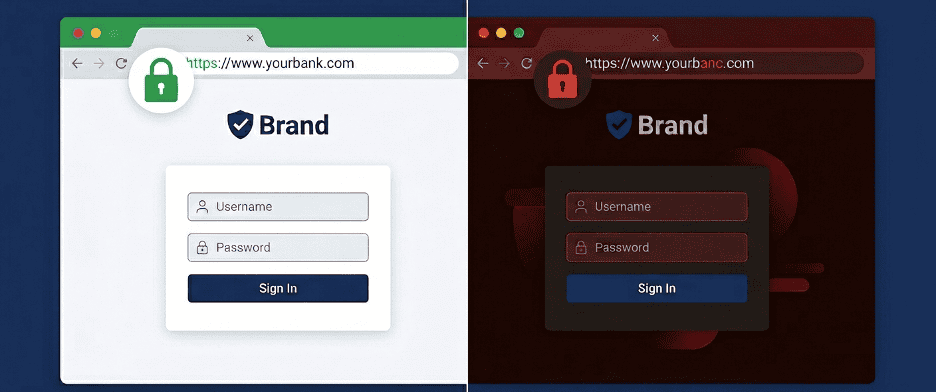
Lookalike domains are domain names registered to look like a legitimate brand’s domain, so that customers and employees trust them. Attackers use them for credential theft, business email compromise and malware delivery. This post explains how lookalike domains are built and the five common techniques. It also covers what attackers do with them and how to detect and take them down.
Your customers trust your domain. They type it from memory, click links that carry it, and hand over their credentials the moment your login page appears. That trust is what attackers target. They register a domain that looks exactly like yours. It may have one character swapped, one letter transposed, or one Cyrillic lookalike in place of a Latin letter that no human eye can tell apart.
Lookalike domains are also called typosquatting domains or impersonation domains. They are among the most cost-efficient and lasting tools in the modern threat actor’s kit. Registering a domain is cheap and takes minutes. It can stay live and keep harvesting credentials for a long time before a brand team notices it, if they notice it at all.
Lookalike domains are not edge cases. They are brand abuse operating continuously against organizations that often have no real-time visibility into what is being registered in their name.
This blog explains four things:
- what lookalike domains are and how they are technically constructed
- the five most common attack techniques in active use
- what attackers actually do with them once they are live
- how to detect and take down impersonation domains before your customers become victims
What Is a Lookalike Domain?
A lookalike domain is any domain name registered to look like a legitimate brand’s domain. The purpose is to deceive users, intercept traffic or build fraudulent infrastructure. The deception can be as simple as a single transposed letter. It can also be as sophisticated as swapping a Latin character for a visually identical Cyrillic one that no browser renders differently.
The term covers several related attack techniques with the same objective. The domain must look legitimate enough that users, employees, email recipients and security tools treat it as trustworthy. The attack works because human beings process URLs as visual patterns, not as strings of precisely ordered characters. We read ‘amazon’ and our brain confirms it is Amazon. It does not parse each Unicode code point.
Why Are Lookalike Domains So Effective in 2025?
Three structural factors make lookalike domain attacks persistently effective despite years of awareness campaigns.
First, the economics are asymmetric. Domain registration is inexpensive. Automated tools can generate thousands of permutations of any target domain in seconds. With registration costs this low, threat actors can secure hundreds of variants at once and operate them in rotation. They absorb takedowns as a negligible cost of doing business.
Second, the SSL padlock problem. Many phishing domains now carry valid HTTPS certificates, which certificate authorities can issue for free. Users have been trained to see the padlock in the browser bar as a sign of legitimacy. It is present on fake domains as reliably as on real ones. The advice ‘check for HTTPS’ has been operationally obsolete for years.
Third, AI-assisted phishing infrastructure. In 2025, automated tools can generate pixel-perfect copies of any login page. They combine the copy with a convincing lookalike domain and deploy the full package within hours. The technical barrier to setting up a convincing impersonation site has collapsed. What previously required web development skill now requires only a template and a domain registration.
| 💡 The Trust Transfer Problem When a user lands on a lookalike domain, they are not encountering an unknown website. They believe they are on a known, trusted brand’s site. Every piece of security conditioning they have received, check for HTTPS, look for the logo, recognize the login page, is satisfied. The attack works precisely because the site looks correct. There is no suspicious signal to catch. Detection must happen at the infrastructure layer, not the user layer. |
The 5 Lookalike Domain Techniques Attackers Use Most in 2025
Lookalike domain attacks are not a single technique. They are a family of approaches that exploit different aspects of how domain names are visually perceived and technically processed. Understanding the specific mechanics of each technique is essential for building a detection program that catches them all.
1. Typosquatting: Exploiting the Mistyped Character
The original and still most widely deployed technique. Attackers register domains with common typographical errors: character transpositions, omitted letters, doubled letters, or adjacent-key substitutions. A user who types ‘amazno.com’ instead of ‘amazon.com’ has made a one-character transposition that lands them on attacker-controlled infrastructure.
Typosquatting domains are most effective against high-traffic destinations where the volume of mistyped visits generates a steady stream of misdirected users. But they are equally used in targeted campaigns, where the domain is embedded in a phishing email rather than waiting for organic typographical errors.
| Real Domain | Lookalike Domain | Technique Used |
| amazon.com | amazno.com | Character transposition (on/no) |
| microsoft.com | microsofft.com | Character doubling (f) |
| paypal.com | paypa1.com | Character substitution (l -> 1) |
| google.com | gooogle.com | Character addition (extra o) |
| linkedin.com | linekdin.com | Character transposition (ke/ek) |
2. Homoglyph Attack: The Invisible Character
The most technically sophisticated and visually undetectable technique. Attackers register domains that contain characters from non-Latin scripts (Cyrillic, Greek, Armenian, Japanese). These characters look identical to Latin characters in virtually every font and browser. To a human reading the URL, the domain is correct. To a computer parsing the actual byte values, it is an entirely different domain.
The Cyrillic alphabet contains several lowercase characters that look identical or nearly identical to Latin ones. For example, ‘а’ (Cyrillic) and ‘a’ (Latin) are indistinguishable at every standard screen resolution. A domain that replaces the Latin ‘a’ in a brand name with the Cyrillic one looks exactly correct. It points to a completely different server. This is called an IDN homograph attack (Internationalized Domain Name homograph attack). It is the attack category where user training gives zero protection, because there is nothing for the user to see.
| 🔴 The Training-Proof Attack: Every security awareness program tells users to ‘carefully check the URL before entering credentials.’ That advice fails entirely against homoglyph attacks. Even the most security-aware employee will pass a domain built from Cyrillic lookalikes, because the characters are visually identical, not just similar. No amount of careful looking reveals the substitution. Detection requires automated systems that analyze domains at the Unicode character level, comparing code points rather than rendered appearance. |
3. Combosquatting: Adding Words to Build False Legitimacy
Rather than misspelling a domain, combosquatting adds words to it: ‘paypal-verification.com’, ‘amazon-support.net’, ‘microsoft-account-secure.com’. The brand name is spelled correctly, making these domains immune to typo-detection tools. Instead, they exploit the fact that users expect legitimate companies to use descriptive subdomains and hyphenated service domains.
Combosquatting is particularly effective in BEC (Business Email Compromise) and targeted spear-phishing campaigns. There, the domain appears in a context that makes the extra word feel natural. ‘Please verify your account at paypal-security.com’ reads as an expected message from a payment provider’s security team.
4. TLD Substitution: Same Name, Different Extension
This means registering the same brand name under a different top-level domain. Examples are ‘.co’ instead of ‘.com’, ‘.net’ instead of ‘.org’, or newer generic TLDs such as ‘.services’, ‘.support’ or ‘.account’. TLD substitution exploits the fact that users focus on the domain name itself and rarely scrutinize the extension carefully.
The technique works best when it matches a particular service. ‘company.support’ or ‘company.account’ feel like legitimate branded subdomains to most users. Add a pixel-perfect copy of the target brand’s login page and a valid TLS certificate. The result is phishing infrastructure that looks the same as the real site.
5. Doppelganger Domains: The Missing Dot
A doppelganger domain omits a separator character from a legitimate domain, most commonly the dot between ‘www’ and the domain name. ‘wwwcompany.com’ (no dot) is a different domain from ‘www.company.com’ but is visually almost identical when rendered in many display contexts. Email clients, messaging platforms, and document viewers often do not render the distinction clearly.
A doppelganger domain can be registered with mail (MX) records set up but no web content. It is ready to intercept any email sent to it by mistake instead of to the real domain. It never needs to serve a phishing page.
| ⚙️ The Certificate Transparency Advantage: Every TLS certificate issued, including for lookalike domains, is logged publicly in Certificate Transparency (CT) logs. So when an attacker registers a lookalike domain and gets an HTTPS certificate for it, a public record exists before any phishing campaign launches. Organizations that monitor CT logs for their brand name and common permutations get an early warning. The infrastructure is being built before the attack begins. This detection layer is independent of whether the domain has been used yet. |
What Do Attackers Do With Lookalike Domains Once They Are Live?
Registering the domain is only the first step. The operational use of lookalike domains spans four distinct attack objectives, and sophisticated campaigns often combine several simultaneously.
Credential Harvesting
The most direct use: serve a pixel-perfect copy of the target brand’s login page. When the user submits their credentials, they go to the attacker’s infrastructure. The user is then redirected to the real site, often with no sign that anything went wrong. The stolen credentials are used for account takeover, sold on dark web markets, or fed into credential stuffing campaigns. Those campaigns hit other platforms where the same user may have reused the password.
In 2025, credential harvesting through lookalike domains is increasingly combined with session token theft. Adversary-in-the-middle (AiTM) proxies sit between the user and the real site. They capture not just credentials but active session tokens that bypass MFA entirely. The user completes their real authentication including MFA; the attacker’s proxy captures the resulting authenticated session and uses it independently.
- Register the domainThe attacker registers a domain that resembles the brandTechnique T1583.001 (MITRE ATT&CK, opens in a new tab)
- Get a certificateA free HTTPS certificate is issued and logged publicly in CT logs
- Send the lureA phishing email or link carries the lookalike domain
- Harvest credentialsThe login page copy sends credentials to the attacker, then redirects to the real site
Business Email Compromise and Invoice Fraud
Lookalike domains serve as the sender infrastructure for BEC attacks. An email that appears to come from ‘finance@company-invoices.com’ (a combosquatted domain) looks legitimate. So does one from a homoglyph variant of the CFO’s email domain. A completely unrelated domain cannot match that. The recipient’s email client displays the sender domain in a font that makes the substitution invisible.
In wire fraud scenarios, the attacker’s domain is used to send modified payment instructions or urgent requests for fund transfers. Once a wire transfer is initiated to an attacker-controlled account, recovery is typically impossible. The FBI Internet Crime Complaint Center’s 2024 Internet Crime Report recorded $2.77 billion in reported losses from business email compromise.
Malware Distribution
Lookalike domains hosting malicious software downloads are particularly effective when the target brand is a software vendor or developer tool provider. A user who wants to download legitimate software from a vendor’s site may land on a lookalike domain instead. They receive a trojanized installer that works like the real software while silently installing malware in the background.
When the payload is an infostealer, it harvests saved browser credentials, session cookies and cryptocurrency wallet keys. This creates a second breach that reaches far beyond the first victim.
Targeted Visitor Profiling
Some lookalike domain operations do not serve the same content to every visitor, a pattern MITRE ATT&CK describes as execution guardrails. Automated systems profile each visitor using IP geolocation, device fingerprinting and behavioral signals. They then route traffic differently depending on whether the visitor looks like a security researcher, a corporate network user or a genuine residential victim.
Security tools scanning from known research IP ranges see benign parking pages or redirect to the legitimate brand. Residential IP addresses from target geographies receive credential harvesting pages or malware. This is designed to defeat automated scanners that check whether a domain serves malicious content. During the scan, it doesn’t. The attack only activates against genuine human victims.
Why Homoglyph Attacks Defeat User Training
| 🔴 Key Lesson: User Training Cannot Catch What Users Cannot See: Security awareness programs consistently teach employees to check email headers and URLs carefully before entering credentials. That advice assumes there is something to see. Homoglyph attacks are specifically engineered to be invisible: the deceptive characters are selected because they are visually indistinguishable from the characters they replace. No level of employee training addresses this attack class. Detection requires infrastructure-level analysis. Automated systems compare domain character code points and flag mixed-script registrations. They also identify infrastructure signatures linked to malicious intent before any email is sent. |
| Is Your Brand Being Impersonated Through Channels You Cannot See? Brandefense monitors homoglyph domain registrations, certificate transparency logs and phishing infrastructure that targets your brand across all channels. This includes attack types that are invisible to visual inspection. -> See Brandefense Brand Protection -> brandefense.io |
How Do You Detect and Respond to Lookalike Domain Attacks?
Effective lookalike domain defense requires multiple detection layers operating simultaneously. No single mechanism catches all attack types, and attackers tune their infrastructure to defeat individual controls. The program must therefore be layered and continuous.
Certificate Transparency Log Monitoring
Every TLS certificate issued for any domain is logged publicly in Certificate Transparency logs within minutes of issuance. Monitoring CT logs for your brand name, common permutations and known combosquatting patterns shows you lookalike domain infrastructure while it is being built. This happens before any phishing campaign launches. An attacker who registers ‘brandname-support.com’ and obtains a certificate for it has created a public record. Organizations monitoring CT logs receive this signal before their first customer receives the first phishing email.
DNS and Domain Registration Monitoring
Automated monitoring of new domain registrations for brand name permutations, typosquatting variants, and combosquatting patterns across all TLDs provides a second early warning layer. Some tools generate the full set of possible lookalike domains for a target. They then keep checking whether those variants have been registered. This allows proactive detection rather than reactive response. The free Brandefense domain and exposure tools include a domain scan that also looks for phishing domains.
Registration monitoring should include homoglyph variants: domains that contain Unicode characters from Cyrillic, Greek, Armenian, and other scripts that visually resemble Latin characters. This requires Unicode-aware comparison rather than simple string matching. A string comparison of the Latin and Cyrillic variants of a domain would not flag them as related.
Passive DNS and Infrastructure Pattern Analysis
When a lookalike domain moves from parking to active infrastructure, it leaves signals in passive DNS records. These include nameserver changes, hosting provider assignment and IP address resolution patterns that differ from legitimate brand infrastructure. Continuous passive DNS monitoring identifies when previously dormant lookalike domains become active, providing a second detection window between domain registration and active campaign launch.
Dark Web Intelligence
Lookalike domain campaigns do not appear from nowhere. Three things circulate on dark web forums and in underground markets: phishing kits built to impersonate specific brands, lists of registered lookalike domains assembled for targeting campaigns, and credentials harvested from active campaigns. Organizations with continuous dark web monitoring get signals about campaigns in preparation. These include phishing kits for their brand being sold or shared, lists of registered lookalike domains assembled by threat actors, and post-campaign credential dumps that confirm an active campaign.
Takedown Response
Detection without response is incomplete. When a lookalike domain is identified, the objective is rapid takedown through the domain registrar, hosting provider, and any relevant platform. Pre-established relationships with takedown service providers and documented takedown procedures dramatically reduce the time between detection and removal. For homoglyph domains that successfully impersonate a brand, UDRP proceedings through WIPO provide a legal way to transfer the domain. WIPO says a case normally should be completed within 2 months. This makes mitigation through the hosting provider the faster first response.
| 🔍 Why Continuous Monitoring Is Non-Negotiable: Lookalike domain attacks scale with automation. Tools can generate and register thousands of domain permutations in an afternoon, so the threat surface is not static. New lookalike domains targeting any given brand appear every week. Periodic scans, run monthly or quarterly, create detection gaps that extend for weeks during which active phishing campaigns operate undetected. Continuous detection is the only way to match that pace. |
Lookalike Domain Defense: A Practical Checklist
| DETECTION AND MONITORING | |
| ✓ | Monitor Certificate Transparency logs continuously for your brand name, common permutations, and combosquatting variants. CT log signals appear before any phishing email is sent. |
| ✓ | Implement automated domain permutation monitoring across all TLDs, including Unicode-aware scanning for homoglyph variants that use Cyrillic, Greek, and other non-Latin characters. |
| ✓ | Monitor passive DNS records for lookalike domains moving from registered-but-parked to active infrastructure. The window between infrastructure setup and campaign launch is your best chance to detect them. |
| ✓ | Integrate dark web monitoring for phishing kit sales, assembled lookalike domain lists, and post-campaign credential dumps targeting your brand. |
| ✓ | Monitor WHOIS and registrar data for bulk registrations of brand-adjacent domains; bulk registration patterns are a reliable early indicator of campaign preparation. |
| DEFENSIVE REGISTRATION AND RESPONSE | |
| ✓ | Defensively register the highest-risk typosquatting variants of your primary domain. These are common character transpositions, adjacent-key substitutions, and .co, .net and .io variants of your primary .com domain. |
| ✓ | Implement DMARC, DKIM and SPF records at enforced policy levels. They stop spoofed emails from being delivered as if they came from your domain. This does not stop lookalike domain abuse, but it closes the direct spoofing route. |
| ✓ | Establish documented takedown procedures with pre-identified contacts at major registrars, hosting providers and takedown service partners. Response speed is the main factor in how much damage a live phishing campaign causes. |
| ✓ | For domains confirmed as actively phishing your customers, pursue hosting-level takedown before UDRP proceedings; hosting providers typically respond faster than domain registrar processes. |
How Brandefense Detects Lookalike Domains Targeting Your Brand
Brandefense’s Digital Risk Protection platform monitors the full lifecycle of lookalike domain attacks. This runs from domain registration and certificate issuance, through active campaign infrastructure, to post-campaign credential distribution on dark web markets.
| Brandefense Capability | What It Covers in Lookalike Domain Defense |
| Phishing Domain Monitoring | Continuous monitoring of new domain registrations, certificate transparency logs and DNS resolution data. It looks for typosquatting variants, combosquatting patterns, TLD substitutions and doppelganger domains that target your brand |
| Homoglyph and IDN Detection | Unicode-aware scanning that identifies lookalike domains built with Cyrillic, Greek, Armenian and other non-Latin characters that look identical to your brand name. It detects the attack category that bypasses visual inspection entirely |
| Certificate Transparency Intelligence | Real-time monitoring of CT log entries that match your brand name and known permutations. It gives early warning when lookalike infrastructure is being built, before campaigns launch |
| Phishing Infrastructure Takedown | Coordinated takedown support for confirmed phishing domains through registrars, hosting providers, and relevant platforms; pre-established relationships that compress response time |
| Dark Web Phishing Kit Intelligence | Monitoring of underground markets and forums for phishing kits that target your brand, assembled lookalike domain lists and post-campaign credential dumps. These confirm active impersonation campaigns |
| Social Media and App Store Impersonation | Brand monitoring extended beyond domains to social media profiles and mobile app stores. Lookalike accounts and fake apps there impersonate your brand to the same customers |
| Real-Time Alert and Analyst Escalation | Automated alerts for new lookalike domain detections with analyst review for high-severity cases requiring immediate takedown response or customer notification |
Lookalike domain abuse scales faster than any manual monitoring program can track. The organizations that protect their customers effectively are not those with the most comprehensive takedown procedures. They are those with the earliest warning. Continuous detection identifies lookalike infrastructure at registration and certificate issuance. That is before any customer has been redirected, before any credential has been stolen and before the brand has been damaged.
Related guide: Takedown Service Evaluation Checklist
For the full pattern guide, read what typosquatting is and how to defend against it.