


Stop/Djvu is a family of Windows ransomware. It encrypts the files on a computer, marks them with changing file extensions, and leaves a ransom note called _readme.txt in each folder. Victims are told that files can only be recovered by buying a decryption tool and a unique key. This post covers how the analyzed sample runs and how it spreads.
This blog post comes from the “Stop/Djvu Ransomware Technical Analysis” by the Brandefense CTI Analyst Team. For more details about the analysis, download the report.
What is Stop/Djvu ransomware?
Stop/Djvu ransomware is a malicious computer virus that aims to encrypt all files on the system and make them inaccessible and it can use many different extensions to mark encrypted files. The malware also creates money-demanding notes in each folder, naming them as _readme.txt. The cybercriminals demand paying a ransom to them in exchange for data decryption tools.
The ransom note contains two email addresses that victims are told to contact quickly, because the price of the decryption tools goes up if they wait. It is emphasized that the decryption of files is only possible with the purchase of decryption software and a unique key.
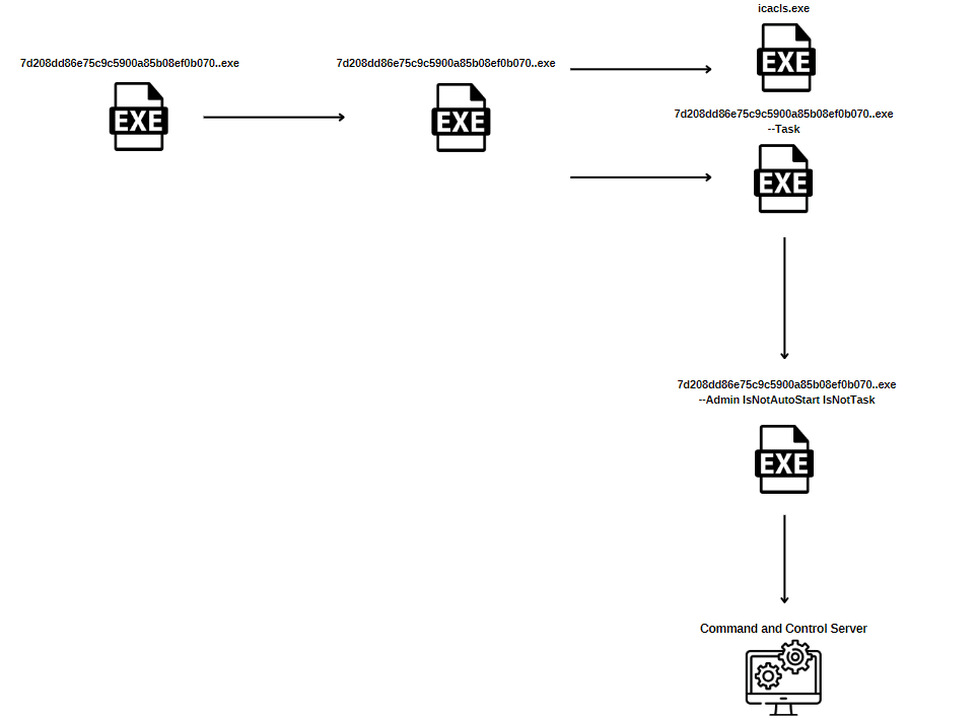
The analyzed malware exhibits multiple functionalities. Upon execution, it loads additional libraries, generates shellcode at runtime, and creates a self-copy. The main payload is then injected, and a UUID is generated to use as the directory’s name, where the malware is copied. The malware uses XOR encryption with a hardcoded key to decrypt relevant strings and hashes the buffer containing the MAC address using MD5.
To achieve persistence, the ransomware employs the ITaskService interface of the TaskScheduler COM object to create a scheduled task and create a mutex value. Once persistence is established, the malware encrypts all files on the system and communicates with its C2 server using WinINet functions.
- Payload injectedShellcode is generated, a self-copy is made and the main payload is injectedTechnique T1055 (MITRE ATT&CK, opens in a new tab)
- Persistence set upScheduled task and mutex createdTechnique T1053 (MITRE ATT&CK, opens in a new tab)
- Files encryptedAll files on the system are encryptedTechnique T1486 (MITRE ATT&CK, opens in a new tab)
- Contacts the C2 serverUses WinINet functionsTechnique T1071 (MITRE ATT&CK, opens in a new tab)
Overview
File Name: 7d208dd86e75c9c5900a85b08ef0b070.exe
MD5: 7d208dd86e75c9c5900a85b08ef0b070
SHA-1: 79a453d4e5403307b54205094ded4e5ff0382c71
SHA256: 4380c45fd46d1a63cffe4d37cf33b0710330a766b7700af86020a936cdd09cbe
File Name: stop.exe
MD5: 74c7126ff188eb5f72fee4b4eb4cfc23
SHA-1: c9545f039159ceb8413b2ca6d83b06dca86b5839
SHA256: adeb345ba0d60fecdb0823d0cb713c933900ecb545025ec8cc3f442d844af24b
Where does Stop/Djvu come from?
Stop/Djvu is a family of ransomware. The malware was designed to encrypt user files and demand a ransom payment for their decryption. New variants have continued to be released over time.
How does Stop/Djvu spread?
Stop/Djvu primarily targets individual users and small businesses running Windows operating systems. The delivery method typically involves the use of software cracks or illegal activation tools, which are often downloaded from torrent sites or other untrustworthy sources. These cracks or activation tools are disguised as legitimate software and can be bundled with Stop/Djvu ransomware, infecting the victim’s system upon installation.
Another delivery method involves spam emails containing malicious attachments, such as fake invoices or job offers, which download and execute the ransomware when opened.
Behavior Graph of Stop/Djvu Ransomware
MITRE ATT&CK Threat Matrix
- TA0002 Execution
- T1053 Scheduled Task/Job
- TA0003 Persistence
- T1547.001 Registry Run Keys/Startup Folder
- TA0004 Privilege Escalation
- T1055 Process Injection
- TA0005 Defense Evasion
- T1036 Masquerading
- T1497 Virtualization/Sandbox Evasion
- TA0007 Discovery
- T1018 Remote System Discovery
- T1057 Process Discovery
- T1082 System Information Discovery
- T1083 File and Directory Discovery
- TA0011 Command and Control
- T1071 Application Layer Protocol
- T1095 Non-Application Layer Protocol
- T1573 Encrypted Channel
- TA0040 Impact
- T1486 Data Encrypted for Impact
Download IoCs and YARA Rules from GitHub.