

Shadow AI is the use of AI agents that nobody in the company manages or tracks. The clearest example is OpenClaw, formerly Clawdbot and Moltbot, an agent gateway that people run on their own devices. In February 2026, SecurityScorecard counted more than 40,000 instances open to the internet. Left exposed, they can leak API keys, chat memory and connected accounts. Below: how the exposure happens, and how to find these agents in your company.
What Is Shadow AI and Why Are Unmanaged AI Agents the New Frontier of Shadow IT?
From “Shadow IT” to “Shadow AI”
The cybersecurity landscape of 2026 has been altered by the democratization of “Agentic AI.” We are witnessing a paradigm shift from centralized, cloud-native chatbots to decentralized agents running on the network edge (like Mac Minis, Edge Servers).
Unlike traditional data leaks where internal data leaves the perimeter to a foreign server, here the perimeter itself dissolves. Users are turning their personal devices into always on servers that hold API keys to every connected service (Gmail, Slack, GitHub) and exposing them to the internet via unhardened gateways.
Analyst Note
During our research for this report, the tool formerly known as Clawdbot officially rebranded to Moltbot. This change was initiated following a trademark request from Anthropic, which noted the similarity between “Clawd” and their “Claude” model. The project has transitioned to the new handle @moltbot, and while the founder reported some initial issues with handle-squatting during the move, the core functionality of the tool remains unchanged.
Why Developers are Deploying Unsecured LLM Wrappers
The adoption of tools like Clawdbot is driven by “Adoption Velocity” rather than security. Developers seek the utility of a “JARVIS-like” experience, an assistant that proactively checks emails and manages files.
However, unlike a standard application, an AI Agent requires extensive permissions: read/write access to the file system (‘fs‘), shell execution (‘exec‘), and network access. On home hardware with no company rules around it, these tools create a spread-out, unprotected attack surface that is very valuable to attackers.
Case Study: Anatomy of a Leak (Clawdbot)
The “Insecure by Default” Trap (Port 18789/3000)
Our analysis of the Clawdbot architecture reveals a critical systemic failure. By default, the Clawdbot gateway listens on port 18789 (while predecessors like Flowise used 3000). While the documentation suggests binding to ’127.0.0.1’, the functional pressure to access these assistants remotely leads users to bind the gateway to ’0.0.0.0’ or misconfigure reverse proxies.
Recent independent public reports observed a four-digit exposure scale exposed to the public internet within days of the tool’s viral release. These are not just web servers; they are remote command consoles.
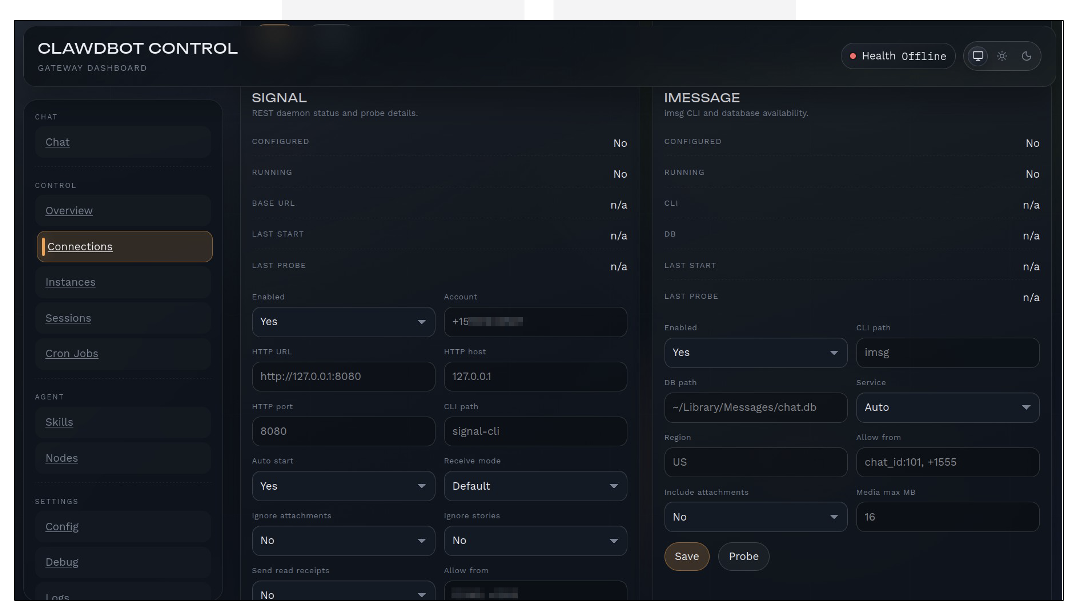
OSINT Discovery Methodology: Measuring Internet Exposure
We do not want this case study to become a step-by-step scanning guide. So we describe our method in general terms and share only totals.
We took a snapshot from two separate internet scan datasets to estimate how many Clawdbot gateways anyone could reach from the internet. Rather than relying on a single identifier, we used a layered fingerprinting approach:
(i) a broad UI identifier (page title),
(ii) one or more structural HTML anchors unique to the UI,
and (iii) validation using the default gateway port.
Analyst Note
Responsible disclosure in reporting: This section leaves out ready-to-use search queries and does not list targets. The goal is to show a defensive way to measure exposure (list your assets, then shrink what is open), not to help anyone attack.
Point-in-TimeExposure Snapshot
At 2026-01-27 (13:00, UTC+3), our measurement yielded the following results:
• Broad UI fingerprint: 634 reachable instances.
• Tightened fingerprint (UI + structural anchors + default port): 611 reachable
instances.
• Cross-validation dataset: 530 reachable instances.
Interpretation
The difference between the broad UI fingerprint and the tightened signature suggests that not every exposed instance is trivially classifiable using a single trait. Some deployments may be proxied, hosted behind non-default ports, or partially match the UI fingerprint. For defenders, the tighter signature is usually more useful for deciding what to fix first, because it cuts noise and points to real gateways.
Best Practice/Analyst Advice
Analyst Tip — Reporting without over-disclosing. When you publish exposure research, give totals and explain the fingerprint types (title, page anchor, default port). Leave out exact search strings and target lists. This preserves the core security lesson while reducing operational value for attackers.
No Auth, No Problem: How Easy is Access?
The critical vulnerability lies in the “Localhost Fallacy.” To make local development easy, Clawdbot often approves requests that look like they come from localhost.
When a user deploys a simple Nginx or Caddy proxy to access their agent from the office, they often fail to configure ‘X-Forwarded-For‘ header validation. The Gateway sees the request coming from the local proxy IP and bypasses authentication completely. This allows an external attacker to gain full administrative control over the agent without a single exploit, simply by navigating to the URL.
- Proxy set upA simple Nginx or Caddy proxy is added to reach the agent from the office.
- Header check missingX-Forwarded-For validation is not configured.
- Request looks localThe gateway sees the local proxy IP and trusts the request.
- Authentication bypassedAn external attacker gets full administrative control by navigating to the URL.
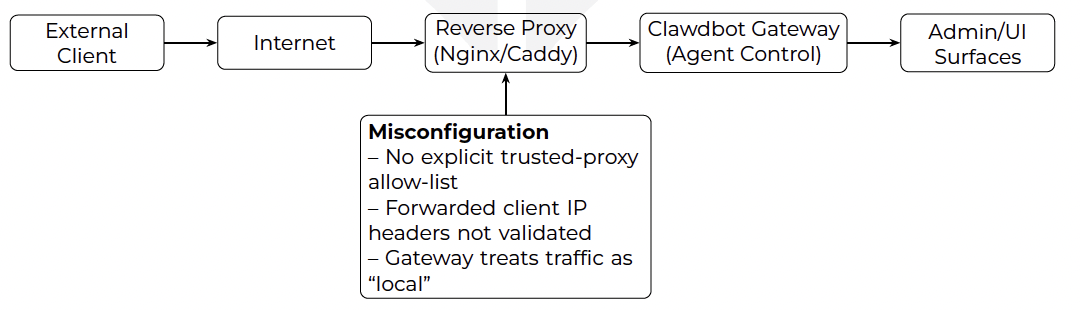
Figure 2: The “Localhost Fallacy”: a reverse proxy without strict trust configuration can cause a gateway to misclassify remote traffic as local, weakening authentication
assumptions.
What’s at Risk? Observations from the Wild
The “Prompt History” Nightmare: PII and Corporate Secrets
What makes agent gateways uniquely dangerous is that the attack surface is not limited to a traditional admin panel. These systems aggregate high context operational data (project details, errors, access patterns) and store it persistently. In Clawdbot setups seen in the wild, this shows up as plaintext memory files (for example MEMORY.md) and local databases (for example SQLite). They sit in the user’s home folder (for example ~/.clawdbot/memory/). In other words, a compromise yields a “cognitive dossier” rather than a single session transcript.
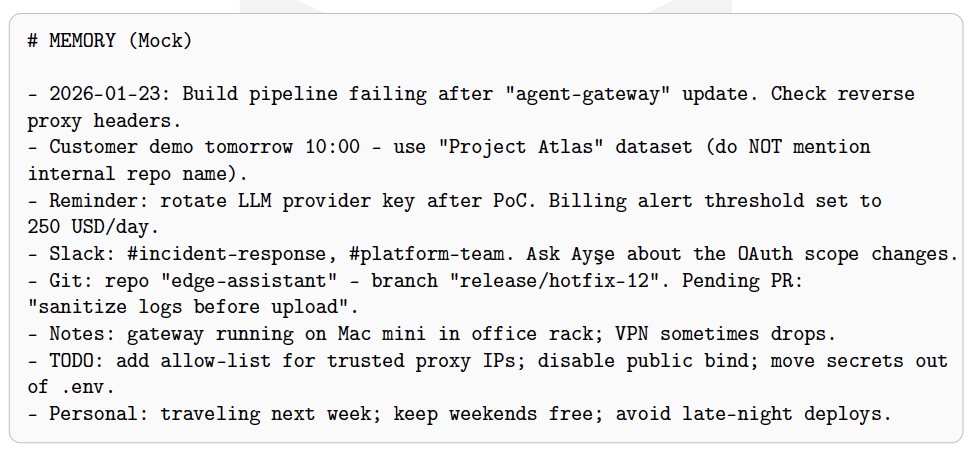
Observed data categories.
From what we saw in the field and how the platform works, the leaked data can include:
- Operational context: error logs, local paths, project names, and troubleshooting notes that reveal internal architecture.
- Social graph signals: who the operator interacts with (tools, channels, repositories), and which systems are “trusted”.
- Credential-adjacent material: configuration artifacts and integration tokens that enable follow-on access.
Analyst Note
Why this matters: Saved agent memory makes targeted abuse possible. Even without “exploiting” the host, an attacker who can read the memory files can write very targeted scams and move on to other systems.
Storage Model: Plaintext Memory + Local Databases
Clawdbot data persistence typically blends human-readable files (for memory) with structured state (for sessions). The lesson for defenders is simple: if the gateway UI or its data store is exposed, the operator’s whole work history can be exposed. This includes both plaintext artifacts (e.g., MEMORY.md) and local databases (e.g., .sqlite).
3.2.1. API-like session surfaces (conceptual).
The platform’s session tooling concepts (e.g., session_history, session_list) reflect a common pattern: a control UI that can enumerate sessions and retrieve historical context. In misconfigured deployments, these surfaces may become reachable without the intended trust boundary.
Best Practice/Analyst AdviceAnalyst Tip — What to treat as “sensitive data”: Treat any file that holds long chat history, provider keys, integration tokens, or file paths and internal IDs as sensitive. Handle it like a credential.
The Financial Impact: Stolen LLM Provider Keys
The most immediate impact is financial loss. Agent gateways commonly store third-party LLM provider credentials (e.g., OpenAI/Anthropic) in plaintext configuration
artifacts (such as .env, config.json, or service-specific credential files). Once harvested, these keys can be abused for high-volume inference workloads and resold in underground ecosystems.
Network Indicators and Detection Pivots (Defensive)
To help you list and watch these assets, we sum up the signs we saw during the case study. Use these signs to find assets, check exposure and write detection rules, in networks you are allowed to test.
| Indicator | Value | Defensive Use |
| Default port | 18789 | Exposure validation and inventory prioritization for agent gateways. |
| Alternate ports | 18790, 18800 | Secondary validation for related services/dev modes (verify per environment). |
| mDNS service | _clawdbot-gw._tcp.local | LAN discovery signal; useful for internal scanning and endpoint hygiene. |
| Service name | clawdbot-gw | Local service identification in internal discovery workflows. |
| UI anchors | clawdbot-app, CLAWD BOT_CONTROL_UI_BASE_P ATH | Higher-confidence structural markers for classification and false-positive reduction. |
| Favicon hash | -805544463 | Clustering pivot for internet-scale exposure measurement (use with care in reporting). |
Table 1: Defensive indicators and pivots derived from case study observations.
What Real-World Attack Scenarios Does an Exposed Agent Gateway Allow?
Scenario 1: The “Free LLM” Abuse (Quota Theft)
Vector: Automated scanning for port 18789.
Attack: An attacker identifies an unauthenticated Clawdbot instance. They query the ’/api/config’ endpoint to retrieve the ’OPENAI_API_KEY’.
Outcome: The key is added to a rotation pool for a spam botnet. The victim’s credit card is charged thousands of dollars for token usage before the breach is discovered.
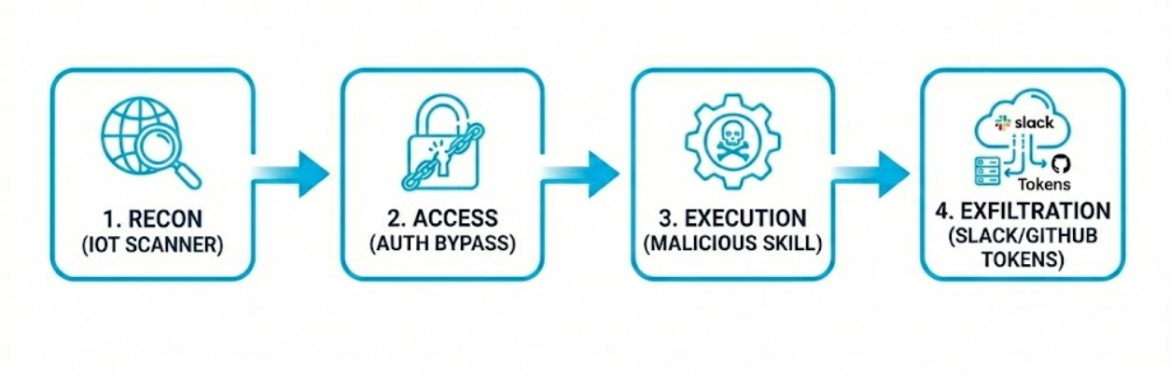
Scenario 2: Lateral Movement via Integration Tokens
Vector: Supply Chain Poisoning via “ClawdHub.”
Attack: Based on the “Eating Lobster Souls” research, an attacker uploads a malicious skill (e.g., “Stock Market Analyzer”) to the skill registry. The victim installs it.
Outcome: The skill executes with the agent’s privileges. It accesses the user’s connected Slack and GitHub tokens, allowing the attacker to pivot from the personal Mac Mini into the corporate code repository and internal communication channels.
How Do You Secure Your AI Stack Right Now?
Quick Fix: Network Segmentation & Reverse Proxies
For organizations and individuals running edge agents, “defense-in-depth” is mandatory:
- Bind to loopback by default: Ensure the gateway listens on 127.0.0.1 unless there is a justified, controlled access requirement.
- Eliminate direct internet exposure: Do not expose agent gateways via public port-forwarding. Prefer authenticated overlay access (e.g., corporate VPN, device posture-aware tunnels).
- Reverse proxy hardening (fail-closed): If a proxy is required, explicitly define trusted proxy boundaries and validate forwarded client IP headers. Do not let login checks trust “local” traffic unless the network or cryptography proves it is local.
Best Practice/Analyst AdvicePractical rule: Treat agent gateways like remote administration consoles. If you would not expose an SSH jump host without MFA and strict allow-listing, do not expose an agent gateway.
Secrets Hygiene: Reduce the Blast Radius
- Move secrets out of plaintext where possible: use OS keychains, secret managers, or environment injection at runtime; avoid committing or copying .env style files across systems.
- Rotate aggressively after exposure risk: if a gateway was ever reachable from untrusted networks, assume it was hacked and change your LLM provider keys and tokens.
- Apply least privilege to integrations: Slack, GitHub, Gmail and similar tokens should get the smallest scope (read-only where possible) and be kept apart for personal and work use.
Local Network Hygiene: Discovery Signals and mDNS
Edge agents are commonly deployed on consumer hardware within home or small office networks. Local discovery (for example mDNS announcements) can make the gateway easy to see for attackers or infected machines on the same network. Defensive steps:
- Inventory discovery broadcasts: identify whether the gateway advertises services on the LAN (mDNS/Bonjour) and disable or segment if unnecessary.
- Segment “lab” devices: place edge devices (Mac Minis, homelabs) in isolated VLANs with controlled egress.
Strategic Fix: Governance and Monitoring
- Container isolation: run agents inside containers or constrained sandboxes to limit filesystem and process access on the host.
- Supply chain auditing: treat “skills” and plugins as untrusted code. Review sources and pin versions; monitor for anomalous outbound connections and unexpected tool executions.
- Observability: log access attempts, administrative actions, and token usage. Alert on sudden spikes in LLM consumption and on access from unusual networks.
How Do You Discover Shadow AI Agents in Your Company?
You cannot govern an agent you have not found. Discovery has two sides: the devices inside your network, and what your company exposes to the internet.
- Ask and inventory: ask engineering and IT teams which assistants they installed, and compare the answers with the software lists from your device management tool.
- Scan your own network: look for the default gateway port 18789 and the _clawdbot-gw._tcp.local service listed in Table 1. SecurityScorecard also advises blocking port 18789 at the perimeter.
- Watch outbound traffic: review connections to LLM provider APIs from hosts that are not approved, and alert on sudden spikes in token use.
- Check what the outside world sees: search your own public IP ranges and cloud accounts for agent control panels. This is the daily work of external attack surface management.
- Assign an owner: for each agent, record who runs it, which keys and tokens it holds, and whether it is reachable from outside. Rotate the keys first for any gateway that was ever exposed.
Stolen logins are the second trail. AI keys and sessions often sit in the same browser profile that infostealers copy. The free Atlas AI Exposure Check shows whether your organization’s ChatGPT, Claude, Gemini or Copilot logins appear in infostealer logs. It takes work addresses only, shows aggregate results and needs no account. It does not find gateways, so use it next to the steps above.
Conclusion: The Need for AI Observability
Unmanaged AI agents are a new phase of Shadow IT: personal helper tools quietly become systems with high privileges. The Clawdbot case shows how easily these setups become control panels that anyone on the internet can reach, with keys, chat memory and access to other services inside.
Unlike a normal data leak, these exposures give away how people work and decide. That makes financial abuse, movement to other systems and targeted scams likely next steps.
For this reason, visibility remains the primary control gap. AI agents running on edge devices must be inventoried, monitored, and governed as first-class assets. Without this shift, Shadow AI will persist as a silent and highly attractive attack surface.
