


ClickHouse disclosed a vulnerability on 30 October 2026 that can let someone with no login run code on a ClickHouse server. It is tracked as CVE-2026-116366 and rated 9.5, Critical. Our CVE-2026-116366 vulnerability page holds the full record. This post is the work plan: which servers to look at, which ports matter and what to watch until every node runs a fixed build.
ClickHouse Cloud and BYOC customers have less to do, because ClickHouse says it has already applied the fix there. Self-managed servers, including Docker and Kubernetes installs, are on their owners. The steps below are in the order we would run them.
- List every ClickHouse nodeRecord its build with SELECT version() and who owns it.
- Test reach from outsideProbe ports 8123, 8443, 9000 and 9440 from a host outside your network.
- Close what should be privateUse a firewall, a private network or the Cloud IP access list.
- Patch exposed nodes firstMove each one to the fixed build of its branch.
- Patch the rest and confirmCheck the version on every node after the upgrade.
- Watch the logsLook for crashes, new processes and odd outbound traffic.
Why a Password Does Not Protect This Server
The ClickHouse security changelog says the issue, “under certain conditions, could allow an unauthenticated user with network access to execute arbitrary code.” Unauthenticated means the attack works before any login. Passwords and per-user rules act at login, so they may not stand in the way. That is our reading of the advisory, not a ClickHouse statement.
What does stand in the way is reach. The advisory’s own condition is network access. A server that untrusted networks cannot reach gives an attacker nothing to connect to. That is why the plan finds exposed servers first and patches them before the rest.
“Certain Conditions” or “Any Instance”?
ClickHouse has not said what the conditions are, which port is involved or how the bug leads to code execution. The CVE record names an integer overflow (CWE-190) as the weakness. Its CVSS v4.0 vector sets attack complexity to High. FIRST’s CVSS v4.0 specification uses High when an attack must get around defences such as address space randomization, or needs a secret specific to the target.
The researcher credited in the record, Elshad Toklayev, set the bar much lower. In a post on X on 30 October, he described an unauthenticated RCE that needs only the public hostname. ClickHouse has not repeated that claim.
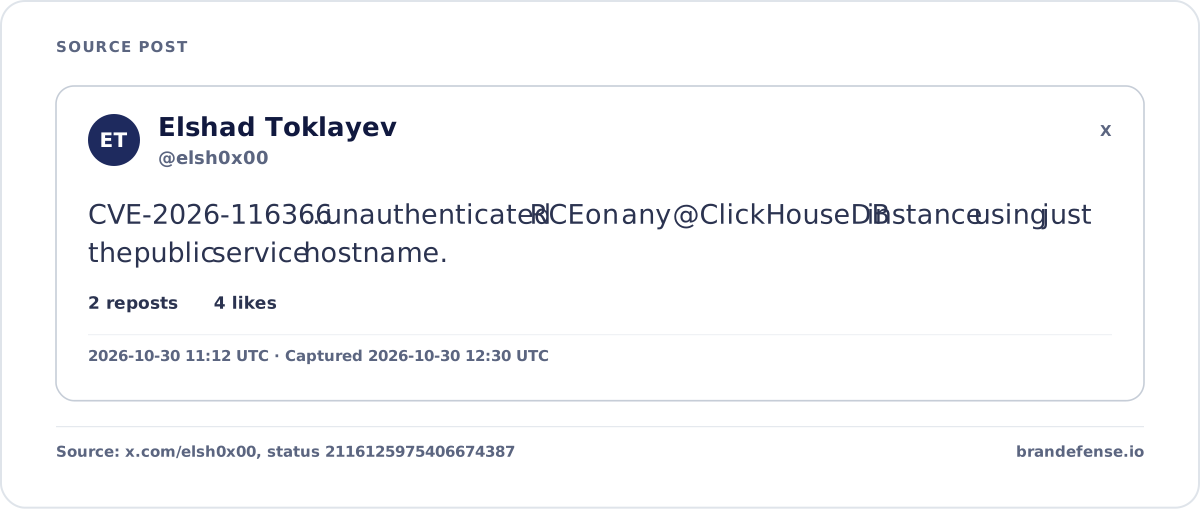
The CVE record also lists ClickHouse Cloud as affected below specific Cloud builds. So the flaw was not limited to self-managed servers. CISA added its own enrichment to the record at 16:36 UTC on 30 October. It rates exploitation “none” and automatable “no”, with “total” technical impact.
- CISA KEVNot seenCatalog release 2026.10.30 does not list CVE-2026-11636630 Oct
- CISA exploitation ratingNot seenVulnrichment on the CVE record rates exploitation none and automatable no30 Oct
- Researcher claim on XYesRCE with no login, using only the public hostname30 Oct
- Alerts on XYesFour more public posts repeat the advisory and the fixed builds30 Oct
- Brandefense BlackholeYesTwo Telegram posts, both from automated CVE alert channels repeating the vendor text30 Oct
Plan for the researcher’s version anyway. The fixed builds are out, and the advisory is too thin to rule your own setup out of the “certain conditions.”
Day One: Find Every ClickHouse Node You Run
List every node, not only the ones your data team owns. Check the compose files and Helm charts of other tools too, since some ship ClickHouse as a container. Run SELECT version() on each node and note it next to the owner and network zone.
Any build below the fixed build of its branch is affected. The record sets its default status to affected, so builds it does not list count as affected too. The ClickHouse security policy marks 26.4 to 26.7, and 26.2 and older, as unsupported, and the changelog names no fix for them.
Which ClickHouse Ports Answer From the Internet?
The advisory does not name a port, so treat every listening interface as in scope. The ClickHouse network ports page lists these defaults:
| Port | Interface | Who uses it |
|---|---|---|
| 8123. | HTTP. | Self-managed servers. |
| 8443. | HTTP over TLS. | Self-managed servers and Cloud. |
| 9000. | Native protocol. | Clients, tools and distributed queries. |
| 9440. | Native protocol over TLS. | Self-managed servers and Cloud. |
| 9004 and 9005. | MySQL and PostgreSQL emulation. | Self-managed servers. |
| 9009. | Inter-server traffic. | Replication between nodes. |
From a host outside your network, run curl -s http://SERVER:8123/ping. The HTTP interface docs say this handler always returns “Ok.” A reply means the HTTP port is open to that network. Test the native port with nc -vz SERVER 9000, then repeat for each port your setup uses.
ClickHouse’s own default config.xml listens only on localhost and warns that a server opened to all addresses needs a firewall, network limits or strong passwords. The official image on Docker Hub stays on the Docker network unless you map its ports. So an exposed server was opened by a change, such as a listen_host edit or a port mapping. Ask why before you close it, so the fix does not break a data pipeline.
Servers that answer from outside are part of your attack surface, and a list of them goes stale fast. Our External Attack Surface Management service scans an organisation’s internet-facing assets within minutes.
Days Two and Three: Move Each Branch to Its Fixed Build
ClickHouse lists one fixed build per supported branch. Stay on your branch where you can, since a branch jump brings other changes. Patch the servers that answered from outside first.
| Branch | Fixed build | Docker image tag |
|---|---|---|
| 26.10. | 26.10.3.7-stable. | clickhouse/clickhouse-server:26.10.3.7. |
| 26.9. | 26.9.27.3-stable. | clickhouse/clickhouse-server:26.9.27.3. |
| 26.8 LTS. | 26.8.36.3-lts. | clickhouse/clickhouse-server:26.8.36.3. |
| 26.3 LTS. | 26.3.62.3-lts. | clickhouse/clickhouse-server:26.3.62.3. |
| 26.4 to 26.7, 26.2 and older. | None listed. | Move to a supported branch. |
The official Docker images for all four builds were pushed on 26 October, four days before the advisory. When we checked at 19:00 UTC on 30 October, the ClickHouse GitHub repository still had no release or tag for them. Teams that build from source should wait for those tags.
On a cluster, upgrade one replica at a time and confirm each node with SELECT version() before moving on. Our patch management entry covers how to plan and check a rollout across many nodes. On an unsupported branch (26.4 to 26.7, or 26.2 and older) there is no fix to install. The way out is a move to a supported branch: 26.3 LTS, 26.8 LTS, 26.9 or 26.10.
ClickHouse Cloud and BYOC: What Is Left for You
ClickHouse says the fix “has been applied to all ClickHouse Cloud and BYOC deployments.” Those customers have no upgrade to run, so their remaining task is exposure. The Cloud IP access list guide lets a service accept traffic from anywhere, but adds: “This isn’t recommended.”
| Task | Self-managed | Cloud and BYOC |
|---|---|---|
| Who applies the fix | You, node by node | ClickHouse, already done |
| What to confirm | The build on every node | The IP access list of each service |
| How to limit reach | Firewall, listen address, private network | IP access list, never Anywhere |
| Who watches the hosts | Your team | ClickHouse on Cloud; BYOC hosts sit in your own cloud account |
The same guide suggests putting an application in front of ClickHouse and restricting the back-end service. That advice fits self-managed servers just as well.
What to Watch in the Logs Until You Patch
ClickHouse has published no indicators of compromise, so there is no signature to hunt. Watch for the traces that any code execution leaves instead. Our remote code execution glossary entry covers the class. For ClickHouse, look at these places:
- Crashes and restarts in
/var/log/clickhouse-server/clickhouse-server.err.log, the default error log in config.xml. - New processes started by the clickhouse user, such as shells or download tools.
- Outbound connections from database hosts to addresses they never talk to.
- Connections to ClickHouse ports from outside your known client ranges, in firewall or flow logs.
- The
system.session_logtable, which records each LoginSuccess, LoginFailure and Logout.
An attack that needs no login may leave no session row at all. That is why network and process logs matter more here than database logs. This is our reading, since ClickHouse has not said what the attack looks like.