


Phishing emails can be spotted by checking the sender’s domain, the greeting, the links and attachments, and any pressure to act fast. A public email domain on a business message, a misspelled company name, a generic greeting or an unexpected attachment are warning signs. If an email looks wrong, verify it with the sender through a separate channel before you click.
How to Detect Phishing Emails?
Phishing is electronically delivered social engineering. It tricks people into giving away credentials, card details or company data, or into running malware. Technical protections are not always enough, because scammers target people who do not know how to protect themselves. That is why companies train their employees to spot these emails.
So, how to detect phishing emails? Here are quick tips for identifying phishing email attacks.
What Is Wrong With a Public Domain Name in a Business Email?
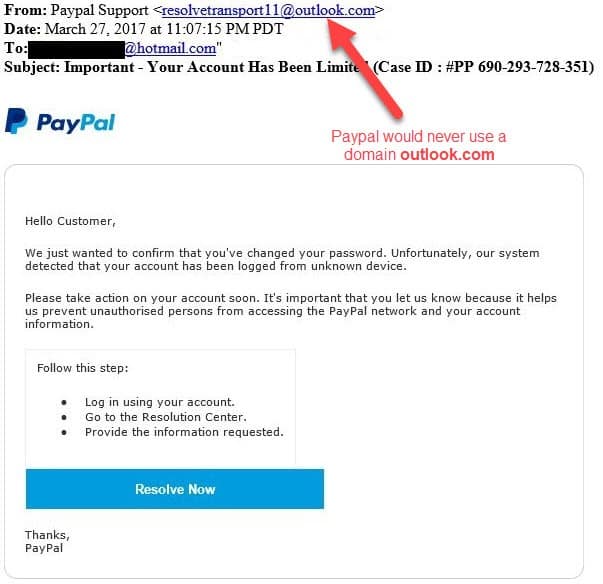
@gmail.com, @outlook.com and @hotmail.com are public domain names. Corporate email accounts usually do not use them. Most companies use their own domain name, such as @example.com.
Public domain names generally belong to personal email accounts. If an email comes from a public domain name but reads like a message from a company, it might be a phishing attack.
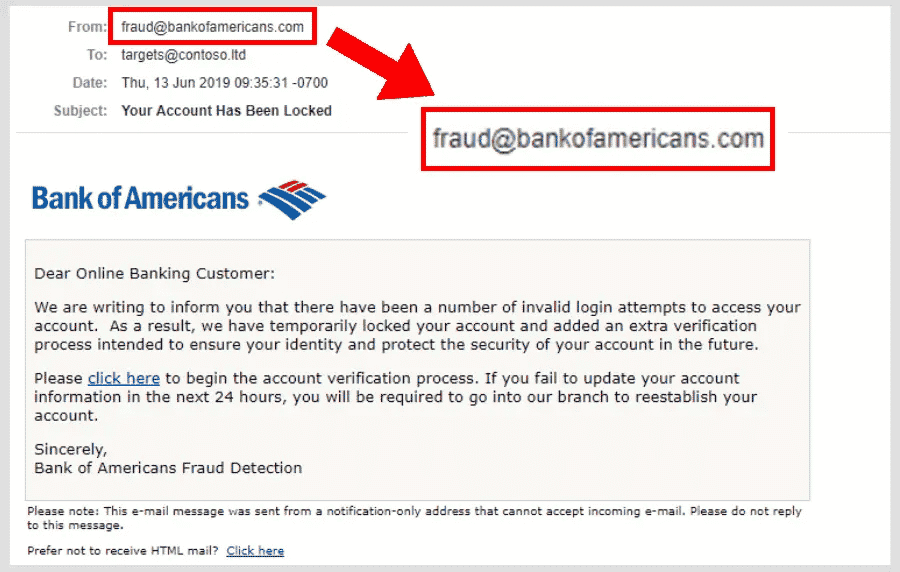
How Do You Spot a Misspelled Domain Name?
Scammers may want to send an email from an account that does not have a public domain name. They may try to imitate the company to be more convincing.
Why Should You Not Log In Through an Email Link?
Be careful when an unexpected email asks you to log in through a link. The link may lead to a fake login page. Go to the website from a new tab and log in there instead.
Do Typos and Poor Grammar Mean an Email Is Phishing?
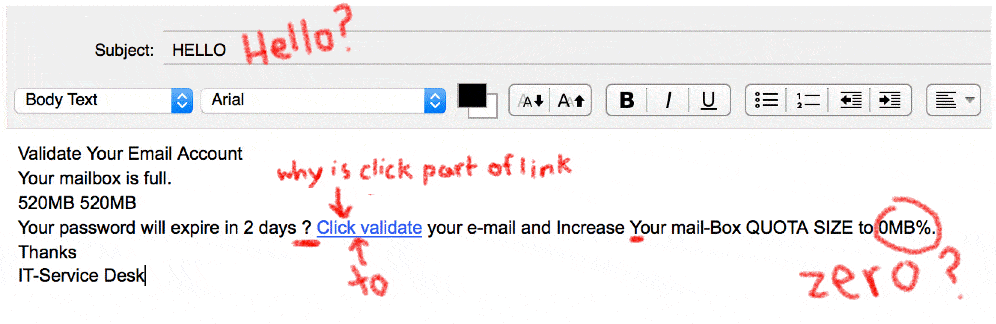
Typos and grammatical errors can be a warning sign. It is not only misspelled words: odd sentence structure and messy formatting count too. If you see them, look for other signs that the email is a lure.
Clean text does not prove an email is safe. AI tools now help scammers write messages without the spelling and grammar mistakes that used to give phishing away.
Uncommon Phrases From Known People
If you have emailed a specific person for a while, you probably know their template of writing (e.g., salutation and valediction). If there is uncommon writing, you should suspect that email.
If the salutation does not contain your name (e.g., Dear Customer, Dear Account Holder, etc.), it must be sent to a lot of receivers. This is suspicious.
How Can You Check Attachments and Links in Phishing Emails?
Do not open the attachment unless you are sure that the source is legitimate. Be especially careful with file types such as .exe and .zip, but any unexpected attachment can carry malware and infect your machine.
An infection may spread to other computers on the same network. It can also steal login credentials, credit card details or company information.
Many legitimate companies point you to their website instead of sending attachments, so treat unexpected attachments with care.
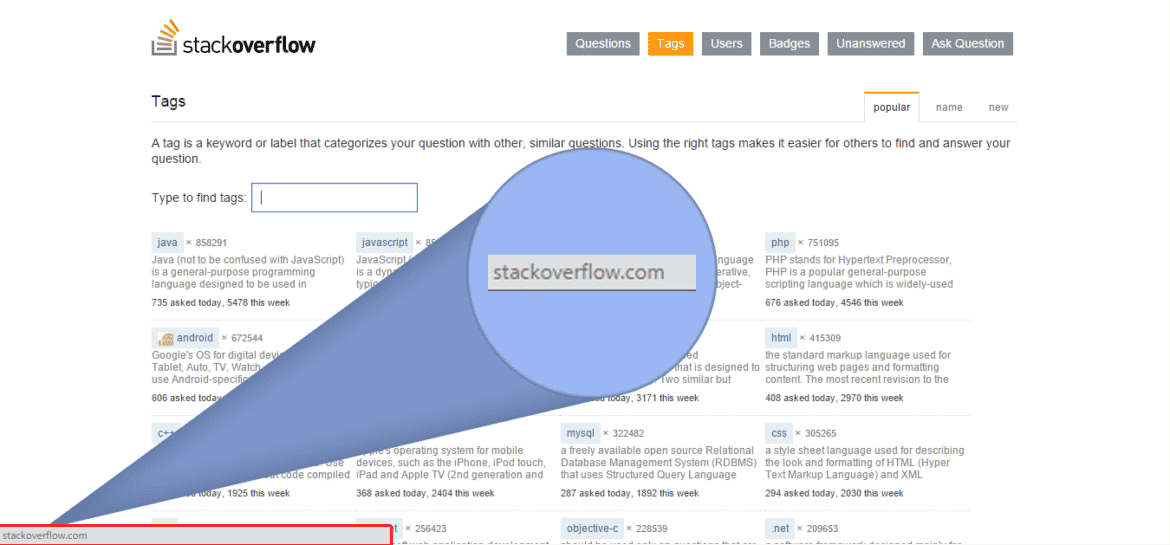
Scammers hide links behind buttons or short links. When you hover your mouse over the link or button, the real address appears at the bottom of your browser window or in a tooltip. Check that it matches the text. On a mobile device, press and hold the link to see the real address in a pop-up.
HTTPS encrypts the connection, but it is not a sign that a site is legitimate. It only means others cannot easily read the data sent between you and the site. The FBI warns that phishing sites often use HTTPS and the lock icon too, so do not trust a link because of them.
Why Do Phishing Emails Create Urgency?
Scammers create a fake urgency so that you do not have time to think if that email came from a legitimate address. Here is an example of such an email.
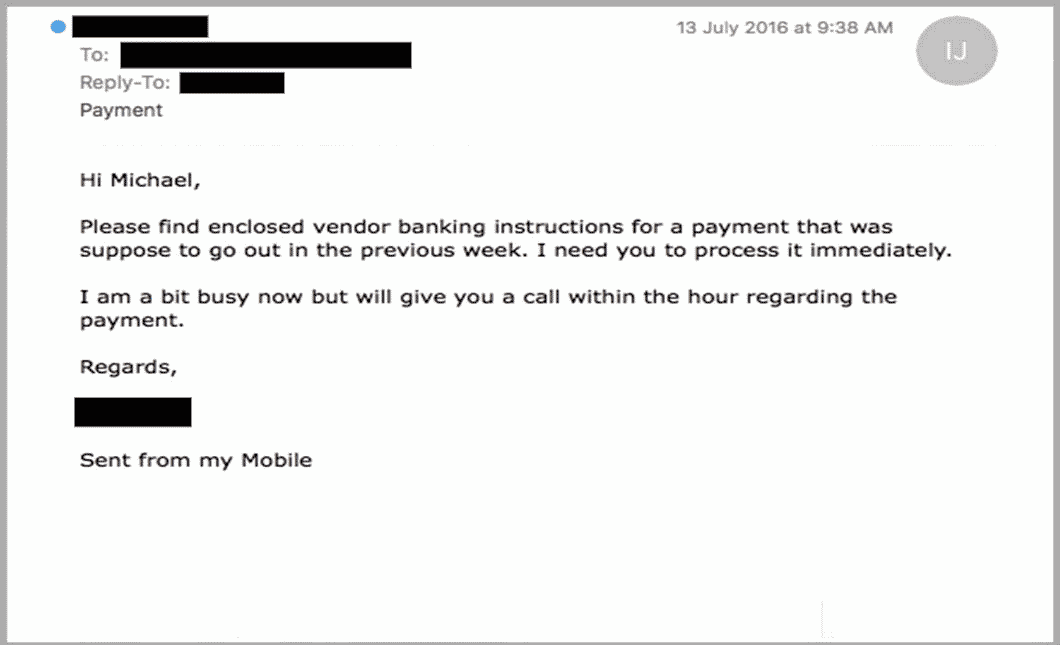
Employees could be shy about verifying the email, especially if it comes from their boss. Companies should understand the reason why their employee request verification, and sometimes, they should even congratulate their employee for their caution.
Awards and Gifts
Another suspicious email content is that scammers might want you to believe that you gained an award. There would be a link to gather the award, but it is probably dangerous. Do not rush into getting the award.
There could also be gifts that some marketing companies offer you. These fake awards and gifts try to make you surprised so that you will not suspect them.
Do not forget! Scammers are likely to make you surprised or feared so that you will not have time to suspect them.
Signatures
Some companies’ employees have a specific signature that indicates that the email is coming from a legitimate source. If the signature is different or does not exist at all, there must be something suspicious. Contact that person to verify the email source.
| Check | Normal | Suspicious |
|---|---|---|
| Greeting | Uses your name | Dear Customer or Dear Account Holder |
| Attachments | Companies point you to their website | May hold malware and spread across the network |
| Login | You open the website in a new tab | The email asks you to log in via a link |
| Signature | Matches the person’s usual one | Different or missing |
What to Do with Suspicious Emails?
Suspicious emails are part of daily life for most people. Many of them are phishing scams that try to steal personal and sensitive information, such as credit card details and email passwords.
Stolen data can lead to financial loss and other harm. To protect yourself, learn the signs of a phishing email and follow a few simple habits.
A phishing email often shows telltale signs. It may ask for personal information, push you to act at once, or carry suspicious links or attachments. Employees who know these red flags are much harder to fool.
Training helps employees understand the risks. It should teach a few habits: do not click suspicious links, do not open suspicious attachments, and report suspicious emails to the IT or security team.
Employees should report phishing emails by forwarding them to the IT or security team. Email filters and these reports deal with the messages themselves.
Phishing monitoring works outside the inbox. It watches the internet for lookalike domains and fake sites that copy your brand, so they can be taken down.
- Do not click links or open attachmentsUnless you are sure the source is legitimate.
- Verify the requestContact the person or company to confirm it.
- Report itForward it to the IT or security team.
Digital Risk Protection and Cyber Threat Intelligence, two parts of the Brandefense platform, help companies find phishing sites and lookalike domains that target their brand. They also show the campaigns behind them.
How to Avoid Phishing Emails?
The first step in avoiding phishing emails is knowing how to detect them. Look at the sender’s address, the tone of the message, and any links or attachments, as described above.
Simple awareness tips help too. Be cautious with emails from unknown senders and with messages that seem too good to be true. Avoid suspicious links, never open attachments from unknown senders, and check the sender’s email address carefully.
Another way to fight phishing emails is to report them. Reporting them to the IT or security team, or to law enforcement, can help prevent others from falling victim to the same scam.
For companies, phishing monitoring can catch a lookalike domain at registration, often before the fake page goes live. Read why companies monitor for phishing sites for more.
Before you click, check the sender’s domain, the greeting, the links and any attachment. Forward anything suspicious to your IT or security team.
Related guide: Phishing 101