Right now, while your development team is maintaining your legitimate mobile application, someone else may already be publishing a copy of it. Same logo. Same interface. Same name. Same store listing screenshots. Different developer. Different code — and a completely different purpose: to steal your users’ credentials, intercept their financial transactions, and harvest their personal data, while your brand takes the reputational hit.
Mobile app impersonation has become one of the most operationally straightforward and financially rewarding attack vectors available to cybercriminals. It requires no zero-day exploit, no network intrusion, and no technical sophistication beyond the ability to repackage an existing application and submit it to an app store with stolen branding. The attacker does not need to breach your infrastructure — they only need your users to make a single download mistake.
This blog breaks down what fake mobile apps are, how attackers build and distribute them, what they steal, and how organizations can detect and remove them before users become victims.
| 83% of mobile apps face active attacks — a 20% YoY increase | 196% increase in banking trojan attacks on smartphones | 280+ fake apps deployed in a single 2024 mobile malware campaign (Source: McAfee) | 65% of consumers blame the brand — not the attacker — when fake app fraud occurs |
What Is a Fake Mobile App?
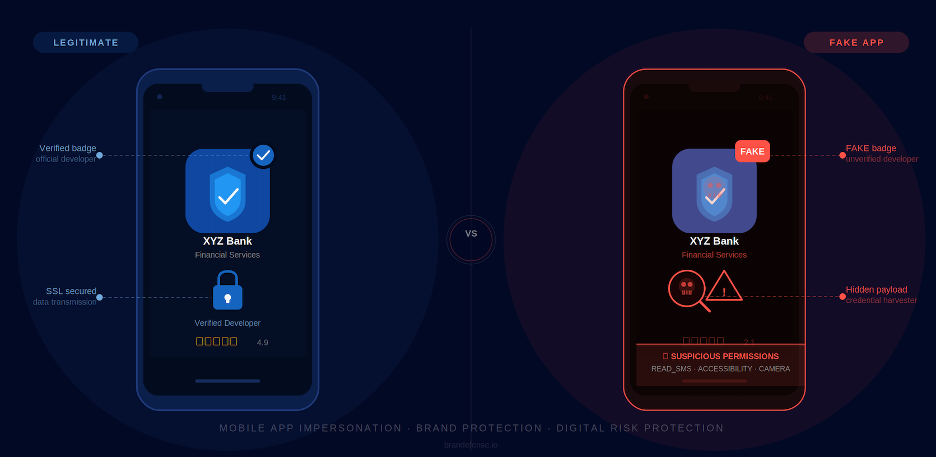
A fake mobile app — also called a rogue app, clone app, or repackaged app — is a malicious application engineered to impersonate a legitimate brand. It replicates the visual identity of the original application: the icon, the name, the UI layout, the splash screen, and often even the core functionality. From the user’s perspective, downloading the fake app looks and feels exactly like downloading the real one.
The critical difference lies in what happens behind the interface. While the legitimate app connects to authorized servers and handles user data according to defined privacy policies, the fake app routes credentials, session tokens, financial data, and personal information to attacker-controlled infrastructure. In many cases, the fake app even proxies the real app’s functionality — the user believes everything is working correctly while their data is being exfiltrated in the background.
The Three Core Types
Not all fake mobile apps are built the same way. Security researchers categorize them into three primary archetypes based on their construction and purpose:
| App Type | How It Is Built | Primary Goal |
| Repackaged App | Legitimate APK decompiled, malicious code injected, re-signed with new certificate and re-uploaded | Credential theft, banking trojan delivery, surveillance |
| UI Clone App | New app built from scratch to visually replicate the target — same layout, same colors, same branding | Phishing login credentials, harvesting PII, payment data |
| Typosquat App | Registered under near-identical name (e.g. ‘Brandefense’ vs ‘Branddefense’) with copied assets | Organic app store discovery by confused users, brand traffic hijacking |
📱 Both Platforms Are Targeted While Android’s open APK distribution model makes it easier to distribute malicious apps outside official stores, iOS is not immune. Attackers exploit Apple’s TestFlight beta distribution platform, enterprise certificate provisioning profiles, and PWA (Progressive Web App) delivery to bypass App Store review processes and install rogue apps on iOS devices.
How Is a Fake Mobile App Built? The Technical Anatomy of a Clone Attack
Understanding how attackers construct fake apps is essential for building effective detection. The process is more industrialized than most organizations realize — and it requires significantly less technical skill than it did five years ago.
Step 1: Target Selection and Asset Harvesting
The attack begins with reconnaissance. The attacker identifies a target application — typically one with a large user base, financial functionality, or high brand trust. They then download the legitimate app and begin harvesting visual assets: the app icon, splash screen, color palette, typography, and UI component layouts. All of this is publicly visible in the app store listing and extractable from the APK or IPA binary.
Step 2: APK Decompilation and Code Injection (Repackaging Attack)
For a repackaged app, the attacker uses freely available reverse engineering tools to decompile the legitimate APK into readable source code. They inspect the code structure, identify the authentication and network communication modules, and inject malicious payloads — typically credential harvesters, keyloggers, overlay engines, or RAT (Remote Access Trojan) components.
The modified APK is then recompiled and re-signed with a new certificate. Since the original developer’s certificate is no longer attached, the app store’s verification checks treat it as a new submission from a new developer which it technically is. The malicious payload travels inside what appears to be a standard app.
⚠️ The Janus Vulnerability — APK Signatures Bypassed On Android versions 5.0 to 8.0, a vulnerability known as Janus (CVE-2017-13156) allows attackers to prepend malicious code to a legitimate APK without invalidating the original v1 signature. The modified app installs and passes signature verification — while executing injected malicious code. This technique was observed in active fake app campaigns as recently as 2024.
Step 3: Permission Abuse — The Red Flags Users Ignore
After installation, the fake app’s primary mechanism for data collection is an aggressive permission request. Unlike the legitimate app, which requests only the permissions required for its documented features, the fake app requests a broad set of Android permissions that provide access to nearly every data source on the device.
Android’s permission model is designed to be transparent — every permission the app requests must be declared in the AndroidManifest.xml file and presented to the user before being granted. In theory, this gives users visibility and control. In practice, users confronted with a familiar interface and a trusted brand name grant permissions reflexively, without reading the implications. The fake app’s visual identity is specifically designed to neutralize this friction.
The following table breaks down the most commonly abused permissions in fake mobile app campaigns, explaining not just what each permission does but how attackers operationalize it:
| Android Permission | What It Grants | How Attackers Weaponize It |
| READ_SMS / RECEIVE_SMS | Read and intercept all incoming SMS messages in real time | OTP and 2FA codes sent via SMS are intercepted before they reach the user. The attacker receives the code, authenticates to the target account, and the victim never sees a prompt — the code arrives and is silently consumed by the malicious app. |
| BIND_ACCESSIBILITY_SERVICE | Full programmatic control over the device UI: read any on-screen text, simulate taps and gestures, navigate between apps | The most dangerous permission in the fake app arsenal. Used to execute overlay attacks (draw fake login screens over real apps), perform automated in-app actions (transfer funds, approve transactions), read on-screen OTPs from authenticator apps, and bypass in-app security measures that check for user interaction. |
| SYSTEM_ALERT_WINDOW | Draw UI elements (windows, dialogs) on top of any other running app | Enables overlay phishing: renders a pixel-perfect replica of a banking or payment login screen over the legitimate app. The user believes they are interacting with the real app. Credentials and OTPs are captured at entry and transmitted to C2 before the overlay dismisses and hands control back. |
| READ_CONTACTS / READ_CALL_LOG | Full access to the device address book and complete call history | The contact list is exfiltrated to attacker infrastructure and used as a targeting list for follow-on smishing campaigns. Because messages arrive appearing to come from a known contact’s number, victims in the contact network are significantly more likely to engage. |
| REQUEST_INSTALL_PACKAGES | Silently prompt for and install additional APK packages without user interaction | Enables dropper behavior: the initial fake app installs a secondary, more capable malware payload after gaining device trust. This two-stage model allows the initial app to pass automated store review while the dangerous payload is downloaded after installation. |
| READ_PHONE_STATE | Access the device’s IMEI, SIM card identifiers, phone number, and network state | The IMEI and SIM identifiers are used to support SIM swap attacks and to create a persistent device fingerprint for tracking victims across credential rotation. Attackers with IMEI data can impersonate the device in carrier interactions. |
| CAMERA / RECORD_AUDIO | Activate the front and rear cameras and microphone at any time, including when the app is in the background | Enables real-time covert surveillance. More commonly used in targeted espionage campaigns than in mass-distribution fake apps, but increasingly observed in banking trojan families that capture the victim’s face for biometric bypass attempts on financial platforms. |
| WRITE_EXTERNAL_STORAGE / READ_EXTERNAL_STORAGE | Read and write to the device’s shared storage including the photo library, downloads, and document folders | Used in combination with OCR capabilities (as observed in the SpyAgent 2024 campaign) to scan the photo library for screenshots containing passwords, seed phrases, or identity documents. Files of interest are silently copied to attacker infrastructure. |
🔎 The Dangerous Combination: BIND_ACCESSIBILITY_SERVICE + READ_SMS Individually, each of these permissions is capable of significant damage. Together, they form a complete MFA bypass chain: READ_SMS intercepts OTP codes delivered via text, while BIND_ACCESSIBILITY_SERVICE intercepts OTP codes delivered through on-screen authenticator apps. An attacker with both permissions can bypass every form of SMS-based and app-based two-factor authentication without any interaction from the victim.
There is no legitimate reason for a banking or finance app to require BIND_ACCESSIBILITY_SERVICE, REQUEST_INSTALL_PACKAGES, or RECORD_AUDIO. Legitimate apps document their permission requirements in their privacy policies and app store listings. Any app that requests permissions inconsistent with its stated functionality is exhibiting a high-confidence indicator of malicious intent — and should be treated as such.
📋 The Permission Audit Test Security teams and end users can apply a simple permission audit before installing any app: compare the permissions requested during installation against the permissions documented in the official app store listing. Any undocumented permission — especially BIND_ACCESSIBILITY_SERVICE, REQUEST_INSTALL_PACKAGES, or READ_SMS — is a strong indicator that the app is not what it claims to be.,
Step 4: The Overlay Attack — Stealing Credentials at the Moment of Entry
The most technically sophisticated capability deployed by fake mobile apps is the overlay attack. Using the BIND_ACCESSIBILITY_SERVICE or SYSTEM_ALERT_WINDOW permission, the malicious app monitors for the launch of targeted legitimate apps — banking applications, payment platforms, corporate SSO — and renders a pixel-perfect replica of their login screens on top of them.
The victim sees what appears to be their bank’s login page. They enter their credentials. The credentials are captured by the overlay and sent to the attacker’s command-and-control server. The overlay then dismisses itself and hands control back to the real application — which proceeds with the login normally, giving the victim no indication that anything occurred.
🔴 Why Overlay Attacks Bypass 2FA Overlay attacks are designed to capture credentials at the exact moment they are entered — including OTP codes delivered by SMS or authenticator apps. The attacker’s server receives both the password and the one-time code in real time, with enough time to authenticate before the OTP expires. This is a fully MFA-bypassing technique that operates entirely within the legitimate app’s own session flow.
How Is a Fake Mobile App Distributed? The 5 Primary Delivery Channels
Getting a malicious app onto a victim’s device requires distribution. Attackers have developed a multi-channel delivery ecosystem that exploits both technical weaknesses in app store review processes and the psychological trust users place in familiar brand names.
| 1 | Official App Store Submission — The Most Trusted Channel Attackers submit rogue apps directly to the Google Play Store and Apple App Store using stolen developer accounts or newly registered accounts with clean histories. They exploit gaps in automated review processes by initially submitting a clean version of the app, then updating it with malicious functionality after it passes review. App store vetting catches many but not all malicious submissions — and the trust signal of appearing in an ‘official’ store dramatically increases download rates. |
| 2 | Third-Party App Stores — Unvetted and High-Volume Dozens of third-party Android marketplaces operate with minimal or no security review. These platforms are particularly effective in regions where official store access is restricted or unreliable. A single malicious APK can be listed across multiple third-party stores simultaneously, generating thousands of installs before detection. |
| 3 | Phishing and Smishing Campaigns — Targeted Delivery Spear-phishing emails and SMS messages (smishing) direct targeted victims to fake download pages that visually replicate official app store listings. The URL contains a slight variation (brandefence.io, br4ndefense.com), the page renders perfectly on mobile browsers, and the download button delivers a direct APK install. Users who arrive via a trusted-looking link rarely check the URL carefully. |
| 4 | Paid Search Ads and Social Media Promotion — Reaching Unsuspecting Users Threat actors run paid advertising campaigns using the legitimate brand’s trademark terms as keywords. When a user searches for the app in a mobile browser, the first result is an advertisement pointing to the attacker’s download page. This technique is particularly effective against less technical users who trust search result positioning as a proxy for legitimacy. |
| 5 | QR Code Substitution — Physical World Attack Surface In environments where QR codes are used for app installation (onboarding kiosks, printed marketing materials, product packaging), attackers substitute the legitimate QR code with one that points to a malicious APK. The user scans what appears to be an official QR code in a trusted physical context — bank branch, retail store, conference — and installs a clone app without awareness. |
Real-World Case Study: 280 Fake Apps, One Campaign, Thousands of Victims
Source: McAfee
In September 2024, security researchers disclosed an active Android malware campaign that had deployed more than 280 fake applications since January of that year. The campaign targeted users primarily in South Korea and the United Kingdom, with evidence of expansion toward additional markets. The malware family, designated SpyAgent, was distributed through a network of deceptive websites and SMS phishing campaigns that impersonated trusted institutional brands — banking services, government agencies, utility providers, and streaming platforms.
The campaign’s defining innovation was its use of optical character recognition (OCR) technology to harvest cryptocurrency mnemonic recovery keys directly from device photos. When users stored seed phrases — the backup keys for cryptocurrency wallets — as screenshots in their photo library, SpyAgent automatically extracted and transmitted them to attacker-controlled servers. This turned what appeared to be a simple credential-harvesting campaign into a direct cryptocurrency wallet draining operation.
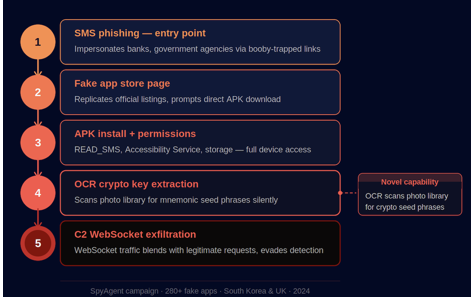
The operational structure of the SpyAgent campaign is instructive for understanding how modern fake app attacks are industrialized:
| 1 | Phishing Entry Point – Brand Impersonation Victims received SMS messages impersonating banks, government ministries, and utility companies. The messages contained links to deceptive websites that replicated official app store listing pages in high fidelity. The fake listing pages featured the impersonated brand’s official logo, app screenshots, and star ratings. |
| 2 | APK Delivery — Outside Official Store Review Rather than submitting to official stores and risking automated detection, the campaign delivered malicious APK files directly via browser download. The landing pages were optimized for mobile browsers, with download prompts that guided users through enabling third-party installation. |
| 3 | Permission Harvesting — Comprehensive Device Access Upon installation, SpyAgent requested SMS access, contact list access, device storage access, and camera access — the full permission set required for credential interception, OTP capture, and photo library scanning. Users, believing they had installed a legitimate institutional app, granted the permissions. |
| 4 | OCR-Based Crypto Key Extraction — Novel Capability The malware scanned every image in the device’s photo library, applying OCR to extract text from screenshots. Any text matching patterns associated with cryptocurrency mnemonic phrases (12-24 word sequences) was flagged and transmitted to the C2 server in real time. Victims who had photographed their wallet seed phrases lost their cryptocurrency holdings without any additional attacker interaction. |
| 5 | C2 Communication — WebSocket Upgrade for Evasion Initially, the campaign used standard HTTP for command-and-control communication — a pattern easily detected by network security tools. The campaign was later observed upgrading to WebSocket-based C2 communication, enabling real-time bidirectional data exchange that blends with legitimate web traffic and evades HTTP-based detection signatures. |
| 280+ Fake apps deployed in a single campaign | 2 Countries actively targeted (Korea + UK) with expansion in progress | 9 mo Campaign active duration before public disclosure — January to September 2024 |
💡 What This Case Demonstrates SpyAgent illustrates that fake app campaigns are no longer ad hoc operations. They are sustained, multi-phase campaigns with specific brand targets, industrialized APK delivery infrastructure, evolving evasion techniques, and novel data theft capabilities. A single campaign can deploy hundreds of unique fake apps simultaneously — each tailored to a different brand, a different sector, or a different geography.
What Do Fake Mobile Apps Actually Steal?
The data exfiltrated by a fake mobile app depends on the permissions granted, the capabilities injected into the malicious code, and the attacker’s operational objectives. The following table maps the most commonly harvested data types to their downstream use in the criminal ecosystem:
| Data Type Stolen | Collection Mechanism | Criminal Use |
| Login credentials | Fake login overlay replicated over legitimate app | Account takeover (ATO), credential stuffing, dark web sale |
| OTP / 2FA codes | READ_SMS permission intercepts authentication SMS | MFA bypass, real-time account takeover |
| Banking session tokens | Overlay attack captures post-authentication session | Unauthorized transfers, fraud transactions |
| Cryptocurrency seed phrases | OCR scanning of photo library for mnemonic sequences | Immediate wallet drain — irreversible loss |
| Contact lists | READ_CONTACTS harvests entire address book | Targeted smishing, social engineering of victim’s network |
| Corporate SSO tokens | Session capture after legitimate authentication completes | Enterprise access, data exfiltration, ransomware staging |
| Device identifiers (IMEI) | READ_PHONE_STATE permission captures device fingerprint | SIM swap attacks, account takeover using device identity |
| Screen content | MediaProjection API or Accessibility Service screen reader | Real-time credential capture, OTP interception, surveillance |
What Is the Business Impact? Beyond the Stolen Data
Organizations often underestimate the collateral damage from mobile app impersonation, focusing exclusively on the direct financial fraud rather than the longer-term business consequences.
Reputational Damage — The Brand Carries the Cost
When a user downloads a fake version of your app and has their credentials stolen or their bank account drained, they do not immediately conclude that a third-party attacker built a clone. They conclude that your app compromised their data. Industry research consistently shows that the majority of consumers hold the impersonated brand responsible for fraud that occurs through fake app attacks — not the attacker, and not the app store platform.
This translates directly into customer churn, negative reviews that affect organic app store discovery, and increased customer acquisition costs as former customers are reluctant to re-engage. For financial services organizations and regulated industries, it also triggers regulatory scrutiny and potential compliance exposure.
Platform Trust Erosion — The App Store Rating Effect
Fake apps that successfully impersonate your brand in official app stores accumulate reviews and ratings alongside your legitimate listing. Victims who experienced fraud leave negative reviews — on your genuine app. When the fake app is eventually removed, the review trail it generated continues to surface in search results, damaging the perception of your legitimate product. This effect is particularly pronounced when the fake app achieves significant download volume before detection.
Downstream Attack Surface — Your Users Become Attack Vectors
Contact lists harvested from compromised devices are used to send smishing messages to the victim’s known contacts — friends, colleagues, family members — using the victim’s real identity as a trust signal. A single fake app infection does not affect only the direct victim; it expands the attacker’s targeting surface to everyone in that user’s contact network. For enterprise users, this creates a pathway from a personal device compromise to a corporate network intrusion.
| 📊 The 65% Attribution Problem Research shows that 65% of consumers hold the brand – not the attacker – responsible when fake app fraud occurs while impersonating that brand. This creates a direct financial liability for organizations that fail to proactively monitor for and remove rogue apps: customer lifetime value loss, increased fraud investigation costs, and regulatory exposure are all attributable to a security failure the organization may not even know has occurred. |
How to Detect If Your Brand Is Being Impersonated in App Stores
Most organizations discover fake mobile app attacks reactively — a customer complaint, a news article, a social media post from a victim. By that point, the app may have been live for weeks or months, generating thousands of installs. Proactive detection requires systematic monitoring across multiple surfaces:
App Store Monitoring — The Obvious Starting Point
Search your brand name, product name, and common misspellings in both the Google Play Store and the Apple App Store on a regular basis. Filter results by developer identity — any listing that uses your brand name or app icon but is not published under your registered developer account is a potential rogue app. Pay particular attention to listings with recent publication dates, zero reviews, or suspiciously large claimed download numbers.
Third-Party Marketplace Coverage — The Critical Gap
Official app store monitoring alone is insufficient. The majority of malicious fake app distribution occurs through third-party marketplaces, regional stores, and direct APK hosting sites. A comprehensive detection capability must cover dozens of alternative distribution channels — from regional Android stores to APK file hosting platforms — where malicious apps operate with minimal oversight and maximum distribution speed.
Certificate and Hash Monitoring — Technical Identity Verification
Every legitimate app binary is signed with a specific developer certificate. A repackaged app, by definition, carries a different certificate. Monitoring for APKs that share your app’s package name, interface assets, or code structure but are signed with unauthorized certificates is one of the most reliable technical indicators of a repackaging attack. This requires access to binary analysis tools or a threat intelligence platform with mobile threat feeds.
Phishing Infrastructure and Domain Monitoring
Fake app distribution campaigns are supported by phishing infrastructure: deceptive download pages, SMS campaign domains, and fraudulent social media advertisements. Monitoring for newly registered domains that incorporate your brand name or trademark, as well as social media accounts that impersonate your brand and promote app downloads, provides early-warning signals before an active campaign reaches significant scale.
Dark Web and Underground Forum Intelligence
Malicious APKs are frequently advertised, distributed, and traded in underground forums before or alongside their public distribution. Threat intelligence coverage of dark web marketplaces and cybercriminal communities provides visibility into campaigns targeting your brand that have not yet surfaced in app stores or phishing pages — enabling preemptive takedown action before the first user is compromised.
🔍 Detection Is Not Removal Detecting a fake app is the first step. Takedown — the formal process of requesting removal from app stores and hosting providers — requires documented evidence of trademark infringement, brand impersonation, or policy violation, submitted through each platform’s intellectual property enforcement process. The window between detection and takedown is when most victims are compromised. Automated detection with pre-prepared takedown workflows is the only way to minimize that window.
How to Defend Against Fake Mobile App Attacks — A 12-Point Security Checklist
Defending against mobile app impersonation requires action at three layers: your own application’s technical hardening, your organization’s external monitoring posture, and your users’ awareness. The following checklist covers all three:
| FOR YOUR APP | |
| ✓ | Implement code obfuscation and anti-tampering controls in your app binary — make reverse engineering and repackaging significantly more time-consuming and technically demanding for attackers |
| ✓ | Implement runtime application self-protection (RASP) to detect modified or repackaged versions of your app at runtime and refuse to execute |
| ✓ | Use certificate pinning for all API communications — a repackaged app cannot replicate your original certificate, making its network traffic immediately distinguishable |
| ✓ | Publish your app’s official SHA-256 hash and certificate fingerprint in your security documentation — enabling technically sophisticated users to verify authenticity |
| FOR YOUR MONITORING POSTURE | |
| ✓ | Establish continuous monitoring coverage across official and third-party app stores, not just the Google Play Store and Apple App Store |
| ✓ | Monitor newly registered domains incorporating your brand name or trademark terms as early-warning indicators for upcoming phishing campaigns |
| ✓ | Include mobile threat intelligence in your CTI program — underground forum monitoring for APK sales or distribution campaigns targeting your brand |
| ✓ | Establish pre-approved takedown workflows with app stores and hosting providers to minimize the response window once a fake app is detected |
| FOR YOUR USERS | |
| ✓ | Publish a clear ‘Download Our App’ page on your official website with direct links to your verified store listings — give users a trusted reference point |
| ✓ | Include app security guidance in customer communications: how to identify your official app, what developer name to expect, and how to report suspicious apps |
| ✓ | Alert users immediately when a fake app targeting your brand is detected — proactive communication reduces victim count and preserves customer trust |
| ✓ | Implement anomaly detection for your platform’s authentication layer to identify credential stuffing patterns that indicate stolen credentials from fake apps are being weaponized |
How Brandefense Detects and Removes Fake Mobile Apps
Brandefense’s Digital Risk Protection platform is built around the premise that external threats — those operating outside your own infrastructure — are among the most dangerous and the least visible. Fake mobile app attacks are a textbook example: they operate entirely in the attacker’s environment, using your brand as a weapon, while your internal security tools have no visibility into them.
Brandefense addresses this blind spot through a multi-layer detection and response capability spanning 36+ analysis mechanisms and 13,000+ active security controls:
| Brandefense Capability | What It Detects / What It Does |
| App Store Monitoring | Continuous scanning of 200+ official and third-party app stores for listings using your brand name, logo, or package name variants |
| Rogue APK Detection | Binary-level analysis of APKs that share your app’s UI assets, package name structure, or code signatures without matching your official certificate |
| Phishing Infrastructure Intelligence | Detection of newly registered domains and SMS campaigns used to distribute fake app download pages impersonating your brand |
| Dark Web App Listing Alerts | Monitoring of underground forums and marketplaces where malicious APKs are sold, traded, or advertised targeting your brand |
| Social Media Impersonation | Identification of fake social accounts promoting unauthorized app downloads using your brand identity |
| Automated Takedown Workflow | Pre-approved takedown request submission to app stores and hosting providers — minimizing the detection-to-removal window |
| 24/7 Continuous Monitoring | All capabilities operate around the clock, with analyst escalation for high-severity detections requiring immediate response |
Fake mobile app attacks do not wait. A malicious app can accumulate tens of thousands of installs in its first 48 hours — especially when promoted via paid advertising or active SMS campaigns. The window between launch and detection is the window in which your users are most at risk. Continuous, automated monitoring is the only defense that operates at the same speed as the attack.