
A tabletop exercise is a talk-through of an incident: a facilitator reads a scenario and feeds in new facts (injects) on a timer, and the team says what it would decide and do. This free kit gives you how-to-run steps, a scoring table and six scenarios built on external signals: lookalike domains, leaked credentials, brand impersonation, data leaks, ransomware leak-site listings and supplier exposure.
- Start from two or three objectives and a 90 minute session, not from a long scenario.
- Every scenario here opens with an external signal, so you test how outside warnings turn into decisions.
- Score each decision from 0 to 2 and turn every gap into an action with an owner and a date.
- Run it again after the fixes. A repeat shows whether the gaps closed.
Maps to
- CISA Tabletop Exercise Packages (CTEP) Objectives, scenarios, discussion questions and after action reporting
- NIST SP 800-84 Design, develop, conduct and evaluate exercises
- ENISA Cybersecurity Exercise Methodology Plan, run and evaluate a cybersecurity exercise
- NIST SP 800-61 Rev. 3 Incident response in cybersecurity risk management (April 2025)
- CISA #StopRansomware Guide Scenario 5 reference
- MITRE ATT&CK T1566 Phishing and T1078 Valid Accounts
What Do These Tabletop Exercise Scenarios Contain?
This kit has everything to run a discussion-based exercise in one sitting: a planning table, roles, ground rules, a time plan, six scenarios with timed injects, and a scoring and after-action table. An inject is a new fact the facilitator reads out at a set time, so the team has to react to a changing story.
The structure follows public guidance. CISA publishes CISA Tabletop Exercise Packages, which bundle objectives, scenarios, discussion questions, slide decks and after action report templates. NIST SP 800-84 covers how to design, develop, conduct and evaluate test, training and exercise events for IT plans (NIST SP 800-84, September 2006). ENISA’s Cybersecurity Exercise Methodology (February 2026) describes planning, running and evaluating exercises end to end. Use them for depth. This kit adds the external-threat side: the scenarios start from signals found outside your network.
The external signal is the first inject in every scenario. It is a lookalike domain, a leaked login, a fake account, a forum post, a leak-site listing or a supplier alert. Each scenario links to the matching how-to-respond page so the team can compare its answer with a written one.
Pair this kit with the incident response plan template and the ransomware response playbook and checklist. A tabletop is the cheapest way to find the holes in both.
How Do You Plan The Exercise?
Start with what you want to learn, not with a scenario. Write two or three objectives, say how you will see each one, and keep the exercise small enough to finish.
| Objective | How we will see it | Target |
|---|---|---|
| [Example: we can confirm and escalate an external alert quickly] | [Time from alert to named incident lead] | [__ minutes] |
| [Example: legal and communications know who approves a customer message] | [Name stated without prompting] | [Yes or no] |
| [Objective 2] | [Evidence] | [Target] |
| [Objective 3] | [Evidence] | [Target] |
- Pick the scenario and write the objectives
- Name the facilitator, a note taker and an observer
- Invite the players and one decision maker per area
- Send the plan and ground rules two days before
- Prepare the injects as separate cards or slides
- Book a room and a call line, and set up a shared notes file
- Print or open your incident response plan and contact list
Run no more than one scenario per sitting at first. Each scenario here fits about 60 minutes of play.
Who Plays Which Role, And What Are The Ground Rules?
Players use their real roles. The facilitator and note taker do not play. Write a name next to each role.
| Role and name | What they do |
|---|---|
| Facilitator: [Name] | Reads the scenario and injects, keeps time, asks questions, does not give answers. |
| Note taker: [Name] | Records decisions, times and open questions in the shared file. |
| Observer: [Name] | Watches for gaps against the objectives. Takes part in the review only. |
| Incident lead: [Name] | Plays the person who would run the incident. |
| Security and SOC: [Name] | Plays analysis, containment and evidence. |
| IT and identity: [Name] | Plays access changes, blocking and recovery. |
| Legal and privacy: [Name] | Plays notification, contracts and evidence handling. |
| Communications and support: [Name] | Plays customer, staff and press messages. |
| Executive sponsor: [Name] | Plays the decisions that need leadership. |
Ground rules
- This is a discussion, not a test of people. Mistakes are the point.
- Say what you would really do with the tools and contacts you have today.
- Nothing in the room is live. Do not open real leaked data, contact sellers, or touch real systems.
- The facilitator can pause the clock to ask why. Stay on the inject in front of you.
- Notes are shared with the group, not used for appraisal.
- If you do not know who owns something, write it down. That is a finding.
What Is A Good Time Plan?
A 90 minute session works well for one scenario. Cut the injects, not the review, if you run short.
| Time | Block | What happens | Lead |
|---|---|---|---|
| 0:00 to 0:10 | Welcome | Objectives, roles, ground rules, how injects work. | Facilitator |
| 0:10 to 0:15 | Scene setting | Read the opening situation and the external signal. | Facilitator |
| 0:15 to 1:10 | Play | Read one inject every 10 minutes. Ask for decisions and owners. | Facilitator |
| 1:10 to 1:25 | Hot wash | Each player names one thing that worked and one gap. | Observer |
| 1:25 to 1:30 | Close | Agree owners and dates for the first actions. | Facilitator |
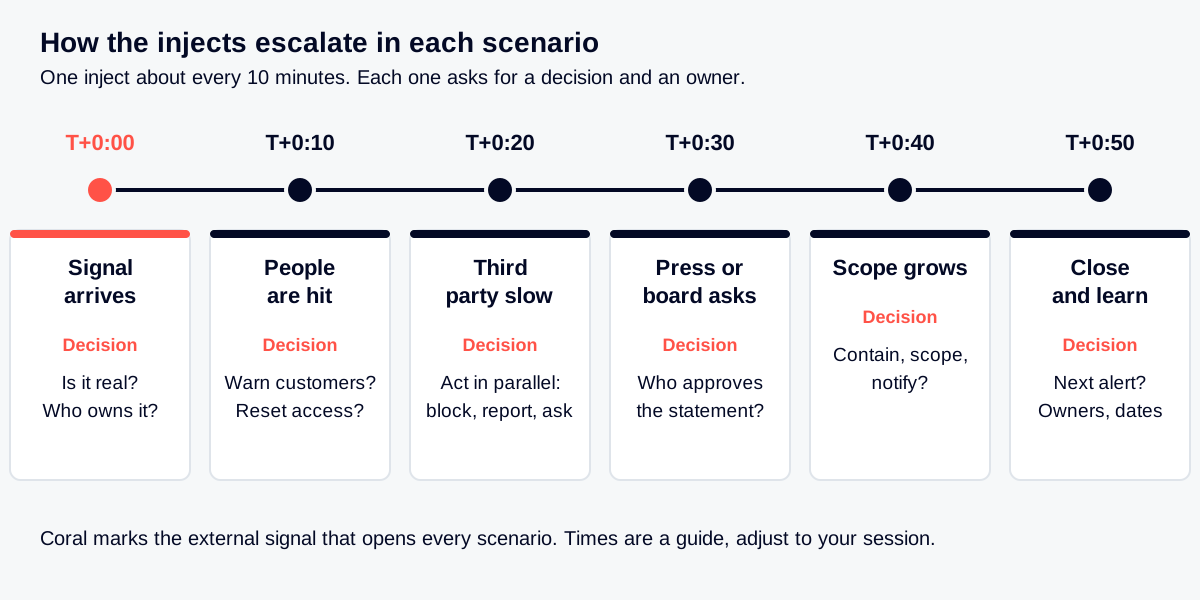
The diagram shows how the injects in each scenario escalate: the signal arrives, customers or staff are hit, a third party answers slowly, press or regulators ask, the scope grows, and the team closes and learns.
Scenario 1: A Lookalike Domain Targets Your Customers.
Objective. Test how fast the team confirms a fake login site, protects customers and starts a takedown, and who owns each step.
Participants. Security lead, SOC analyst, brand or fraud owner, legal, communications, customer support, web or IT, [other].
Where the external signal enters. A brand monitoring alert shows a new domain one character away from yours. It has a valid certificate and a login page that copies yours.
| Time | Inject | Expected decision | Who |
|---|---|---|---|
| T+0:00 | Alert: a domain registered two days ago looks like your brand and serves a copy of your login page. | Confirm it is hostile, open an incident, name an owner and a severity. | Analyst, incident lead |
| T+0:10 | Customer support reports three customers who got a text message with a link to that domain and typed their password. | Decide whether to warn customers now, and through which channel. Start password resets for those accounts. | Support lead, communications, security lead |
| T+0:20 | The domain registrar replies and asks for proof of trademark. The hosting provider has not answered. | Run in parallel: block the domain in mail, web and DNS filters, send evidence to the registrar and host, and involve legal. | Legal, brand owner, IT |
| T+0:30 | A journalist emails to ask about “the phishing campaign against your customers”. | Agree who approves the holding statement and what it can say. | Communications, legal |
| T+0:40 | Mail logs show two employees also opened the link. | Reset passwords, revoke sessions, search for other recipients and sign-ins from the fake page. | IT, analyst |
| T+0:50 | A second lookalike domain appears, hosted at the same provider. | Decide how you will watch for variants and who gets future alerts. Record lessons. | Security lead, brand owner |
Discussion questions
Related technique, confirmed on MITRE ATT&CK: Phishing (T1566).
- Who has the authority to ask a registrar or host to take a domain down, and how long does it take to reach them?
- What do we tell customers, and what do we ask them not to do?
- Which of our own logs show who visited the fake site?
- How do we learn about the next lookalike before customers do?
Compare your answers with: How to respond to lookalike and phishing domains; Phishing and lookalike domains use case; Brand impersonation takedown use case.
Scenario 2: Leaked Credentials And Infostealer Logs For A Privileged Account.
Objective. Test whether a leaked login for an admin account is treated as a live intrusion, not a password reset ticket.
Participants. Security lead, SOC analyst, identity or IT admin, endpoint team, legal or privacy, the account owner, [other].
Where the external signal enters. A threat intelligence alert says an infostealer log lists a work email, password and session cookies for an administrator.
| Time | Inject | Expected decision | Who |
|---|---|---|---|
| T+0:00 | Alert: a stealer log, seen five days ago, lists the admin’s work email, a password and browser session cookies for your single sign-on. | Treat as possible active access. Name an incident lead and open a case. | Analyst, security lead |
| T+0:10 | Identity logs show a sign-in to that account from a country the admin has not visited, two days ago. | Revoke all sessions and tokens, reset the password, check multi-factor settings. Decide whether to disable the account first. | Identity admin, analyst |
| T+0:20 | The admin used a personal laptop. You cannot scan it or collect it today. | Decide how to handle an unmanaged device: block it, ask for it, or isolate the account. | Endpoint lead, security lead |
| T+0:30 | Audit logs show a new API token and a new mailbox rule created last night under that account. | Scope what was reached, remove the token and the rule, rotate related secrets and escalate to the incident response plan. | IT, analyst, incident lead |
| T+0:40 | Legal asks whether personal data was reached and when the notification clock could start. | Record what is known and unknown, and the time you became aware. Agree when legal is updated. | Legal or privacy, incident lead |
| T+0:50 | The same log holds eleven more accounts from your domain. | Sweep the whole list, force resets, and plan phishing-resistant multi-factor for privileged roles. | Identity admin, security lead |
Discussion questions
Related technique, confirmed on MITRE ATT&CK: Valid Accounts (T1078).
- How would we have learned about this log without the alert?
- Which sessions and tokens survive a password reset in our setup?
- Who decides to disable a senior person’s account in the middle of the day?
- What do we do about personal devices that touch company systems?
Compare your answers with: How to respond to infostealer log exposure; How to respond to leaked credentials; How to respond to initial access listings; Leaked credential monitoring use case.
Scenario 3: Brand Impersonation With Fake Social Accounts, A Fake App And Ads.
Objective. Test how the team collects evidence and reports fakes to several platforms at once, and how it speaks to customers while it does.
Participants. Brand or fraud owner, security lead, social media manager, legal, communications, customer support, mobile or web team, [other].
Where the external signal enters. A customer posts a screenshot of a direct message from a “support” account that is not yours.
| Time | Inject | Expected decision | Who |
|---|---|---|---|
| T+0:00 | A customer posts a screenshot: a social account named like your support team is asking people to confirm their card details. | Confirm it is fake, capture evidence (page, handle, date, URL) and report it to the platform. | Social media manager, brand owner |
| T+0:10 | A search ad using your brand name leads to a fake “support” page with a phone number. | Report the ad to the ad platform, add the number and domain to your block and watch lists. | Brand owner, legal |
| T+0:20 | A mobile app with your logo appears in a third-party app store. | Collect the package details, report it to the store and warn customers where the real app lives. | Mobile team, legal |
| T+0:30 | A platform replies that it needs proof you own the trademark and an authorized contact. | Decide who is the authorized reporter and who holds the proof. Send it. | Legal, brand owner |
| T+0:40 | A photo of your CEO is used on another fake account that promotes an investment offer. | Link to executive impersonation handling. Decide whether the executive and the board are told. | Security lead, communications |
| T+0:50 | The fake post has been shared widely and the press asks if it is you. | Publish a short notice on your official channels. Agree on what customers should do. | Communications, support lead |
Discussion questions
If you plan to use a service for the reporting and takedown steps, the Takedown Service Evaluation Checklist lists what to ask.
- Where is the list of our official accounts, domains and apps, and can customers find it?
- Which platforms do we already have a reporting contact for?
- Who signs the trademark and authorization paperwork?
- How do we measure that a fake is gone, not only reported?
Compare your answers with: How to respond to fake social media accounts; How to respond to fraudulent ads using your brand; How to respond to fake mobile apps; Brand impersonation takedown use case.
Scenario 4: A Data Leak Is Posted On A Forum.
Objective. Test how the team checks a seller’s claim, preserves evidence without buying stolen data, and decides on notification and customer messages.
Participants. Security lead, analyst, data or application owner, legal and privacy, communications, customer support, executive sponsor, [other].
Where the external signal enters. A monitoring alert shows a forum post that offers a “customer database” for sale with a small sample.
| Time | Inject | Expected decision | Who |
|---|---|---|---|
| T+0:00 | Alert: a forum post offers your customer data and includes a sample of 1,000 rows. | Preserve the post (screenshots, URL, handle, time). Do not contact or pay the seller. Open an incident. | Analyst, incident lead |
| T+0:10 | The data team checks the sample. Names and email addresses match real customers. Some fields look old. | Decide how you judge freshness and which system the data likely came from. | Data owner, analyst |
| T+0:20 | The seller sets a price and a deadline, and says the data comes from your payment area. | Treat the claim as unproven. Check the payment area and its logs. Decide who speaks to the seller, if anyone. | Security lead, legal |
| T+0:30 | Customers start asking on social media whether their data is out. | Prepare a holding message and a support script. Agree who approves them. | Communications, support lead |
| T+0:40 | Legal asks what you know, what you do not, and when you became aware. | Write the timeline and decide whether and when a regulator or customers must be told. | Legal or privacy, incident lead |
| T+0:50 | A second post says the data came from a supplier. | Open a supplier inquiry in parallel and keep both lines of work on one timeline. | Security lead, supplier owner |
Discussion questions
- Who is allowed to look at a leak site or forum, and on which device?
- Which facts do we need before we tell customers?
- What do we do if the sample is real but we cannot find the breach?
- How do we know the data does not appear again somewhere else?
Compare your answers with: How to respond to leaked databases and source code; Data leak detection use case; Incident reporting deadlines: NIS2, CRA, SEC, CIRCIA.
Scenario 5: Ransomware With A Leak-Site Listing.
Objective. Test the first hours of a ransomware event, including the extra pressure of a public listing and a deadline.
Participants. Incident lead, IT operations, security lead, executive sponsor, legal, communications, HR, finance, insurer contact, [other].
Where the external signal enters. Staff report that files will not open. A ransom note is on several servers.
| Time | Inject | Expected decision | Who |
|---|---|---|---|
| T+0:00 | Files on several servers are encrypted and a ransom note names a contact and a deadline. | Declare an incident. Isolate affected systems without powering off evidence. Start the log. | Incident lead, IT operations |
| T+0:10 | Backups exist, but the backup console is on the same network and shows odd activity. | Protect the backups first. Decide how to check that they are clean before any restore. | IT operations, security lead |
| T+0:20 | A threat intelligence alert shows your name on a ransomware group’s leak site with a countdown and sample files. | Treat the listing as proof that data left the network. Widen the incident to data theft. | Analyst, incident lead |
| T+0:30 | The board asks whether you will pay and what you will say publicly. | Agree who decides, what advice is needed (legal, insurer, law enforcement) and what stays unsaid. | Executive sponsor, legal |
| T+0:40 | The sample files include HR records and customer contracts. | Identify whose data is involved. Start the notification assessment and a plan for affected people. | Legal, HR, communications |
| T+0:50 | Restores are slow, and the business asks which service returns first. | Agree a recovery order, with security sign-off before each system goes back online. | IT operations, executive sponsor |
Discussion questions
For prevention and response steps, see the CISA and MS-ISAC #StopRansomware Guide.
- Who can make the call on payment, and what do they need to know first?
- What do we say to staff, customers and the press while systems are down?
- How would we find out about a listing before the group contacts us?
- What would we do if backups were also encrypted?
Compare your answers with: How to respond to ransomware leak site listings; Ransomware early warning use case; Ransomware response playbook and checklist.
Scenario 6 (Optional): A Supplier Exposure Reaches You.
Objective. Test how the team learns that a supplier was hit, finds what that supplier can reach, and uses the contract to get answers.
Participants. Security lead, third-party risk owner, procurement, the supplier’s business owner, IT, legal, [other].
Where the external signal enters. A monitoring alert shows one of your suppliers on a ransomware leak site.
| Time | Inject | Expected decision | Who |
|---|---|---|---|
| T+0:00 | Alert: a supplier that handles your support tickets appears on a leak site. | Confirm which supplier and which service. Name an owner on your side. | Third-party risk owner, analyst |
| T+0:10 | The supplier has a service account and a VPN connection into your environment. | List what the supplier can reach. Decide whether to suspend access now. | IT, security lead |
| T+0:20 | The supplier says everything is under control and gives no detail. | Use the contract: ask for facts, a timeline and a contact. Decide the deadline for an answer. | Procurement, legal |
| T+0:30 | The listing mentions files that may include your customer tickets. | Decide what you tell customers and when. Prepare to treat it as your own data event. | Legal, communications |
| T+0:40 | A regulator or a large customer asks how you manage supplier incidents. | Show the record you keep: the alert, the actions, the dates. | Risk and compliance, security lead |
| T+0:50 | Procurement asks if you should keep the supplier. | List what you need to see before restoring access. Record the decision and the owner. | Third-party risk owner, procurement |
Discussion questions
If supplier exposure is a gap, the Attack Surface Management Tools buyer’s guide shows what outside-in monitoring can cover.
- Do we know our critical suppliers and what each can reach?
- What does the contract let us demand after a supplier incident?
- How fast can we cut a supplier’s access, and who decides?
- How would we hear about this if the supplier stayed silent?
Compare your answers with: How to respond when a supplier is on a leak site; How to respond to a supplier’s new exposure signal; Supply chain and vendor risk use case; Vendor cyber risk questionnaire template.
How Do You Score The Exercise And Write The After-Action Report?
Score each decision point right after the exercise, while memory is fresh. Use a simple scale, then turn every gap into an action with an owner and a date.
| Score | Meaning |
|---|---|
| 2 | Done well: the right owner decided quickly and the plan or tool supported it. |
| 1 | Partly: the decision was right but slow, or the owner was unclear. |
| 0 | Gap: no decision, no owner, or the plan did not cover it. |
| Inject | Expected decision | Score (0 to 2) | Time to decide | Gap found | Action | Owner | Due |
|---|---|---|---|---|---|---|---|
| [T+0:00 …] | [From the scenario] | [ ] | [__ min] | [Describe] | [Fix] | [Name] | [Date] |
| [T+0:10 …] | [From the scenario] | [ ] | [__ min] | [Describe] | [Fix] | [Name] | [Date] |
| [T+0:20 …] | [From the scenario] | [ ] | [__ min] | [Describe] | [Fix] | [Name] | [Date] |
| [T+0:30 …] | [From the scenario] | [ ] | [__ min] | [Describe] | [Fix] | [Name] | [Date] |
| [T+0:40 …] | [From the scenario] | [ ] | [__ min] | [Describe] | [Fix] | [Name] | [Date] |
| [T+0:50 …] | [From the scenario] | [ ] | [__ min] | [Describe] | [Fix] | [Name] | [Date] |
After-action report outline
- Exercise name, date, scenario, facilitator and players.
- Objectives and whether each was met.
- What went well.
- Gaps, with the inject where each showed up.
- Actions with owners and dates (use the table above).
- Plan or contact-list changes to make.
- Date of the next exercise.
Update your incident response plan with the changes, then repeat the exercise to see if the gaps closed. The CISA Tabletop Exercise Packages include feedback forms and an After Action Report template if your organization needs a formal format.
Sources And Frameworks Used.
Each source below was opened and checked before this page was written. The exercise steps are paraphrased and adapted, not copied.
Questions.
-
What is a tabletop exercise in cyber security?
It is a talk-through of an incident. A facilitator reads a scenario and new facts (injects), and the team says what it would decide and who would do it. No systems are touched.
-
What is an inject in a tabletop exercise?
An inject is a new piece of information the facilitator adds at a set time, such as a customer complaint or a call from the press. It forces the team to decide again as the story changes.
-
How long should a tabletop exercise take?
About 90 minutes suits one scenario: 10 minutes to set up, about an hour of play and 20 minutes to review. Longer sessions need more scenarios or more players.
-
Who should take part in a tabletop exercise?
The people who would act in a real incident: security, IT, legal, communications, customer support and a leader who can make decisions. A facilitator and a note taker stay out of the play.
-
How often should we run a tabletop exercise?
There is no single rule in the sources used here. Many teams run one at least once a year and after a major change to the plan. Pick a schedule you will keep.
-
Can we use this kit for free?
Yes. The page is complete and the DOCX and Markdown files are free with no form. Please keep the attribution (CC BY 4.0).
Free download
Take the editable file
No form and no email needed. Edit it, fill in the brackets and keep it with your other plans. Current version: v1.0 · October 2026.
- Download DOCX 47 KB
- Download Markdown 25 KB
How to cite this
Brandefense. Tabletop Exercise Scenarios with Injects (Free DOCX). v1.0, October 2026. https://brandefense.io/knowledge-hub/guides/tabletop-exercise-scenarios-injects/
Change log
- v1.0 · October 2026 First release.