
A ransomware response playbook is a short set of steps, owners and decisions that your team agrees on before an attack and follows when ransomware hits. This one is built on the CISA #StopRansomware Guide and NIST SP 800-61 Rev. 3. It adds the external part: leak site listings, access listings, stolen logins from infostealer logs and checks on extortion contacts.
- Fill in the contact sheet, restore order and external watch list before an attack, and keep a printed copy.
- In the first hours: isolate, preserve evidence, use an out-of-band channel and triage what to restore first.
- Check outside sources daily during an incident: stealer logs, access listings, leak sites and supplier listings.
- Verify every extortion contact against your own evidence, and route replies through the incident lead and legal counsel only.
- CISA and its partners do not recommend paying. Record who decided what, and on whose advice.
Maps to
- CISA #StopRansomware Guide Part 2 response checklist, October 2023 version, steps 1 to 21 paraphrased across phases 2, 3, 5, 6 and 7
- NIST SP 800-61 Rev. 3 (April 2025) Incident response as part of cyber risk management, lessons learned as improvement
- NIST CSF 2.0 (February 2024) Govern, Identify, Protect, Detect, Respond, Recover
- CISA Tabletop Exercise Packages Practising the playbook
- MITRE ATT&CK T1078 Valid Accounts, T1567 Exfiltration Over Web Service, T1490 Inhibit System Recovery, T1486 Data Encrypted for Impact
What Is In This Playbook And How Do You Use It?
Copy this page into your own incident response plan, fill in every [bracket] and keep a printed copy that does not depend on your network. The tables are meant to be filled in. The numbered steps are meant to be ticked off, with a name and a time next to each.
The order follows the response checklist in the CISA #StopRansomware Guide (Part 2) and the incident response functions in NIST SP 800-61 Rev. 3, which is written around the six functions of NIST CSF 2.0: Govern, Identify, Protect, Detect, Respond and Recover. We paraphrase both. Read the originals for the full detail.
| Phase in this playbook | CISA guide section | Closest CSF 2.0 function (our reading) |
|---|---|---|
| 1. Prepare | Part 1, preparation and prevention | Govern, Identify, Protect |
| 2. Detect and analyze | Detection and Analysis, steps 1 to 6 | Detect |
| 3. Contain | Detection and Analysis, steps 1 and 2, and Containment and Eradication | Respond |
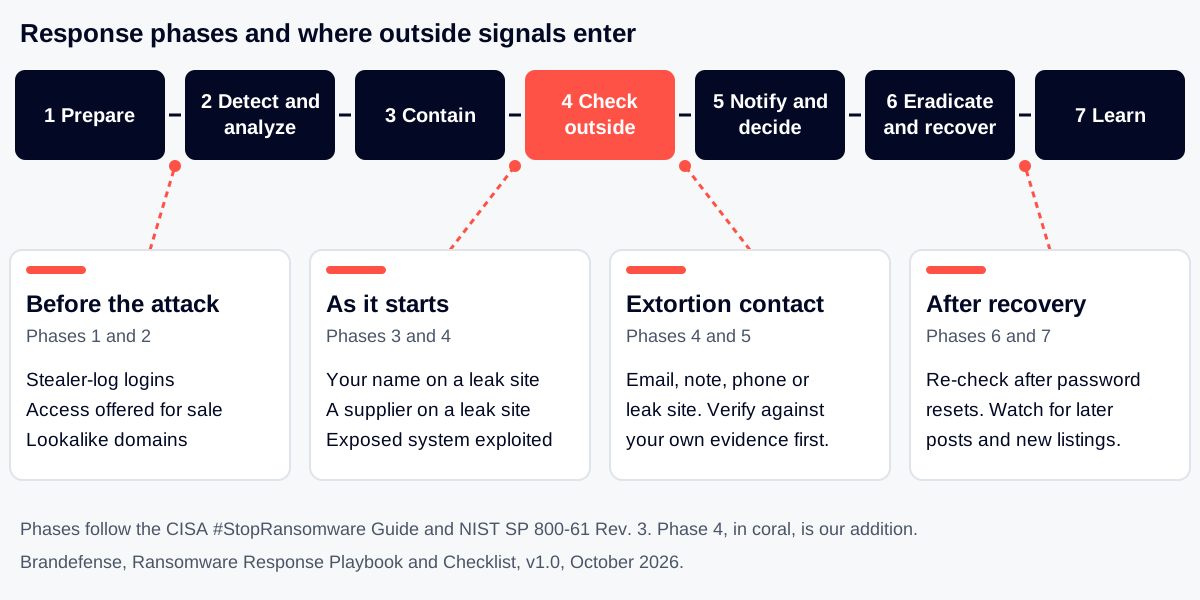
| 4. Check what is known outside | Not in the guide: our addition | Detect, Respond |
| 5. Notify and decide | Reporting and Notification, steps 7 and 8 | Respond |
| 6. Eradicate and recover | Containment and Eradication, then Recovery | Respond, Recover |
| 7. Learn | Recovery and Post-Incident Activity | Identify (improvement) |
Phase 4 is where this playbook goes beyond the public frameworks. Ransomware leaves traces outside your network before, during and after the attack: stolen logins, access offered for sale, a leak site post, a message from the extortionist. The diagram on this page shows where each one enters. Use it to decide who checks what and when.
Who should own the document: the incident lead keeps it current, the security leader approves it, and IT infrastructure owns the recovery tables. Analysts own phase 2 and phase 4.
What Should Be Ready Before Ransomware Hits?
CISA’s preparation advice comes down to a few things: offline and tested backups, golden images to rebuild from, a written response plan with a communications plan, and a printed copy of both. Fill in the two tables below now, not during the incident.
Contact sheet
Include a phone number that works when email and chat are down. Check it every [quarter].
| Role | Primary | Backup | Phone (out of band) |
|---|---|---|---|
| Incident lead | [Name] | [Name] | [Number] |
| IT infrastructure lead | [Name] | [Name] | [Number] |
| Security analyst on call | [Name] | [Name] | [Number] |
| Executive sponsor | [Name] | [Name] | [Number] |
| Legal counsel | [Name] | [Name] | [Number] |
| Communications lead | [Name] | [Name] | [Number] |
| Cyber insurer hotline | [Name] | [Policy number] | [Number] |
| Outside incident response firm | [Name] | [Contract ref] | [Number] |
| Law enforcement contact | [Agency and office] | [Name] | [Number] |
| Backup system owner | [Name] | [Name] | [Number] |
| Key supplier contacts | [Supplier and name] | [Supplier and name] | [Number] |
Critical systems and restore order
CISA asks for a predefined list of critical assets, including systems for health and safety, revenue and other critical services, and what they depend on. List the dependencies too. A system cannot come back before the one it needs.
| Priority | System | Business owner | Depends on | Backup location | Last restore test |
|---|---|---|---|---|---|
| 1 | [System] | [Name] | [Identity, network, database] | [Offline location] | [Date and result] |
| 2 | [System] | [Name] | [Dependencies] | [Location] | [Date and result] |
| 3 | [System] | [Name] | [Dependencies] | [Location] | [Date and result] |
| 4 | [System] | [Name] | [Dependencies] | [Location] | [Date and result] |
Preparation checklist
| Done | Item | Owner | Date |
|---|---|---|---|
| [ ] | Backups of critical data are kept offline and encrypted, and a restore has been tested | [Name] | [Date] |
| [ ] | Golden images and cloud templates are kept offline and version controlled | [Name] | [Date] |
| [ ] | The response plan and the communications plan are approved in writing by the top executive and a printed copy exists | [Name] | [Date] |
| [ ] | Remote access and internet-facing services are inventoried, patched and monitored | [Name] | [Date] |
| [ ] | Multi-factor authentication is on email, remote access and admin accounts | [Name] | [Date] |
| [ ] | External watch list written down (domains, brand names, executive names, supplier names, IP ranges) | [Name] | [Date] |
| [ ] | Someone is named to check leak sites, access listings and stealer logs for your name and your key suppliers | [Name] | [Date] |
| [ ] | The plan has been practised in a tabletop exercise this year | [Name] | [Date] |
For a plan that covers all incident types, start from the incident response plan template. For background, see What is incident response and how to build it and the incident response plan glossary entry. To reduce the exposure that attackers use as a way in, see attack surface reduction.
What Do You Do In The First Hours?
Start the incident record first. Write down who noticed what and when. CISA says to move through the first three steps in sequence: find and isolate affected systems, power down only if you cannot disconnect, then triage what to restore first.
Incident header
| Field | Entry |
|---|---|
| Incident ID | [ID] |
| First noticed (date, time, time zone) | [Date and time] |
| Noticed by | [Name or system] |
| How it was noticed | [Alert, user report, ransom note, outside notice, extortion message] |
| Incident declared by and at | [Name, time] |
| Incident lead | [Name] |
| Scribe (keeps the timeline) | [Name] |
| Out-of-band channel in use | [Phone bridge, personal phones, other] |
Detect and analyze checklist
| Done | Step | Owner | Time |
|---|---|---|---|
| [ ] | 1. Find which systems are affected and isolate them. If many systems or subnets look hit, take the network offline at the switch level. | [Name] | [hh:mm] |
| [ ] | 2. If you cannot disconnect a device, power it down. This loses evidence in memory, so do it only if there is no other way. | [Name] | [hh:mm] |
| [ ] | 3. Triage affected systems for restoration using the critical systems table. Track the systems that look unaffected so they can wait. | [Name] | [hh:mm] |
| [ ] | 4. Review antivirus, EDR, IDS and other logs for earlier malware. A ransomware event can be the end of an older, unresolved compromise. | [Name] | [hh:mm] |
| [ ] | 5. Meet and write down what you think happened so far, and what you do not know yet. | [Name] | [hh:mm] |
| [ ] | 6. Start threat hunting (see the list below). | [Name] | [hh:mm] |
Hunting list
CISA’s guide gives a longer list. These are the main places to look:
- New accounts, accounts with raised privileges and recent use of administrator accounts.
- Unusual VPN or other logins.
- Tools used to switch off backups, shadow copies or boot recovery. This is MITRE ATT&CK T1490 Inhibit System Recovery.
- Remote management software that nobody installed on purpose.
- Signs of stolen credentials, such as dumping from memory or directory data.
- Large or odd outbound traffic and file transfer tools, a sign of T1567 Exfiltration Over Web Service.
- New services, scheduled tasks or software that no one can explain.
If the files were encrypted by T1486 Data Encrypted for Impact, the ransom note and any readme file are evidence. Do not delete them. CISA warns that removing the readme file can make decryption impossible.
How Do You Contain The Attack Without Tipping Off The Attacker?
Attackers may be watching your email and chat. CISA advises isolating systems in a coordinated way and using phone calls or other out-of-band channels, so they cannot move faster or deploy ransomware widely before the network is offline.
| Done | Containment step | Owner | Time |
|---|---|---|---|
| [ ] | Move the response team to the out-of-band channel. Stop discussing the incident on email and chat that may be watched. | [Name] | [hh:mm] |
| [ ] | Isolate affected systems in one coordinated action, critical systems first. | [Name] | [hh:mm] |
| [ ] | For cloud resources, take a snapshot of volumes for later forensics before changing them. | [Name] | [hh:mm] |
| [ ] | Take a system image and a memory capture of a sample of affected devices. Keep volatile evidence: memory, security logs, firewall buffers. | [Name] | [hh:mm] |
| [ ] | Identify the systems and accounts used for the first break-in. This can include email accounts. | [Name] | [hh:mm] |
| [ ] | If credentials may be stolen, disable or restrict VPN, remote access servers, single sign-on and other public-facing access that those credentials could reach. | [Name] | [hh:mm] |
| [ ] | If a workstation is encrypting files on a server, find the user or machine writing the files (open sessions, file owners, remote desktop logs). | [Name] | [hh:mm] |
| [ ] | Kill or disable known ransomware binaries once you can identify them. | [Name] | [hh:mm] |
Ask law enforcement whether a decryptor exists for this variant, even if you can contain the attack yourself. Police forces also work across borders: INTERPOL’s Operation Serengeti III targeted ransomware alongside fraud and extortion in 21 countries in 2026. Researchers sometimes find flaws that allow recovery.
What Does The Outside World Already Know About You?
Your logs show what happened inside. Outside sources show what the attacker has, what is for sale and what they will say next. Assign one analyst to this phase as soon as the incident is declared, and repeat it daily.
- Access is stolen or boughtStolen logins and access listings can appear firstTechnique T1078 (MITRE ATT&CK, opens in a new tab)
- Data is copied outData leaves the network before the lockTechnique T1567 (MITRE ATT&CK, opens in a new tab)
- Recovery is blockedBackups and shadow copies are targetedTechnique T1490 (MITRE ATT&CK, opens in a new tab)
- Files are lockedA ransom note appears and work stopsTechnique T1486 (MITRE ATT&CK, opens in a new tab)
- The claim goes publicA leak site post or a message to you
CISA notes that attackers who sell or buy network access may copy data first and then threaten to publish it. That is why the outside checks below belong in the first day, not after recovery.
| Outside signal | Where it shows up | What it tells you | Do this | How to respond page |
|---|---|---|---|---|
| Your staff or VPN logins in stealer logs | Infostealer log markets and dumps | A valid login may already be in an attacker’s hands, often before any alert fires | Reset the password, end all sessions, review sign-ins from new places, check MFA enrolment | How to respond to infostealer log exposure and leaked credentials |
| Access to your company offered for sale | Initial access listings on criminal forums | Someone is selling a foothold. The buyer may be a ransomware group | Treat as a possible live compromise. Hunt for the access described and rotate what it names | How to respond to initial access listings |
| Your company named on a leak site | Ransomware data leak sites | A group claims it holds your data and may set a deadline | Save the page, check the claim against your own evidence, brief legal, see the extortion checks below | How to respond to ransomware leak site listings |
| A supplier named on a leak site | Ransomware data leak sites | Your data, or the supplier’s access to you, may be at risk | Ask the supplier what they hold of yours, restrict their access, watch for your data | How to respond when a supplier is on a leak site |
| Your files or code posted or offered | Forums, paste sites, leak sites | Data is already out or on sale | Confirm what it is, which systems it came from, who must be told | How to respond to leaked databases and source code |
| Fake domains or pages using your name | Newly registered lookalike domains | Attackers may use them to reach staff or customers during the incident | Block, report and take down. Warn staff and customers | How to respond to lookalike and phishing domains |
| Your exposed systems under active exploitation | Exploited-vulnerability advisories, scans of your perimeter | A known way in may still be open | Close it before restoring, or recovery may be hit again | How to respond to actively exploited vulnerabilities |
The same checks run continuously are described in the ransomware early warning and leaked credential monitoring use cases. Supplier checks are covered in supply chain and vendor risk. To send suppliers a questionnaire after an incident, use the vendor cyber risk questionnaire template. Our ransomware and data leak site glossary entries explain the terms.
How do you check an extortion contact?
Extortion messages arrive by email, through the ransom note, by phone or on a leak site. Not every message is what it claims to be. Some may refer to an attack that did not happen or to data from an older incident. Verify before you act, and do not answer from normal systems.
- Route every contact to the incident lead and legal counsel. No one else replies.
- Save the message, headers, chat logs, wallet addresses and any file samples. Do not open links or attachments from the sender.
- Compare the claim with your own evidence. Does the sample data match your systems, and is it current? Does it match what your logs show was accessed?
- Check whether the contact channel is the one named in your ransom note or on the leak site entry. A different channel needs a second look.
- Treat unsolicited offers of help or data recovery in the same way. Check who they are before sharing anything.
- Record the result as verified, not verified or false, with the reason, and who decided.
| Date and time | Channel | Sender or handle | What they claim | Evidence offered | Verified? | Handled by |
|---|---|---|---|---|---|---|
| [Date, time] | [Email, note, phone, leak site] | [Handle] | [Claim] | [Samples, proof] | [Yes, no, partly] | [Name] |
| [Date, time] | [Channel] | [Handle] | [Claim] | [Evidence] | [Result] | [Name] |
Leak site listing record
| Field | Entry |
|---|---|
| Group name on the listing | [Name] |
| Date listed and any deadline | [Date] |
| Data volume claimed | [Amount] |
| Samples published | [Yes or no, what] |
| Matches data we hold? | [Yes, no, partly, which systems] |
| Screenshots and page saved by | [Name, time] |
| Legal and communications briefed | [Name, time] |
If you are choosing a service to watch these sources, the threat intelligence evaluation checklist and the guide on feeds, platform or managed service can help you compare options.
Who Must Be Told, And What Must You Decide?
CISA tells victims to follow the notification rules in their own response and communications plans, keep leaders updated on a regular schedule and consider reporting to CISA, the FBI, the FBI Internet Crime Complaint Center or the U.S. Secret Service. If you are outside the United States, replace these with your national authority. Deadlines differ by law and sector. Our post on incident reporting deadlines under NIS2, CRA, SEC and CIRCIA lists what the sources say. Ask legal counsel for the final answer.
| Audience | What they need to know | Owner | Deadline | Sent |
|---|---|---|---|---|
| Executive team | Impact, decisions needed, next update time | [Name] | [Every hh hours] | [ ] |
| Legal counsel | Facts so far, data possibly taken, extortion contacts | [Name] | [Immediately] | [ ] |
| Cyber insurer | Notice of incident as the policy requires | [Name] | [Per policy] | [ ] |
| Regulators and national authority | Notification as required by law and sector | [Name] | [Per law] | [ ] |
| Law enforcement | Report and evidence (see list below) | [Name] | [hh:mm] | [ ] |
| Customers and partners | What happened, what you do, what they should do | [Name] | [Per law and contract] | [ ] |
| Staff | Holding statement, who to call, what not to do | [Name] | [hh:mm] | [ ] |
| Suppliers with access to you | Rotate shared credentials and restrict their access | [Name] | [hh:mm] | [ ] |
| Media | Approved statement only | [Name] | [As needed] | [ ] |
Evidence to collect
CISA lists items that investigators may want, if your organization can legally share them:
- A copy of the ransom note and the readme file, left untouched.
- Malware samples, names and recovered executables.
- Encrypted file samples.
- Log files, such as Windows event logs and firewall logs.
- Memory captures and images of affected systems.
- Accounts created and machines added during the attack.
- Attacker email addresses, other contact accounts and wallet addresses.
- The ransom amount, whether it was paid, and copies of any conversation with the attackers.
Should you pay?
The CISA guide refers to the U.S. Treasury OFAC advisory on sanctions risks and says to contact the local FBI field office about mitigating factors. The decision belongs to executive leadership with legal counsel. This table keeps a record.
| Decision | Options considered | Decided by | Date and time | Basis and advice received |
|---|---|---|---|---|
| Contact the extortionist at all? | [Options] | [Name] | [Date] | [Reasons] |
| Pay or not? | [Options] | [Name] | [Date] | [Legal advice, law enforcement view] |
| Tell affected people? | [Options] | [Name] | [Date] | [Reasons] |
| Say anything publicly? | [Options] | [Name] | [Date] | [Reasons] |
How Do You Eradicate The Attacker And Recover?
Do not rebuild until you know how the attacker got in and what they left behind. Restoring onto a network where the way in is still open, or from a backup that holds the attacker’s tools, invites a second attack.
| Done | Eradication and recovery step | Owner | Time |
|---|---|---|---|
| [ ] | Research trusted guidance for the exact variant and follow its advice to contain and clean. | [Name] | [hh:mm] |
| [ ] | Extended analysis for persistence. Outside-in: rogue accounts, backdoors on perimeter systems, exploited external flaws. Inside-out: implants and misuse of legitimate admin tools. | [Name] | [hh:mm] |
| [ ] | Close the original way in (patch, remove exposed service, disable abused account) before restoring. | [Name] | [hh:mm] |
| [ ] | Check backups for attacker tools and earlier malware before restoring from them. Take care not to re-infect clean systems. | [Name] | [hh:mm] |
| [ ] | Rebuild critical services first, from clean standard images. Use infrastructure as code to rebuild cloud resources. | [Name] | [hh:mm] |
| [ ] | After the environment is clean and rebuilt: reset passwords for all affected systems and accounts, apply patches, rotate customer-managed encryption keys where needed. | [Name] | [hh:mm] |
| [ ] | Run the outside checks again (stealer logs, access listings, leak sites). Look for new logins or new claims after the reset. | [Name] | [hh:mm] |
| [ ] | The designated authority declares the incident over, based on criteria written below. | [Name] | [hh:mm] |
Recovery tracker
| Priority | System | Restored from | Checked clean by | Restored at | Verified working by |
|---|---|---|---|---|---|
| 1 | [System] | [Backup or image] | [Name] | [Date, time] | [Name] |
| 2 | [System] | [Backup or image] | [Name] | [Date, time] | [Name] |
| 3 | [System] | [Backup or image] | [Name] | [Date, time] | [Name] |
Criteria to declare the incident over
- [All critical systems restored and verified]
- [No sign of attacker access for [number] days under monitoring]
- [Original way in closed and checked]
- [All affected credentials reset]
- [No new claims or listings about us outside for [number] days]
- [Notifications completed]
Backups matter most at this step. CISA warns that automated cloud backups may not be enough, because encrypted local files can sync to the cloud and overwrite good copies. See the ransomware recovery and detection guide for more on this.
What Do You Do After The Incident?
NIST SP 800-61 Rev. 3 treats lessons learned as a loop: what you learn in each phase feeds improvement in all of them. Hold the review while memory is fresh, then change the plan, not only the notes.
| Review question | Answer | Action and owner | Due |
|---|---|---|---|
| How did the attacker get in, and was there an outside signal before the attack? | [Answer] | [Action, name] | [Date] |
| How long between the first sign and the decision to act? | [Answer] | [Action, name] | [Date] |
| Which steps in this playbook were unclear or missing? | [Answer] | [Action, name] | [Date] |
| Did the restore order match reality? | [Answer] | [Action, name] | [Date] |
| Did the contact sheet work? | [Answer] | [Action, name] | [Date] |
| Which outside sources should be watched from now on? | [Answer] | [Action, name] | [Date] |
| What must be reported to the board? | [Answer] | [Action, name] | [Date] |
Keep watching the outside sources for your name, domains, staff accounts and suppliers for [number] days after the incident. Stolen data can be posted later, and old credentials may be reused. For board reporting, see the ROI and board report template. Then practise the revised playbook with a tabletop exercise. CISA’s tabletop exercise packages include cyber scenarios, with ransomware among the threat types.
Sources: CISA #StopRansomware Guide (October 2023 version), NIST SP 800-61 Rev. 3 (April 2025), NIST CSF 2.0 (February 2024), MITRE ATT&CK. Paraphrased, not quoted. Check the originals for the full text.
Related reading: Akira ransomware advisory stages and tools, leaked credentials from ransomware groups and our Aur0ra AI agent defender playbook.
Questions.
-
What should a ransomware response plan include?
Roles and out-of-band contacts, a ranked list of critical systems with restore order, steps to isolate and investigate, notification duties, evidence handling, recovery steps and criteria for closing the incident. Keep a printed copy.
-
How do you recover from a ransomware attack?
Isolate affected systems, find how the attacker got in, close that way in, then rebuild critical systems first from clean images and checked backups. Reset passwords only after the environment is clean.
-
How long does it take to recover from ransomware?
There is no honest single answer. It depends on how many systems are hit, how good and how recent your backups are, and whether the attacker still has access. Tested restore times in your restore table are the best predictor.
-
Does cloud backup protect against ransomware?
Not on its own. CISA warns that automated cloud backups can sync encrypted files and overwrite good copies, so keep offline backups and test restores.
-
Should we pay the ransom?
CISA and its partners do not recommend it. Payment does not ensure data is decrypted, that the attacker is gone or that data stays private, and it can carry sanctions risk. Leadership decides with legal advice.
-
How do you tell if an extortion claim is real?
Compare any sample data with your own systems and logs, check that it is current, and check the contact channel against your ransom note or the leak site entry. Do not reply from normal systems.
Free download
Take the editable file
No form and no email needed. Edit it, fill in the brackets and keep it with your other plans. Current version: v1.0 · October 2026.
- Download DOCX 51 KB
- Download Markdown 28 KB
How to cite this
Brandefense. Ransomware Response Playbook and Checklist (Free DOCX). v1.0, October 2026. https://brandefense.io/knowledge-hub/guides/ransomware-response-playbook-checklist/
Change log
- v1.0 · October 2026 First release.
In Our Research
- 1 Lindnor Backdoor and EDR Killers: A Hunt Plan in Seven Steps November 2026
- 2 Sophos 2026 Survey: What Falling Ransom Payments Mean for Banks and Insurers November 2026
- 3 NCSC: AI-Powered Ransomware on UK Critical Infrastructure Highly Likely by 2028 November 2026
- 4 Aur0ra Ransomware’s AI Agent Intrusions: A Defender’s Task List November 2026
- 5 Cyber Threat Landscape Outlook: November 2026 to April 2027 November 2026
- 6 Operation Serengeti III: How INTERPOL’s Latest Sweep Compares With the Last Two October 2026