
An incident response plan template is a document you fill in once, so your team knows who decides, what counts as an incident and what to do first. This one follows NIST SP 800-61 Rev. 3 and CSF 2.0, and it adds the signals that start outside your network: leaked logins, lookalike domains, data leaks and supplier warnings.
- Fill in Parts 1 to 3 first. Roles, contacts and severity rules save the most time in a real incident.
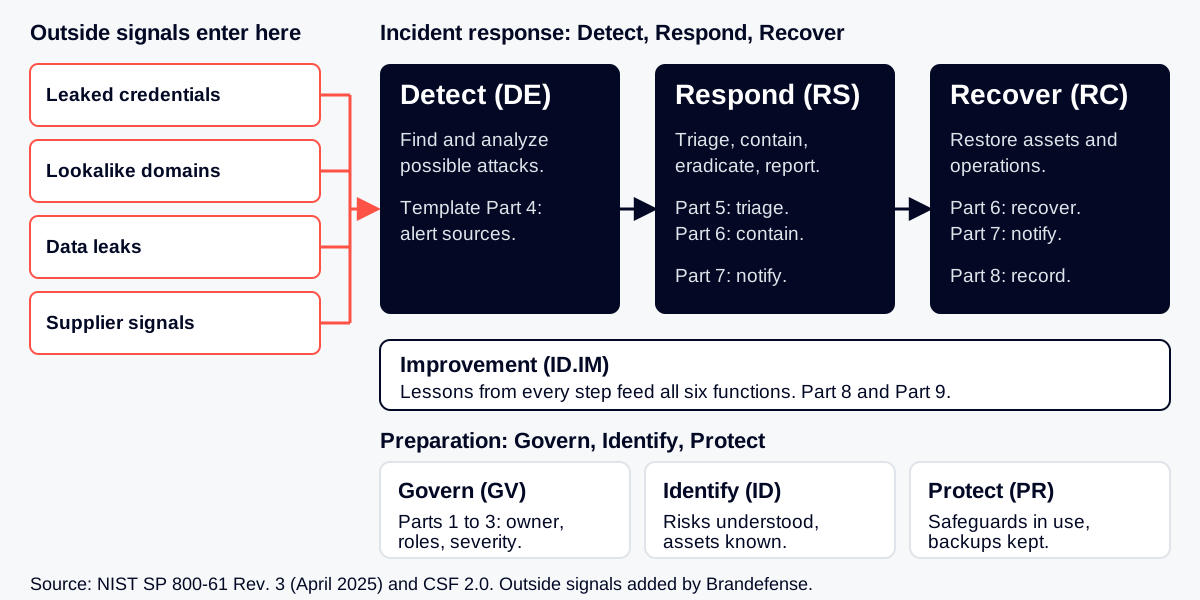
- NIST SP 800-61 Rev. 3 uses the six CSF 2.0 functions: Govern, Identify, Protect, Detect, Respond, Recover.
- Outside signals such as leaked logins, lookalike domains, data leaks and supplier warnings need an owner and a place in the queue.
- An outside signal is a lead until it is validated and meets your written incident criteria.
- Test the plan with a tabletop exercise, then feed what you learn back into it.
Maps to
- NIST SP 800-61 Rev. 3 Incident Response Recommendations and Considerations for Cybersecurity Risk Management: A CSF 2.0 Community Profile (April 2025). Basis for Parts 1 to 9
- NIST CSF 2.0 Govern, Identify, Protect, Detect, Respond, Recover. Category ids used: DE.CM-06, DE.AE-02, DE.AE-03, DE.AE-04, DE.AE-07, DE.AE-08, RS.MA-02, RS.MA-03, RS.AN-06, RS.AN-07, RS.MI-01, RS.MI-02, RC.RP-03, GV.SC-08, ID.IM-04
- CISA #StopRansomware Guide Part 2, the response checklist, for ransomware cases
How Do You Use This Template?
Copy the tables into your own document, or download the DOCX or Markdown file above. Replace every [bracket] with your own answer. Delete what does not apply. Keep the plan short enough that a tired person can use it at 3 a.m.
- Fill in Parts 1 to 3 once, with your security lead, IT, legal and communications.
- Fill in Part 4 with the alert sources you really have, including the ones outside your network.
- Print Parts 5 to 7 and keep a copy outside your own systems, in case they are down.
- Test the plan with a tabletop exercise, then fix what did not work (Part 9).
NIST SP 800-61 Rev. 3 (April 2025) replaces the older four-phase model with the six functions of NIST CSF 2.0. Govern, Identify and Protect are preparation. Detect, Respond and Recover are the incident response itself. Lessons learned feed back into all of them. The table shows where each part of this template sits.
| Part of this template | CSF 2.0 function | What it answers |
|---|---|---|
| 1 Scope and owner, 2 Roles, 3 Severity | Govern (GV), Identify (ID) | Who is in charge and what counts as an incident |
| 4 Alert sources | Detect (DE) | Where we hear about trouble, inside and outside the network |
| 5 Triage, 6 Contain and recover | Respond (RS), Recover (RC) | What we do, in what order |
| 7 Notify | Respond (RS), Recover (RC) | Who must be told, and when |
| 8 Record and learn, 9 Maintain | Identify: Improvement (ID.IM) | What we keep and what we change |
If your incident is ransomware, use this plan with the ransomware response playbook and checklist. For a longer explainer on the topic, read What is incident response and how to build it.
1. What Does The Plan Cover And Who Owns It?
NIST lists the usual parts of an incident response policy: management commitment, purpose, scope, definitions, roles and authorities, how to rank incidents, and performance measures. This table covers the same ground in one page.
| Field | Your answer |
|---|---|
| Plan name and version | [Plan name], [v1.0] |
| Plan owner (one person) | [Name, role] |
| Approved by and date | [Name, role], [date] |
| Purpose | [Example: limit harm, restore service and meet our legal duties after a cyber incident] |
| Scope: systems, sites, subsidiaries | [List] |
| Scope: data we hold for others | [Customers, partners, employees] |
| Out of scope | [Example: physical safety events, handled by the facilities plan] |
| Definition of an event | [Example: any observable change that may matter to security] |
| Definition of an incident | [Example: an event that harms or threatens confidentiality, integrity or availability] |
| Who can isolate or shut down a system | [Role names and what they may do without asking] |
| Where this plan is stored offline | [Location, who has a copy] |
| Next review date | [Date] |
2. Who Does What During An Incident?
Name people, not only teams. Add a deputy for every role. NIST describes roles such as leadership, incident handlers, technology staff, legal, public affairs, human resources, physical security and asset owners. Use only the ones you need.
| Role | Main person | Deputy | Phone (out of hours) | What they decide |
|---|---|---|---|---|
| Incident lead | [Name] | [Name] | [Number] | Severity, who is called in, when we stand down |
| Technical lead | [Name] | [Name] | [Number] | Containment and recovery steps |
| Executive sponsor | [Name] | [Name] | [Number] | Big business decisions, such as shutting down a service |
| Legal and privacy | [Name] | [Name] | [Number] | Notification duties, evidence handling, contracts |
| Communications | [Name] | [Name] | [Number] | Words to staff, customers and press |
| Human resources | [Name] | [Name] | [Number] | Cases that involve staff |
| Asset or business owner | [Name] | [Name] | [Number] | Recovery priorities for their systems |
| Scribe | [Name] | [Name] | [Number] | Keeps the time-stamped log (Part 8) |
Outside help
| Party | Contact | Contract or agreement | What they do for us |
|---|---|---|---|
| Incident response retainer | [Company, number] | [Reference] | [Example: forensics, extra hands] |
| Cyber insurer | [Company, number] | [Policy number] | [Notice rules] |
| Law enforcement contact | [Name, number] | [None] | [When we call] |
| Critical suppliers (cloud, ISP, managed services) | [Names, numbers] | [Clauses] | [Who acts for us, what they may do] |
| Takedown and domain abuse partner | [Name, number] | [Reference] | [Lookalike domains, fake pages] |
3. How Do You Decide What Counts As An Incident, And How Bad It Is?
Agree the rules before you need them. An event becomes an incident when it meets your written criteria. Then you give it a level, and the level decides who is told and how fast you start. The wording below is a starting point. Change it to fit your business, and set your own time targets.
| Level | Meaning (edit) | Who is told | Start work within |
|---|---|---|---|
| Critical | [Example: confirmed data theft or loss of a core service] | [Executive sponsor, legal, communications] | [Minutes] |
| High | [Example: confirmed compromise of an account or system with sensitive access] | [Incident lead, technical lead, legal] | [Minutes] |
| Medium | [Example: credible threat with no confirmed harm yet] | [Incident lead] | [Hours] |
| Low | [Example: single user issue, blocked attempt] | [Security queue] | [Next working day] |
| Question to ask for every alert | Yes / No |
|---|---|
| Is sensitive data or a critical service involved? | [ ] |
| Is the activity still going on? | [ ] |
| Is a privileged or shared account involved? | [ ] |
| Does a supplier, customer or partner hold the same data or access? | [ ] |
| Could a legal or contract notice duty apply? | [ ] |
4. Where Do Alerts Come From, Including Outside Your Network?
Inside signals come from your own tools: endpoint alerts, logs, email reports, staff reports. Outside signals come from places you do not control: criminal forums, leak sites, stealer logs, domain registrations and supplier news. Both must reach one queue, with one owner. If an outside signal shows company data for sale, follow Data Breach Response 101.
Inside signals (fill in)
| Source | Who watches it | How it reaches the queue | Hours covered |
|---|---|---|---|
| Endpoint and server alerts | [Name or team] | [Ticket, email, chat] | [24/7 or hours] |
| Email and phishing reports | [Name or team] | [Mailbox, button] | [Hours] |
| Identity and sign-in logs | [Name or team] | [Alert rule] | [Hours] |
| Staff and customer reports | [Name or team] | [Phone, form] | [Hours] |
Outside signals (fill in)
The CSF has no category named after these signals. The mapping below is our reading: the closest CSF 2.0 categories. DE.AE-07 asks you to bring cyber threat intelligence into your analysis of events. DE.CM-06 covers monitoring external service providers. GV.SC-08 asks that suppliers are part of incident planning.
| Outside signal | What it looks like | First check | Closest CSF 2.0 items | Response page |
|---|---|---|---|---|
| Leaked credentials and infostealer logs | Company or customer logins in a stealer log or combo list | Is the account active, does it have MFA, any sign-in from new places? | DE.AE-02, DE.AE-07 | Leaked credentials and infostealer log exposure |
| Lookalike domains and phishing kits | New domain close to your name, with mail records or a copy of your login page | Is it live, can it send mail, did anyone in the company visit it? | DE.AE-03, DE.AE-07 | Lookalike and phishing domains |
| Data leak | A post, paste or leak site listing that claims to hold your data or source code | Is the sample real, is it ours, which system could it come from? | DE.AE-04, DE.AE-07 | Leaked databases and source code and ransomware leak site listings |
| Supplier signal | A supplier named on a leak site, or a new exposure at a supplier | Do they hold our data or have access to us? Has the supplier confirmed? | DE.CM-06, GV.SC-08 | Supplier on a leak site and supplier exposure changes |
Fill in who owns each outside signal today, and how often it is checked.
| Outside signal | Owner | Checked how often | Tool or service | Goes to queue |
|---|---|---|---|---|
| Leaked credentials and stealer logs | [Name] | [Daily] | [Tool] | [Queue] |
| Lookalike domains and fake pages | [Name] | [Daily] | [Tool] | [Queue] |
| Data leaks and leak sites | [Name] | [Daily] | [Tool] | [Queue] |
| Supplier signals | [Name] | [Weekly] | [Tool] | [Queue] |
More on each signal: leaked credential monitoring, phishing and lookalike domains, data leak detection and supply chain and vendor risk.
5. How Do You Triage An Alert In The First Hour?
Triage means deciding fast what you are looking at. In CSF terms, reports are triaged and validated (RS.MA-02), then categorized and prioritized (RS.MA-03). Use the checklist for every alert, and copy the record table into your ticket.
- Write down time and sourceWho or what raised it, and exactly what was seen.
- ValidateCheck a second source. Is it real, and is it about us?
- ScopeWhich accounts, systems, data and suppliers could be involved?
- Check the outside viewSearch for the same account, domain or data in leak and stealer sources.
- Set the levelUse the table in Part 3.
- Declare or closeWrite the reason in one line.
- Name the lead and open the logStart Part 8 now, not later.
- NotifyUse the list in Part 7.
| Triage record | Entry |
|---|---|
| Ticket or case number | [ID] |
| Time first seen, time reported | [Date and time], [Date and time] |
| Source (inside or outside signal) | [Source] |
| What was seen (facts only) | [Text] |
| Validated by, and how | [Name], [method] |
| Assets, accounts, data and suppliers involved | [List] |
| Level | [Critical / High / Medium / Low] |
| Declared as incident | [Yes or No], [reason] |
| Incident lead | [Name] |
6. How Do You Contain, Remove And Recover?
Contain first, then remove the cause, then restore. In CSF terms: contain and eradicate (RS.MI-01, RS.MI-02), then recover (RC.RP). Check that backups are sound before you restore from them (RC.RP-03). Do not wipe a system before you have kept the evidence you need.
| Situation | First containment steps | Done by | Done at |
|---|---|---|---|
| Leaked or stolen credentials | Reset the password, end active sessions, check multi-factor settings, review recent sign-ins | [Name] | [Time] |
| Infostealer on a device | Isolate the device, reset every login used on it, then rebuild | [Name] | [Time] |
| Lookalike domain or phishing page | Keep screenshots and page source, block the domain in mail and web filters, report it to the registrar and host | [Name] | [Time] |
| Data leak claim | Keep the sample safely, confirm the source system, close the access path, take legal advice on duties | [Name] | [Time] |
| Supplier incident | Ask the supplier for facts, limit their access, rotate shared secrets | [Name] | [Time] |
| Ransomware | Isolate affected systems, protect backups, follow the ransomware checklist | [Name] | [Time] |
For a lookalike domain or fake page, the takedown service evaluation checklist helps you judge how a takedown partner works. Recovery steps:
- [ ] Eradication confirmed: the cause is closed, not only the symptom
- [ ] Backups tested and clean before restore
- [ ] Restore in the order the business owners set
- [ ] Passwords and keys changed where exposure is possible
- [ ] Monitoring raised on restored systems for [number] days
- [ ] End of recovery declared by [role], with the reason written down
7. Who Must Be Told, And When?
Duties and deadlines depend on your country, your sector and your contracts. They are not the same everywhere, so list yours here with the help of legal. See incident reporting deadlines under NIS2, CRA, SEC and CIRCIA for an overview, and the glossary entries for NIS2 and DORA.
| Audience | Owner | Trigger (edit) | Deadline | Approved by | Channel |
|---|---|---|---|---|---|
| Executive team | [Name] | [High or Critical] | [Time] | [Name] | [Phone] |
| Legal and privacy | [Name] | [Any possible data exposure] | [Time] | [Name] | [Phone] |
| All staff | [Name] | [When action is needed] | [Time] | [Name] | [Email, chat] |
| Customers and partners | [Name] | [Their data or service affected] | [Time or legal limit] | [Name] | [Email, notice] |
| Regulators or authorities | [Name] | [Legal duty applies] | [Legal limit] | [Name] | [Portal, form] |
| Insurer | [Name] | [Policy terms] | [Policy limit] | [Name] | [Phone] |
| Law enforcement | [Name] | [Criminal activity] | [Time] | [Name] | [Phone] |
| Affected suppliers | [Name] | [Shared data or access] | [Time] | [Name] | [Phone] |
| Media | [Name] | [Public interest or leak] | [Time] | [Name] | [Statement] |
Prepare holding statements in advance, one for staff and one for outsiders. Keep them short and factual. Never say more than you have confirmed.
8. What Do You Record, And What Do You Learn Afterwards?
Keep a time-stamped log from the first minute. Record who did what, and keep the evidence safe. CSF RS.AN-06 and RS.AN-07 ask that records and incident data keep their integrity and origin.
| Time | Who | Action or finding | Result | Evidence location |
|---|---|---|---|---|
| [Date and time] | [Name] | [Text] | [Text] | [Path or ticket] |
| [Date and time] | [Name] | [Text] | [Text] | [Path or ticket] |
| [Date and time] | [Name] | [Text] | [Text] | [Path or ticket] |
NIST Rev. 3 says lessons should be shared as soon as they are found, not held back until recovery ends. Hold a short review soon after the incident, and fill in this table.
| After-action question | Answer |
|---|---|
| What happened, in five lines? | [Text] |
| How and when did we first learn of it? Which signal came first? | [Text] |
| Which outside signal, if any, could have warned us earlier? | [Text] |
| What slowed us down? | [Text] |
| What worked well? | [Text] |
| Which parts of this plan need to change? | [Text] |
| Improvement action | Owner | Due date | Done |
|---|---|---|---|
| [Action] | [Name] | [Date] | [ ] |
| [Action] | [Name] | [Date] | [ ] |
| [Action] | [Name] | [Date] | [ ] |
9. How Do You Keep The Plan Alive?
A plan that is never tested fails when it is needed. CSF ID.IM-04 asks that incident response plans are established, communicated, maintained and improved. Set a rhythm and name the owner.
| Task | How often | Owner | Last done | Next due |
|---|---|---|---|---|
| Review the whole plan | [Interval] | [Name] | [Date] | [Date] |
| Check contacts and phone numbers | [Interval] | [Name] | [Date] | [Date] |
| Run a tabletop exercise | [Interval] | [Name] | [Date] | [Date] |
| Check outside monitoring covers our domains, brands, key people and suppliers | [Interval] | [Name] | [Date] | [Date] |
| Update after every real incident | Each time | [Name] | [Date] | [Date] |
Use the tabletop exercise scenarios and injects to test this plan. For suppliers, send the vendor cyber risk questionnaire. To decide which questions your intelligence should answer first, use the threat intelligence PIR template. If you are choosing how to source external intelligence, read Threat Intelligence: Feeds, Platform or Managed Service. Third-party risk deserves its own line in every exercise.
Sources: NIST SP 800-61 Rev. 3, NIST CSF 2.0 and the CISA #StopRansomware Guide.
Questions.
-
What is an incident response plan?
It is a written plan that says who does what when a cyber incident happens. It covers roles, severity levels, steps to contain and recover, who must be told, and how you learn afterwards.
-
What are the steps of incident response?
The older NIST model had four phases: preparation, detection and analysis, containment, eradication and recovery, and post-incident activity. NIST SP 800-61 Rev. 3 (April 2025) maps the work to the six CSF 2.0 functions, with Detect, Respond and Recover as the response itself.
-
What should an incident response plan template include?
At least scope and owner, roles and contacts, severity rules, alert sources, triage steps, containment and recovery steps, notification list, a log, and a review process. This template has a fill-in table for each.
-
How does threat intelligence help incident response?
It gives context while you decide what an alert means, such as known attacker methods or leaked data tied to your company. CSF 2.0 includes this: DE.AE-07 asks for cyber threat intelligence to be integrated into event analysis.
-
Who should own the incident response plan?
One named person, usually the security lead, with a deputy. Legal, IT, communications and the business must agree on it and know their part.
-
How often should the plan be tested?
Pick an interval that you can really keep and write it in Part 9. A tabletop exercise is a low-cost way to test it, and any real incident is a reason to review it.
Free download
Take the editable file
No form and no email needed. Edit it, fill in the brackets and keep it with your other plans. Current version: v1.0 · October 2026.
- Download DOCX 46 KB
- Download Markdown 18 KB
How to cite this
Brandefense. Incident Response Plan Template (Free DOCX). v1.0, October 2026. https://brandefense.io/knowledge-hub/guides/incident-response-plan-template/
Change log
- v1.0 · October 2026 First release.
In Our Research
- 1 Tackling Ransomware Threats in the Energy Sector: Prevention and Response January 2024
- 2 What is Incident Response and How to Build It? March 2023
- 3 Data Breach Response 101 101 guide
- 4 Ransomware Response Playbook and Checklist (Free DOCX) 101 guide
- 5 Tabletop Exercise Scenarios with Injects (Free DOCX) 101 guide
- 6 Third-Party Cyber Risk Questionnaire Template (Free DOCX) 101 guide